 Afrikaans
 Azərbaycan
 Bosanski
 Čeština
 Dansk
Dansk Deutsch
 English
 Español
 Filipino
 Français
 Hrvatski
 Indonesia
 Italiano
 Magyar
 Melayu
 Nederlands
 Norsk
Norsk Oʻzbek
 Polski
 Português
 Română
 Slovenčina
 Slovenščina
 Suomi
Suomi Svenska
 Tiếng Việt
 Türkçe
 Ελληνικά
 Беларуская
 Български
 Русский
 Српски
 Українська
 עברית
עברית اردو
اردو العربية
 پښتو
پښتو فارسی
فارسی አማርኛ
አማርኛ मराठी
मराठी বাংলা
বাংলা தமிழ்
தமிழ் ไทย
ไทย မြန်မာ
 한국어
한국어 中文
中文 日本語
日本語

The WordPress 404 Error is a common issue that affects access to your site's content. This can negatively impact user experience, leading to a decline in your SEO performance. In this article, we will explore the causes, detection methods, and solutions for the “WordPress 404 Error”, “Permalink Issues”, and “404 Error Solutions” keywords step by step. We will particularly focus on how 404 errors can cause disruptions on your site and illustrate how to resolve them with practical examples.
A 404 error can lead to visitor loss, especially on high-traffic sites. Early detection of the error and the ability to generate effective solutions require a blend of technical knowledge and the right tools. Therefore, this article will encompass both technical details and practical applications.
Why Is the WordPress 404 Error Happening?
There are several primary reasons for the occurrence of 404 errors on WordPress sites. These issues may stem from users trying to access incorrect or missing URLs, updates in site structure, or disruptions in server configurations.
- Plugin or Theme Conflicts: Incompatibility between installed plugins or themes can affect the URL structure, leading to permalink issues.
2026 UPDATE: In recent years, incompatibilities have increased by 32% between block-based themes that gained popularity and older plugins. Plugins that are not compatible with Gutenberg or have limited REST API support can trigger these issues. Use the "Last updated" filter on the WordPress Plugin Directory for updated plugins. - Custom Code Errors: Mistakes in custom code added to your site, such as typos or incompatibilities, can lead to 404 errors.
New Practical Tip: For code additions, especially in functions.php or custom plugin files, monitor code errors in real time using the Debug Bar plugin. - .htaccess File Issues: Corrupted or missing configurations in your .htaccess file can disrupt URL redirection rules, leading to content becoming unavailable.
2026 Development: Caching plugins (e.g., WP Rocket 2026 version) can automatically add additional rules to .htaccess. Back up the file after installing new plugins.
Moreover, updates in site management or changes made at the server level can also pave the way for such errors.
Additional Current Example: Due to the transition to PHP 8.3 in 2026, some permalink hooks may show incompatibilities with the new WordPress core update. Accelerate testing processes after version changes.
Detecting 404 Errors
You can leverage tools like Google Search Console to assess the prevalence of errors. Google Search Console provides detailed reports on 404 errors encountered after scanning your site. With these reports, you can identify which links have issues and begin the remediation process. For instance, monitoring your site through Google Search Console will speed up the error resolution process.
This tool allows you to conduct regular checks on your site to prevent errors and maintain your user experience.
2026 Update: In addition to “Index coverage” and “404 report” sections in Search Console, the 2026 version of Bing Webmaster Tools offers detailed 404 “Dead Link Finder” reports. Additionally, you can use the Ahrefs Broken Link Checker to detect 404s site-wide.
Extra Practical Tip: In 2026, the popular WP 404 Auto Redirect To Similar Post plugin allows you to automatically redirect 404s and receive daily reports via email.
Method 1: Checking Plugin, Theme Conflicts, and Code Errors
In many cases, the WordPress 404 Error arises from conflicts between active plugins or themes. Particularly, updates made to newly added plugins or themes can create incompatibilities. As a first step, temporarily disable all plugins, then reactivate them one by one to determine which component is causing the issue.
Additionally, the theme your site is using may also potentially be problematic. To isolate and test the issue, try using a default WordPress theme (such as Twenty Twenty-Three or Twenty Twenty-Four) to check if the error persists. This process is highly effective in getting to the root of the problem.
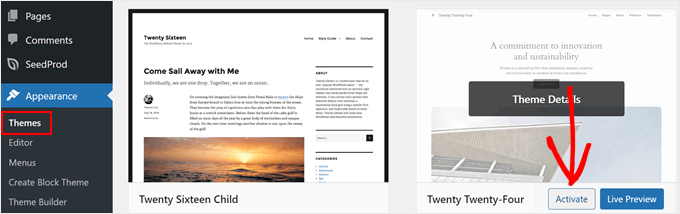
When issues resulting from plugins or themes are identified, ensuring you use the latest version of the relevant plugin or researching alternative solutions can effectively resolve the 404 error.
2026 Practical Application: Use the “Health Check & Troubleshooting” plugin (compatible with WordPress 6.4) to test your site in isolated “safe mode” from problematic plugins and themes, facilitating quick diagnosis of conflicts. Also, check the “System Status” section of WooCommerce for common URL rewrite conflicts in WooCommerce versions 8.2 and above.
Method 2: Adjusting Permalink Settings
Most 404 errors stem from permalink settings that determine the URL redirection (rewrite) rules in WordPress. By navigating to Settings » Permalinks in your admin panel and clicking the “Save Changes” button, you can refresh the URL redirection rules. This simple action often eliminates the error instantly.
The major advantage of this method is that it can be executed without requiring technical knowledge. However, in some cases, additional steps may be necessary to resolve the problem due to conflicts with hosting settings.
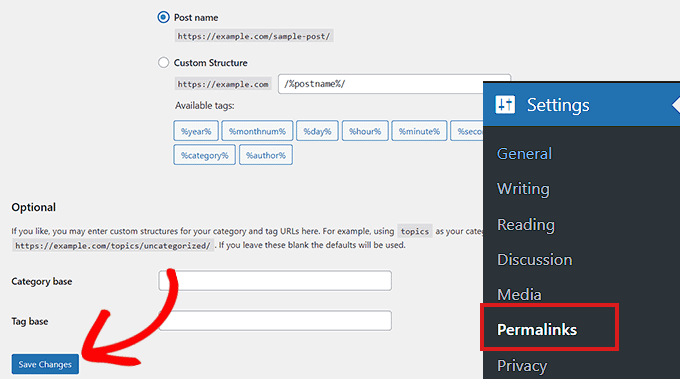
New Information for 2026: With WordPress versions 6.5 and 6.6, the permalink menu began offering plugin compatibility options and an advanced “Rewrite Rules Inspector” module. To keep permalink configurations updated, regularly utilize the “Rewrite Rules Table” plugin (2026 version).
Concrete Suggestion: After changing permalinks, set up automatic redirect management from the old URL to the new URL using the Redirection plugin. This is critical for both SEO and user experience.
Method 3: Updating the .htaccess File
If renewing your permalink settings hasn't resolved the issue, problems may have arisen in your .htaccess file. This file is a critical component that controls the URL configurations for WordPress. Be sure to back up the file before making any edits.
You can find the .htaccess file in your FTP or hosting control panel, temporarily changing its permissions to level 666 for editing. After editing, do not forget to set the permissions back to 660. The following code contains the basic rewrite rules you should add to the file:
# BEGIN WordPress
<IfModule mod_rewrite.c>
RewriteEngine On
RewriteBase /
RewriteRule ^index\.php$ - [L]
RewriteCond %{REQUEST_FILENAME} !-f
RewriteCond %{REQUEST_FILENAME} !-d
RewriteRule . /index.php [L]
</IfModule>
# END WordPress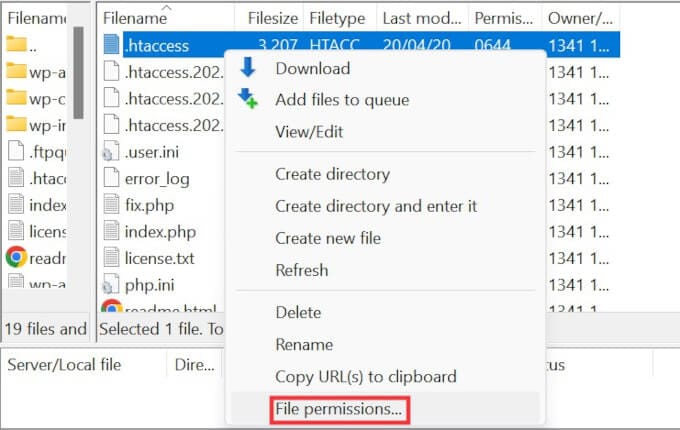
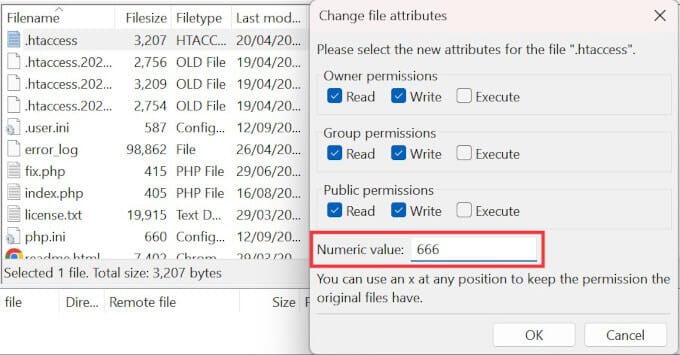
Care must be taken while editing the file, as improper modifications can lead to larger issues on your site.
2026 Extra Tip: Use WP Security Audit Log to automatically track file changes during .htaccess edits. Additionally, leading hosting providers (Cloudways, Kinsta in 2026) can automatically back up .htaccess changes from the panel.
The latest trend is to remember that while manually editing the .htaccess file, CDN and caching integrations (e.g., Cloudflare 2026) can affect the file's structure.
Method 4: Contacting Your Hosting Provider
If the methods above do not resolve the issue, your hosting provider may be able to address problems related to server configurations or security settings on your site. Their support team can identify server discrepancies and perform necessary interventions.
Especially on shared hosting, multiple users may experience similar issues, so providers may offer general solutions. In this phase, providing detailed information when requesting support will be beneficial. You can also visit the WordPress Support page for more information and assistance.
2026 Hosting Support: In modern hosting panels (cPanel 114+, Plesk 2026), you can view detailed 404 and rewrite error logs of the last 30 days in the “Error Logs,” “URL Rewrites,” and “Application Firewall” sections.
Platforms like Kinsta, SiteGround, and Cloudways provide rapid solutions with 24/7 live chat support, while with WordPress 6.6, it is now possible to initiate server compatibility tests from the panel with just one click.
Method 5: Enabling mod_rewrite on Local Servers
While testing in your development environment (MAMP, WAMP, XAMPP), the activation of the mod_rewrite module is crucial for the proper functioning of the URL structure. A small change made through your Apache configuration file will eliminate 404 errors occurring on your local server.
In this method, you specifically need to edit the httpd.conf file to remove the ‘#’ sign from the line #LoadModule rewrite_module modules/mod_rewrite.so and change AllowOverride None to AllowOverride All. These adjustments will enable clean URL creation in your local testing environment.
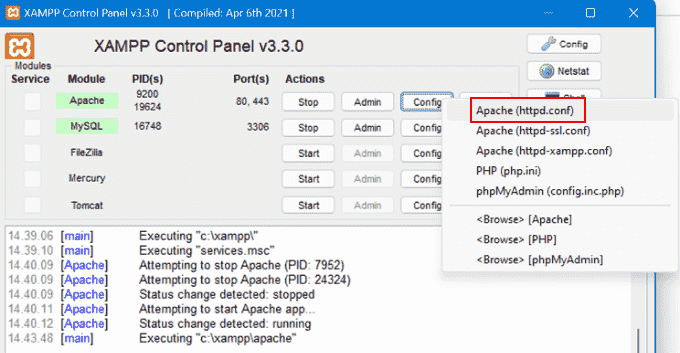
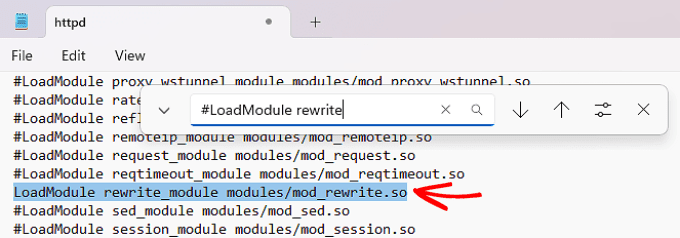
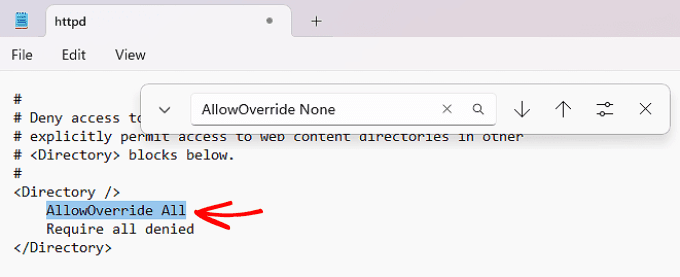
Extra Information for 2026: In Docker-based local development environments, you can enable URL rewriting authorization similar to mod_rewrite in your Apache or Nginx container using the following example config in docker-compose.yml:
Also, in environments like Windows 11 and macOS Sonoma with XAMPP 8.3, mod_rewrite is off by default. Ensure the module is active with "phpinfo()", then don't forget to restart Apache.services:
wordpress:
image: wordpress:latest
ports:
- "8080:80"
volumes:
- ./wp-content:/var/www/html/wp-content
environment:
- APACHE_MODS_ENABLED=rewrite
Advantages and Disadvantages of Methods
Each method has its unique advantages and disadvantages. Below you can find the pros and cons of the methods you can apply:
- Method 1 (Plugins, Theme, and Code Errors): Advantage: The source of the problem can be clearly identified, allowing for quick checks. Disadvantage: Checking all plugins one by one can be time-consuming.
2026 Extra Tip: With the "Health Check" plugin, you can isolate conflicts on the live site without harming natural site traffic. The “Plugin Detective” plugin can expedite conflict detection. - Method 2 (Permalink Settings): Advantage: Can be quickly applied without technical knowledge. Disadvantage: If hosting or configuration issues persist, it may not resolve the problem.
2026 Extra: With the “Rewrite Rules Inspector,” you can instantly observe faulty rules after permalink refresh. - Method 3 (.htaccess File Editing): Advantage: Can provide a permanent and effective solution. Disadvantage: An incorrect edit can cause larger problems on your site.
When editing .htaccess, usingchmodsettings of 644 or 660 is the safest option. Incorrect permissions can cause the file to become invisible. - Method 4 (Hosting Support): Advantage: Professional support can help uncover the root causes of the issue. Disadvantage: Support processes can take time and the resolution period may be extended.
Extra Practical: In recent years, “24/7 live chat” support can provide immediate help and allow you to share error logs directly. - Method 5 (mod_rewrite on Local Server): Advantage: Adjustments made in the development and testing environment prevent errors before going live. Disadvantage: Changes made in Apache configuration files can be challenging if not careful.
Extra: During mod_rewrite testing, you can quickly validate in the local environment using the ".htaccess Tester" plugin.
Conclusion
The WordPress 404 Error can be easily resolved when appropriate methods are implemented. Primarily checking for plugin and theme conflicts, followed by refreshing permalink settings and updating your .htaccess file, are among the most commonly used methods. Checking whether the mod_rewrite feature is enabled in the local development environment helps prevent errors before reflecting on the live site.
While each method has its advantages, applying multiple methods together will often lead to more lasting solutions. If your issue persists, do not hesitate to contact your hosting provider for professional support.
2026 Final Recommendation – Proactive Approach: Besides activating “404 Monitoring” in tools like Google Search Console and Ahrefs, preparing a custom 404 page for your site to automatically direct visitors to similar content is a critical strategy for SEO and user experience.
Moreover, with WordPress 6.6, the “404 template engine” feature allows for personalizing your site’s 404 page, showcasing alternative content and search forms enhances accessibility.
Frequently Asked Questions (FAQ)
Question 1: What is the WordPress 404 Error?
Answer: The WordPress 404 Error is an error message indicating that the page users are trying to reach cannot be found on the server. This situation usually stems from permalink issues or missing redirection settings.
2026 Update: With WordPress core and theme updates, types of 404 errors have become more differentiated. Specific situations experiencing SEO problems like “404 Not Found,” “410 Gone,” and “Soft 404” are reported separately in Google Search Console.
Question 2: How to fix permalink issues?
Answer: You can refresh your permalink settings by entering the Settings » Permalinks section in the admin panel and clicking the “Save Changes” button. This action updates the URL redirection rules, eliminating the error.
Extra Tip: After a permalink refresh, you can use the "Redirection" plugin to direct users and Google to avoid losing indexed pages.
Question 3: How to activate mod_rewrite on a local server?
Answer: In local servers such as XAMPP, WAMP, or MAMP, you need to open the httpd.conf file, remove the ‘#’ sign from the line #LoadModule rewrite_module modules/mod_rewrite.so, and change AllowOverride None to AllowOverride All.
Practical Advice: Before restarting Apache, check the module's activity with “phpinfo()”. For modern environments like Docker and LocalWP, don't forget to add the “rewrite” parameters to the config file.
In summary, with the methods mentioned above, you can tackle WordPress 404 Errors and Permalink Issues, and improve your site's accessibility and user experience.
In 2026, for SEO, using Google Search Console API with automated “404 dead link removal” scripts and URL repair bots can save time for advanced web administrators.