 Afrikaans
 Azərbaycan
 Bosanski
 Čeština
 Dansk
Dansk Deutsch
 English
 Español
 Filipino
 Français
 Hrvatski
 Indonesia
 Italiano
 Magyar
 Melayu
 Nederlands
 Norsk
Norsk Oʻzbek
 Polski
 Português
 Română
 Slovenčina
 Slovenščina
 Suomi
Suomi Svenska
 Tiếng Việt
 Türkçe
 Ελληνικά
 Беларуская
 Български
 Русский
 Српски
 Українська
 עברית
עברית اردو
اردو العربية
 پښتو
پښتو فارسی
فارسی አማርኛ
አማርኛ मराठी
मराठी বাংলা
বাংলা தமிழ்
தமிழ் ไทย
ไทย မြန်မာ
 한국어
한국어 中文
中文 日本語
日本語


WordPress 404 Error, Punjabi websites vich posts, pages ya content vich access karan di samasya hai jo aam taur te SEO te visitor experience nu nuksan pahuncha sakdi hai. Is article vich “WordPress 404 Error”, “Permalink Problems” te “404 Hal” de focus keywords ‘te asi is di wajah, paunchan di method te hal de practical tareekan nu Punjabi style vich detail naal samjhaange. Asi explain karange ki error kiven hosting, plugins ya server config di bhool nal aa janda, te kiven tusi apne site di accessibility nu bacha sakde ho. Examples, local idioms te 2026 de latest tips naal step-by-step guide milu.
404 error, khas taur ‘te jado site ch traffic vadha hona shuru ho jave, visitors nu miss kara sakda hai. Is di early detection te hal layi technical info te sahi tools di zaroorat hai. Guide vich asi technical & practical solutions nu milake explain karange, taan ki beginners te advanced Punjabi webmasters dono fayda lai saken!
WordPress 404 Error Di Wajah Ki?
WordPress sites vich 404 error bahut karan karke aa janda. Wrong ya missing URLs, site di structure update, ya server configuration di mistake is problem da source ho sakda. Punjabi hosting clients nu error fix karan layi halaan di sochiye:
- Plugin ya Theme Conflicts: WordPress te install plugins, themes de mutual compatibility serious matter aa. Kise plugin vich chakk, theme update ya conflict, Permalink Problems laa sakda.
2026 Nawa Danger: Block-based themes te purane plugins di compatibility issues 32% vadh ja chuke ne. Gutenberg naal fully compatible na hoye plugins, REST API di support loose hoye plugins vich issue aa sakda. Plugin Directory de “Last updated” filter nu use karo, taan outdated plugin na install hoye. - Custom Code Mistakes: Website vich custom code jitthe likhe, choti mistake, code conflict—404 error di biggest source.
Practical Punjabi Tip: functions.php ya custom plugin files vich code likhan to baad Debug Bar plugin nal live code errors check karo. - .htaccess File Issues: .htaccess file vich galat config, ya missing redirect rules—site da url mess kar dinda, te content show nahi hunda.
2026 Change: Cache plugins (WP Rocket 2026 etc.) apne aap .htaccess vich extra rules add kar dende. Plugin install karan to baad .htaccess di backup zaroor lo.
Site management vich update ya server side change bhi problems la sakde ne.
Fresh Example 2026: PHP 8.3 update karke, kuch permalink hooks WordPress core update naal mismatch kar ja rahe ne. Version change to baad site testing speed up karo.
404 Error Kiven Paaya Janda Hai?
Error di spread ja scope samajhan layi Google Search Console ek powerful tool aa. WordPress da owner Search Console vich 404 errors te full reports check kar sakda, tusi pata kar sakde ho ke kehde URLs ch bug aa te fix start karo. ਗੂਗਲ ਸਰਚ ਕੰਸੋਲ nu site te activate karo, process te speed mil jaye.
Regular check karan nal user experience nu bara level te protect karo, te traffic loss nu prevent karo.
2026 Update: "Index coverage" te "404 report" vich hor detail aa. Bing Webmaster Tools vich 404 “Dead Link Finder” reports, te Ahrefs Broken Link Checker naal pure site vich 404 error trace karo.
Extra Punjabi Tip: Nawa WP 404 Auto Redirect To Similar Post plugin—automatic 404 redirects te daily reports email te mil jande ne.
Method 1: Plugin, Theme ya Code Errors Check Karo
Punjabi webmasters vich WordPress 404 error, mostly recently installed plugin/theme di compatibility te update karan nal aa janda. Shuruat vich sare plugins temporarily off kar ke, ek-ek activate karo te check karo, kehda error laa riha.
Theme de vich bhi galat config ho sakda, default theme (Twenty Twenty-Three, Twenty Twenty-Four) naal check karo ki error aa ya nahi.
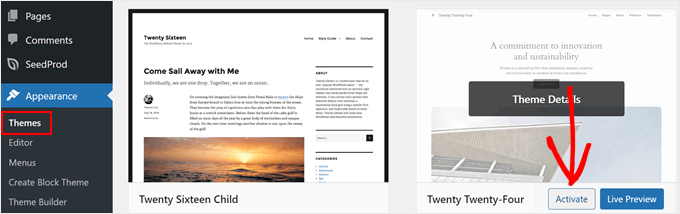
Jado plugin/theme source mil jave error da, updated version use karo ya better alternative try karo, error khatam karan vich success milegi.
2026 Practical: “Health Check & Troubleshooting” plugin (WordPress 6.4 compatible) site nu “safe mode” vich test kar ke conflict wali plugin/theme nu quickly identify kar sakda. WooCommerce v8.2+ users “System Status” vich URL rewrite conflicts check karan.
Method 2: Permalink Settings Change Karo
Majority 404 error, WordPress da URL rewrite setup—Permalink Settings di mistake naal aa janda. Dashboard vich Settings » Permalinks jao, “Save Changes” button nu click karo, URL setup refresh ho javega. Punjabi admins layi best—no technical skill required!
Sometimes hosting ya special config vich extra steps chahidi, but most cases ch simple settings refresh sufficient aa.
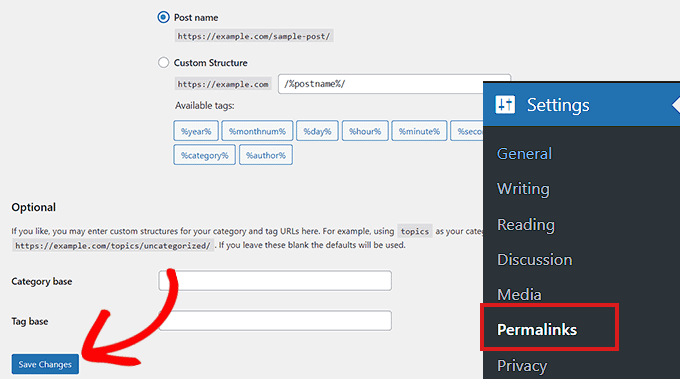
2026 Info: WordPress 6.5, 6.6 Permalink menu vich eklenti compatibility te “Rewrite Rules Inspector” module aageya. “Rewrite Rules Table” plugin (2026 version) naal permalink di health check regular karo.
Punjabi Suggestion: Permalink change karan baad, redirect management layi Redirection plugin install karo, old URL nu new URL te le jao—SEO te visitors da confidence rehta.
Method 3: .htaccess Update Karo
Je permalink settings refresh karke error na jave, .htaccess file di bhool major reason ho sakdi hai. Eh file WordPress di URL structure nu control kardi. File edit karan to pehlan backup zaroor lo.
FTP ya hosting panel vich .htaccess locate karo, temporarily permissions 666 karo, edit baad 660 vapas set karo. Code snippet jo file vich likhn di zaroorat hai:
# BEGIN WordPress
<IfModule mod_rewrite.c>
RewriteEngine On
RewriteBase /
RewriteRule ^index\.php$ - [L]
RewriteCond %{REQUEST_FILENAME} !-f
RewriteCond %{REQUEST_FILENAME} !-d
RewriteRule . /index.php [L]
</IfModule>
# END WordPress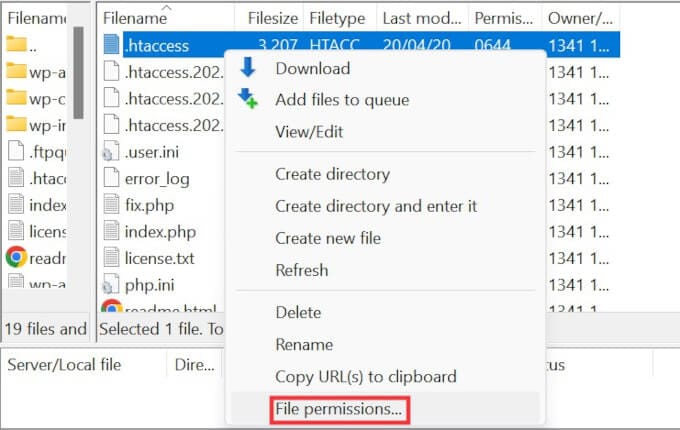
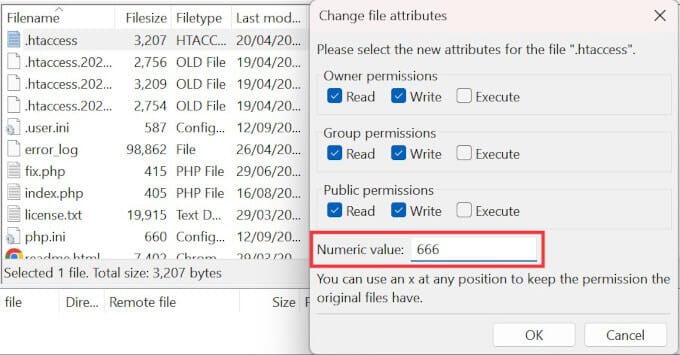
File vich galat edit karan nal site website offline ho sakda, swarn lain careful raho!
Punjabi 2026 Tip: .htaccess edit history track karan layi WP Security Audit Log plugin use karo. Top hosting (Cloudways, Kinsta v2026) panel vich .htaccess nu auto backup karde. CDN ya Cache integration nal, .htaccess manual changes time, CDN da impact samajh ke hi edit karo.
Method 4: Hosting Support Nal Gal Karo
Upar di halan naal problem solve na hoye, hosting provider nu contact karo. Server config ya security settings di mistake error laa sakdi. Hosting support team properly diagnose karke solution de sakdi hai.
Shared hosting vich, server wide problems common hunde, provider vich solution available milega. Precise info dey ke, support ticket open karo. WordPress Support page bhi try karo.
2026 Hosting Support: Modern hosting panel (cPanel 114+, Plesk 2026) error logs, URL rewrite te firewall logs vich past 30 days de 404 reports check kar sakde ho.
Kinsta, SiteGround, Cloudways di chat 24/7 available aa. WordPress 6.6 core vich server compatibility test ek click te chalega.
Method 5: Local Server vich mod_rewrite On Karo
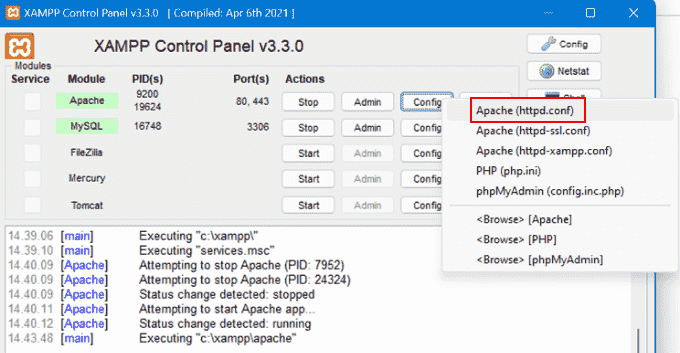
Punjabi developers nu local environment (MAMP, WAMP, XAMPP) te test karan time mod_rewrite module activate rakhan di advice hai. Apache config file vich small change kar ke local 404 error fix karo.
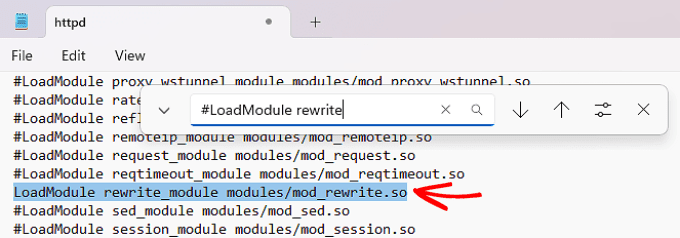
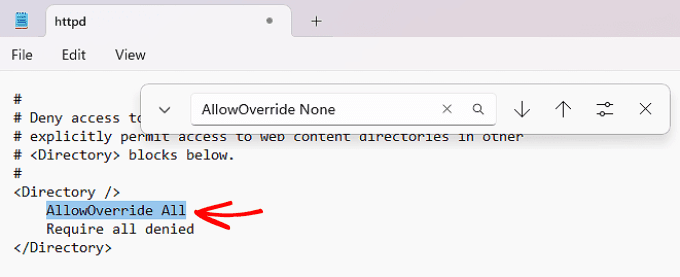
httpd.conf file vich #LoadModule rewrite_module modules/mod_rewrite.so vich '#' sign hatao, te AllowOverride None nu AllowOverride All karo. Eh naal clean URLs te issues fix ho jande.
2026 Info: Docker base local dev vich Apache ya Nginx container mod_rewrite activate karan layi docker-compose.yml example config use karo:
Windows 11/macOS Sonoma te XAMPP 8.3 vich mod_rewrite default off aa. “phpinfo()” vich active module check karo, te Apache restart zaroor karo.services:
wordpress:
image: wordpress:latest
ports:
- "8080:80"
volumes:
- ./wp-content:/var/www/html/wp-content
environment:
- APACHE_MODS_ENABLED=rewrite
Methods De Plus-Minus (Advantages/Disadvantages)
Haran di apni plus-minus aa. Down below, Punjabi webmasters layi methods de pros-cons check karo:
- Method 1 (Plugin, Theme, Code Errors):Plus: Root problem quickly mil janda, fast check possible.Minus: Every plugin individually check karna time-consuming.
2026 Punjabi Tip: "Health Check" plugin use kar ke live traffic nu loss teu bina conflicts isolate karo. "Plugin Detective" plugin naal conflict trace fast ho sakda. - Method 2 (Permalink):Plus: Non-technical, quickly apply.Minus: Hosting ya config same karan naal solution fail ho sakda.
2026 Update: "Rewrite Rules Inspector" naal refresh bad wrong rules instant identify karo. - Method 3 (.htaccess):Plus: Permanent fix possible.Minus: Wrong edit vich site offline ho ja sakda.
.htaccess edit layi chmod 644/660 best. Wrong permissions nal file hidden aa ja sakdi. - Method 4 (Hosting Support):Plus: Expert solution.Minus: Response slow ho sakdi.
Extra: “24/7 live chat” nal instant error log share karo, quick answer milu. - Method 5 (Local mod_rewrite):Plus: Testing before live push.Minus: Apache config change, careful na hoye tough ho sakda.
Extra Tip: .htaccess Tester plugin use kar ke local fix verify karo.
Fayda—Last Solution
WordPress 404 Error, sahi tarike use karke easily fix ho sakda. Punjabi admins layi—plugin/theme conflicts check karo, permalink settings refresh karo, .htaccess update karo. Local dev mod_rewrite nu on rakho, taan live site nu push to pehlan testing confirm ho jave.
Ek method to hor mix, permanent solution layi effective hai. Hosting provider naal gal kar ke professional solution try karo.
2026 Punjabi Advice: Google Search Console te Ahrefs vich “404 Monitoring” active karo, te custom 404 page bana ke visitors nu similar articles vich redirect karo—SEO te UX boost milu. WordPress 6.6 vich “404 template engine” vich custom content te search form show karo—site accessibility vadh jandi.
FAQs (Punjabi Sawaal-Jawaab)
Sawaal 1: WordPress 404 Error ki hai?
Jawab: WordPress 404 Error, jado user website de kis page te jave, te oh server te available nahi hunda, error aa jandi. Mostly permalink ya redirect di mistake di wajah nal.
2026 Update: WordPress core/theme update de nal 404 error de multiple types aa gaye: “404 Not Found”, “410 Gone”, “Soft 404”—Google Search Console vich SEO detail nal alag report ho janda.
Sawaal 2: Permalink Problems fix kiven karan?
Jawab: Dashboard vich Settings » Permalinks de change button nu click karo, url redirect auto refresh ho javega te error fix ho jave.
Extra Tip: Permalink refresh to baad old-new URL vich "Redirection" plugin naal Google index nu loss to bachao, SEO di health maintain karo.
Sawaal 3: Local server vich mod_rewrite enable kiven?
Jawab: XAMPP, WAMP, MAMP vich httpd.conf open karo, #LoadModule rewrite_module modules/mod_rewrite.so vich '#' sign hatao te AllowOverride None nu AllowOverride All karo.
Practical: Apache restart karo, “phpinfo()” vich module check karo. Docker/LocalWP vich rewrite param config file vich add karo.
Summary vich, Punjabi site owners upar diye methods naal WordPress 404 Error te Permalink Problems nu hal kar sakde, site di accessibility te visitor experience nu better bana sakde.
2026 SEO tip: Google Search Console API naal automatic 404 “dead link removal” scripts te URL fix bots use karo—advanced admins layi time save solution.