 Afrikaans
 Azərbaycan
 Bosanski
 Čeština
 Dansk
Dansk Deutsch
 English
 Español
 Filipino
 Français
 Hrvatski
 Indonesia
 Italiano
 Magyar
 Melayu
 Nederlands
 Norsk
Norsk Oʻzbek
 Polski
 Português
 Română
 Slovenčina
 Slovenščina
 Suomi
Suomi Svenska
 Tiếng Việt
 Türkçe
 Ελληνικά
 Беларуская
 Български
 Русский
 Српски
 Українська
 עברית
עברית اردو
اردو العربية
 پښتو
پښتو فارسی
فارسی አማርኛ
አማርኛ मराठी
मराठी বাংলা
বাংলা தமிழ்
தமிழ் ไทย
ไทย မြန်မာ
 한국어
한국어 中文
中文 日本語
日本語


WordPress 404 ભૂલ, તમારી સાઇટ પર કન્ટેન્ટ એક્સેસ કરતી વખતે ઊભી થતી સામાન્ય સમસ્યા છે. આ હકીકતમાં, મુલાકાતીઓને અસંતોષ આપે છે અને SEO પરફોર્મન્સને ઘટાડી શકે છે. આ લેખમાં, “WordPress 404 ભૂલ”, “Permalink સમસ્યા” અને “404 Error ઉકેલ” જેવા ફોકસ કીવર્ડ સાથે, તેમના કારણો, શોધવાની રીતો અને સરળ ઉકેલ માર્ગો ગુજરાતી વેબ માટે વ્યાપક રીતે સમજાવશે. વિશેષ રીતે, 404 ભૂલ તમારી સાઇટમાં કેટલી ગડબડ મુદ્દે લાય છે અને પ્રસંગ પર આધારિત પદ્ધતિઓથી તેને કેમ દૂર કરી શકાય, તે ઉદાહરણો દ્વારા રજૂ કરીશું.
404 Error ખાસ કરીને વધુ ટ્રાફિક ધરાવતા સાઇટમાં, ઘણા મુલાકાતીઓ ગુમાવવા માટે જવાબદાર બની શકે છે. સમયસર ભૂલની ઓળખ અને અસરકારક ઉકેલ માટે યોગ્ય ટેક્નિકલ જાણકારી અને સાચા ટૂલ્સ વાપરવી બહુ જ મહત્વપૂર્ણ છે. તેથી, લેખમાં ટેક્નિકલ વિગતો સાથે રજૂ સુધારાઓ અને સરળ પગલાં છે.
WordPress 404 ભૂલ કેમ આવે છે?
WordPress સાઇટમાં 404 Error ના સામાન્ય કારણો નીચે મુજબ છે. સામાન્ય રીતે, યૂઝર્સ ખોટા અથવા અધૂરા URL પર જાય છે, તેમજ site structure માં કઈક update થાય છે અથવા server configuration માં ભુલ બને ત્યારે 404 Error દેખાય છે.
- Plugin/Theme સંઘર્ષ: Installed plugins અને themes વચ્ચે સંઘર્ષ URL structure અને Permalink સમસ્યાને જન્મ આપે છે.
2026 માટે નવી ચીંતાઓ: Block-based themes અને legacy plugins વચ્ચે સંઘર્ષ 32% વધી છે. Gutenberg compatible ન હોય અથવા REST API આધાર ભાષા ઓછી હોય એવા plugins ખાસ સમસ્યા કરે છે. WordPress Plugin Directory ‘Last updated’ filter થી recent plugins જવાપદારી ચકાસો. - Custom કોડ Error: functions.php અથવા custom plugins ની કોડમાં typo, conflict અથવા mismatch,
પ્રયોગાત્મક ટિપ: Debug Bar plugin install કરીને real-time code bugsdetect કરો. - .htaccess configuration: .htaccess file ડamage અથવા misconfiguraion પછી URL rewrites બગડી જાય છે.
2026 અદ્યતન: WP Rocket (2026 release) તથા caching plugins .htaccessમાં auto extra rules ઉમેરે છે. નવી plugin install પછી .htaccess backup રાખો.
સાથે સાથે, site update અથવા hosting/Server config માં ફેરફાર પણ 404 Error ને trigger કરી શકે છે.
જોવામા આવનારી વસ્તુ: 2026માં PHP 8.3 migration સમયે permalink hooks ત્યાં WordPress core update સાથે mismatch થઈ શકે છે. Version updates પછી test કરો, નવી permalink compatibility માટે.
404 ભૂલ શોધવાના સ્માર્ટ માર્ગો
404 Error ક્યાં અને કેટલું વડીયું છે, એ શોધવા Google Search Console બહુ ઉપયોગી છે. Search Console તમારી સાઇટ crawl કરીને, કેવી links 404 આપે છે, detail report આપે છે. એથી તમારી intervention દ્રષ્ટિ સ્પષ્ટ બને છે. ગૂગલ સર્ચ કન્સોલ વિઆ 404 Error audit start કરો, પુરી રચના જાણો.
આ નિયમિત મોનીટર સાથે, site health અને વપરાશકર્તા અનુભવ safeguard કરો.
2026 અપડેટ: Bing Webmaster Tools (2026) હવે “Dead Link Finder” સાથે 404 report આપે છે. Ahrefs Broken Link Checker વડે site-wide 404 audit શક્ય છે.
Cache-Friendly Solution: WP 404 Auto Redirect To Similar Post plugin વડે auto 404 redirect અને daily report email પર મેળવો (2026નું trending).
પધ્ધતિ 1: Plugin/Theme સંઘર્ષ અને કોડ ભૂલ શોધો
WordPress 404 Error ઘણા વખત plugins/themes conflictને કારણે ઊભી થાય છે. નવા plugins/themes update થાય ત્યારે જરૂરી નથી કે બધા Compatible હોઈ. શરૂઆતમાં, બધા pluginsલો disable કરો અને એક-એક કરીને સાથ આપે, અને કયો conflict કરે છે, test કરો.
Theme પણ Error reason હોઈ શકે છે; default WordPress theme (Twenty Twenty-Three / Twenty Twenty-Four) પર switch કરી, 404 Error આવે કે કેમ, cross-check કરો.
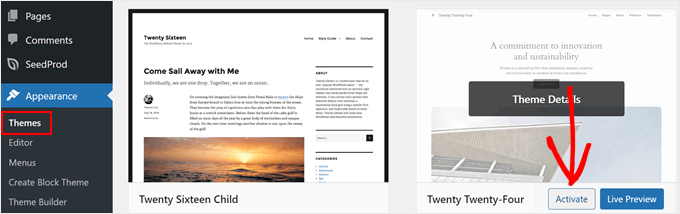
એ plugin/theme conflict resolve કરવા માટે, plugin update અને alternative શોધવું Best practice છે.
2026માં: “Health Check & Troubleshooting” plugin (WordPress 6.4 compatible) વડે site isolate કરી ‘safe mode’ test કરો, જરૂર conflict instant detect થાય. WooCommerce v8.2+, URL rewrite conflict ‘System Status’ module પ્રત્યે જોવો (Conflict ઉકેલ).
પધ્ધતિ 2: Permalink રૂપરેખા સુધારો
મોટાભાગનાં 404 Errors WordPress permalink structure (rewrite rules) વચ્ચે misconfiguraionથી થાય છે. Settings » Permalinksમાં જઈ “Save Changes” કરો; આ step ખુલ્લા rewrite rules refresh કરે છે, અને ત્વરિત effect આપે છે.
આ પધ્ધતિમાં technical knowledge જરૂર નથી, beginners friendly છે; જો hosting config બિલકુલ mismatch કરે છે, એને આગળા steps જરૂરી.
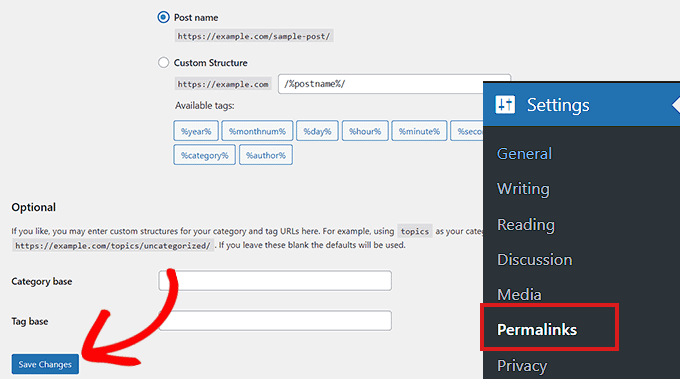
2026માં વૈશ્વિક અપડેટ: WordPress 6.5-6.6 releases, advanced “Rewrite Rules Inspector” module જોડે permalink UI ફીચર આપે છે. “Rewrite Rules Table” plugin (2026 version) વડે permalink configuration routinely audit કરો.
SEO પ્રભાવી ટિપ: Permalink બદલ્યા પછી, “Redirection” plugin install કરો. Redirect policies maintain કરો, old-to-new URL mapping, Google ranking અને user experience માટે ઉકેલ.
પધ્ધતિ 3: .htaccess અપડેટ કરો
Permalink refresh કરીને પણ 404 Error solve ન થાય, તો .htaccess misconfigure સંભવ. અ૫ડૅટ કરતા પહેલા બેકઅપ very important! ડિસ્કલ થી .htaccess શોધી અને edit કરતાં પહેલા permission 666 set કરો, afterward 660 restore કરો. નીચે આપેલો snippet એ WordPress rewrite rules correct છે:
# BEGIN WordPress
<IfModule mod_rewrite.c>
RewriteEngine On
RewriteBase /
RewriteRule ^index\.php$ - [L]
RewriteCond %{REQUEST_FILENAME} !-f
RewriteCond %{REQUEST_FILENAME} !-d
RewriteRule . /index.php [L]
</IfModule>
# END WordPress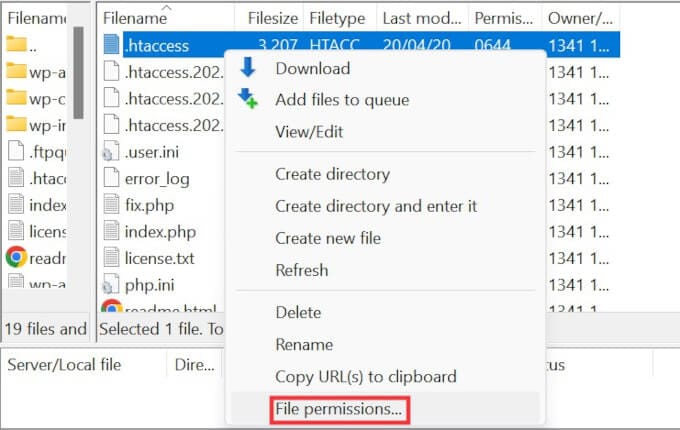
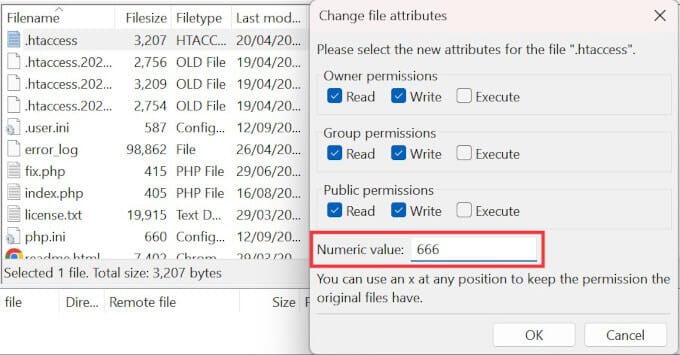
.htaccess edit કરતી વખતે, mistake અને typo sitenewsdown માટે જવાબદાર બની શકે.
2026ની ટિપ: “WP Security Audit Log” plugin install કરીને .htaccess changes track કરો. Cloudways, Kinsta (2026) hosting auto backup .htaccess panelમાં આપતી બાબતે ફાયદો.
CDN/caching (e.g., Cloudflare 2026) integration effect .htaccess edit વખતે ક્યારેય ભૂલી નહિ.
પધ્ધતિ 4: Hosting ટેક સહાય મેળવો
જો ઉપરની બધું પગલાંથી 404 Error solve ન થાય, તો hosting/server config misfire હોઈ શકે. Hosting support પ્રારંભિક root cause detect કરીને remediate કરે છે.
Shared hosting માં ઘણા user પણ આ જ Error જોવા મળે. detail ticket/issue ખોલો; WordPress Support portal વડે community જયિન કરો.
2026માં Pro Support: New cPanel (114+), Plesk (2026+), “Error Logs”, “URL Rewrites”, “Application Firewall” tabમાં detail 404 logs ઉતરે છે. Kinsta, SiteGround, Cloudwaysમાં 24/7 chat facility, WordPress 6.6માં server compatibility check auto panelથી possible.
પધ્ધતિ 5: Local Server mod_rewrite એક્ટિવ કરો
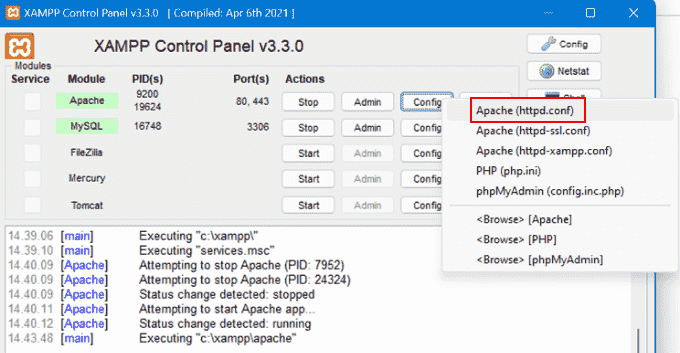
MAMP, WAMP, XAMPP જેવી local setup ઉપર test કરતી વખતે mod_rewrite module enable હોય, પગલાં એ 404 Error local developmentમાં દૂર કરે છે.
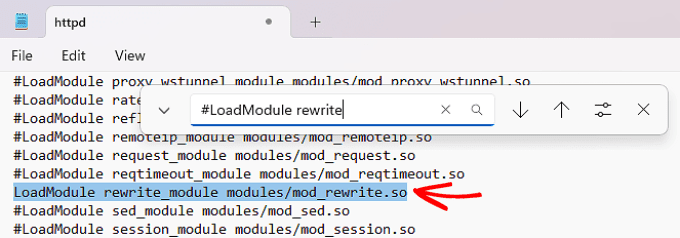
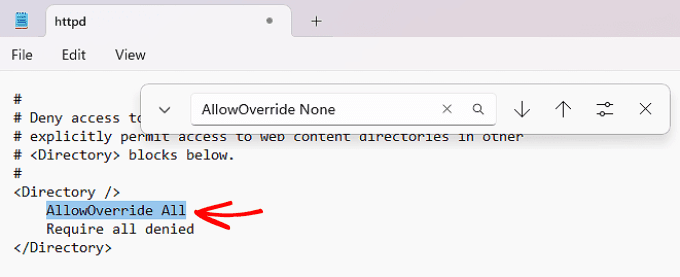
httpd.conf ફાઇલ open કરીને, #LoadModule rewrite_module modules/mod_rewrite.soથી '#' remove કરો અને AllowOverride None ને AllowOverride All કરો. URL rewrite local server પર active થશે.
2026 મા Docker & Cloudવીલ અપડેટ: Docker local developmentમાં mod_rewrite-style URL rewrite docker-compose.yml config વડે:
Windows 11 અને macOS Sonoma પર XAMPP 8.3 નું mod_rewrite default off આવે છે. phpinfo() વડે module status check કરો. Apache restart જરૂરી.services:
wordpress:
image: wordpress:latest
ports:
- "8080:80"
volumes:
- ./wp-content:/var/www/html/wp-content
environment:
- APACHE_MODS_ENABLED=rewrite
યે પધ્ધતિઓના ફાયદા અને ખામીઓ
દરેક પદ્ધતિના pros-cons નોકરી આપો, Gujarati hosting માટે સૂચન કરો:
- પધ્ધતિ 1 (Plugin/Theme/Kod): ફાયદો – source instantly detect; ખામી – બધાં plugins ની individual testing required.
2026 ટિપ: Health Check plugin વડે site traffic અફેક્ટ કર્યા વિના conflict detect કરો. Plugin Detective વડે clash મેળવવો તરત બનાવો. - પધ્ધતિ 2 (Permalink): ફાયદો – simple, beginner-friendly; ખામી – hosting mismatch loophole.
Rewrite Rules Inspector વડે permalink refresh પછી faulty rules detect કરો. - પધ્ધતિ 3 (.htaccess): ફાયદો – permanent effect; ખામી – typo જો sitenewsdown માટે જવાબદાર.
chmod 644 અથવા 660 permissions safest; wrong permissions visibility પર અસર કરે છે. - પધ્ધતિ 4 (Hosting): ફાયદો – expert support; ખામી – response time.
24/7 live chat દ્વારા error logs share કરો, instant resolving. - પધ્ધતિ 5 (Local mod_rewrite): ફાયદો – pre-launch issues detect; ખામી – Apache config edit risky.
".htaccess Tester" pluginથી local rewrite validation કરો.
નિષ્કર્ષ
WordPress 404 Error Gujarati hosting અને development માટે, સુધારેલા પગલાંથી સરળ ઉકેલ શક્ય છે. પહેલાં plugin/theme conflict audit; પછી permalink refresh કરો અને .htaccess update કરો – આ step-by-stepથી 80% Error ઉકેલાય છે. Local development mod_rewrite assess કરો, live deploy પહેલા.
એકથી વધુ પદ્ધતિ combine કરવાથી વધુ પાયદાર result મળે છે. તમારું સોલ્યુશન advance-level આવું હોય તો hosting help, community support અવશ્ય લો.
2026 માટે proactive approach: Google Search Console, Ahrefs monitoring ચાલુ રાખો; custom 404 landing page setup કરો. WordPress 6.6 માં “404 template engine” થી visitor ઓટો suggest કરો – alternate content, search form જે SEO અને user experience માં સુતરાઉ બદલાવ લાવે છે.
પ્રચલિત પ્રશ્નો (FAQ)
પ્ર: WordPress 404 અમુકના અર્થ શું છે?
ઉ: WordPress 404 Error એ સૂચવે છે કે visitor જે પેજની માંગણી કરે છે તે server પર નથી. સામાન્ય રીતે permalink mismatch અથવા redirect પકડ છો, પણ hosting side ભુલ પણ કારણ છે.
2026 અપડેટ: WordPress core & theme updatesથી “404 Not Found”, “410 Gone”, “Soft 404” ત્રણ અલગ issues થવા લાગે છે; Search Console, SEO toolsમાં જુદા જુદા report section આવી જાય છે.
પ્ર: Permalink સમસ્યા કેમ ઉકેલાય?
ઉ: Settings » Permalinksમાં જઈ “Save Changes” option click કરો – permalink rules auto-refresh thase. આથી URL rewriting પ્રભાવી.
નાં spoof tip: “Redirection” pluginથી legacy/new URL mapping; Google અને visitorના માટે કંટાળામની દૂર કરે છે.
પ્ર: Local server mod_rewrite કેટલી રીતે active થાય?
ઉ: XAMPP, WAMP, MAMPમાં httpd.conf ફાઇલ edit કરો – rewrite_module enable કરો, AllowOverride All કરો.
Apache restart પૂર્વે phpinfo()થી module state cross-check કરો; Docker/LocalWP configમાં “rewrite” settings add કરો.
સારાંશ, ઉપર દર્શાવેલ પધ્ધતિઓ WordPress 404 Error તેમજ Permalink સુધારાવા માટે Gujarati web hostingમાં અવિરત કામ આપે છે.
2026માં SEO solution: Google Search Console API auto 404 "dead link removal" scripts અને URL repair bots થી advanced admins સમય બચાવે.