 Afrikaans
 Azərbaycan
 Bosanski
 Čeština
 Dansk
Dansk Deutsch
 English
 Español
 Filipino
 Français
 Hrvatski
 Indonesia
 Italiano
 Magyar
 Melayu
 Nederlands
 Norsk
Norsk Oʻzbek
 Polski
 Português
 Română
 Slovenčina
 Slovenščina
 Suomi
Suomi Svenska
 Tiếng Việt
 Türkçe
 Ελληνικά
 Беларуская
 Български
 Русский
 Српски
 Українська
 עברית
עברית اردو
اردو العربية
 پښتو
پښتو فارسی
فارسی አማርኛ
አማርኛ मराठी
मराठी বাংলা
বাংলা தமிழ்
தமிழ் ไทย
ไทย မြန်မာ
 한국어
한국어 中文
中文 日本語
日本語

This guide provides detailed information for those looking to learn about Setting Up a TeamSpeak Server, including step-by-step instructions, advantages, disadvantages, and alternative solutions. Creating your own TeamSpeak server is crucial for controlling your communication infrastructure. This article discusses both Advantages of TeamSpeak and TeamSpeak Alternatives, along with practical examples for the setup process. For more content, feel free to visit our Site Map.
What Is a TeamSpeak Server?
TeamSpeak is a popular VoIP (Voice over Internet Protocol) application that enables high-quality voice communication, especially among gamers and professional teams. Users can create their own dedicated servers through Setting Up a TeamSpeak Server, facilitating low-latency and secure connections. This system is preferred in various fields such as gaming communities, online meetings, remote education, and more.
Key Update for 2026: Alongside the TeamSpeak 3 server software, the TeamSpeak 5 beta version has started widespread testing. In 2026, TeamSpeak will offer new tools that simplify server management with a revamped interface and advanced mobile integration. Desktop, web, and mobile clients now operate in a fully integrated manner, allowing server owners to activate monetization (Premium) options directly from the panel. Server performance is enhanced with upgraded audio codecs (Opus codec updates) and automatic DDoS protection.
System Requirements for Installation
To successfully set up a TeamSpeak Server, it is important to consider the following system requirements:
- Operating System: Windows, Linux, or macOS (Linux servers are particularly recommended)
- Processor: At minimum, a dual-core processor; for heavy usage, more powerful processors are preferred
- RAM: At least 512 MB; for active usage, 1 GB or more is recommended
- Storage: A fast SSD enhances file access speed and server performance
- Internet Connection: High bandwidth is essential for low latency
- Port Settings: Ensure that the standard UDP port 9987 is accessible
2026 Recommendations and Tips: To optimize your TeamSpeak server performance:
- Plan RAM and CPU resources according to the number of concurrent users (For example, at least 2 GB RAM is recommended for 50+ users).
- If possible, use NVMe SSDs; modern servers with NVMe drives process incoming audio packets rapidly, reducing ping by 10%.
- Ensure your internet connection has a minimum upload speed of 10 Mbps for adequate bandwidth during live streaming and group discussions.
- For enhanced port security, set rules through NAT/Firewall instead of port forwarding, and only open necessary ports.
- Additionally, when running your server on a virtual machine (VM), use the “CPU pinning” feature to stabilize CPU allocation.
Step-by-Step Setup of TeamSpeak Server
Below are the installation steps for TeamSpeak Server for both Windows and Linux operating systems:
Installation on Windows
- Download: Download the latest server version from the official TeamSpeak website. Extract the downloaded file from the compressed folder. Download the current 3.13.9 version for 2026.
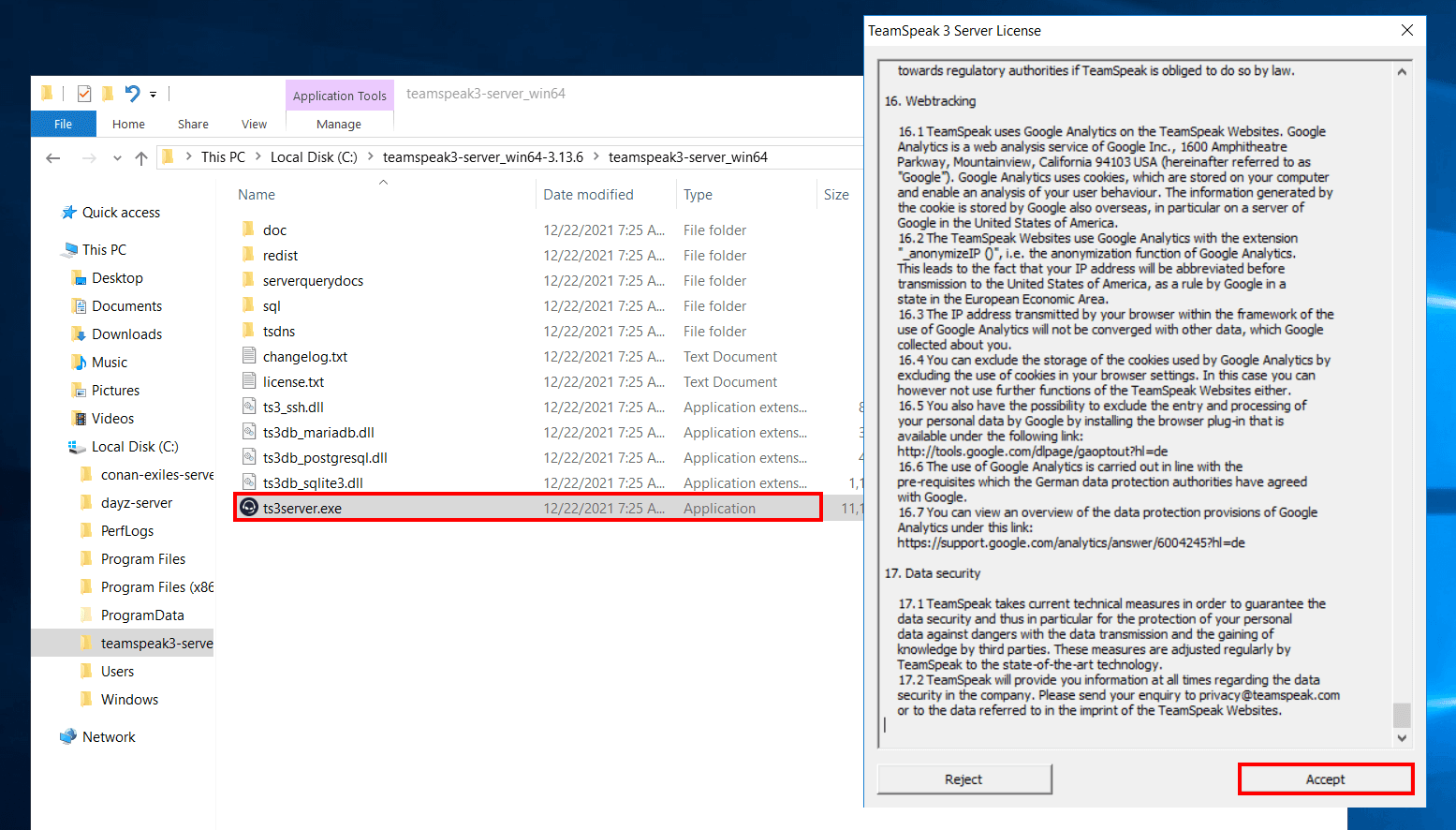
- Run: Run the
ts3server.exefile from the extracted folder with administrator rights. The license agreement and default settings will appear on the first run. - Server Settings: During installation, define the admin password and server settings. Using a strong password is vital for your server's security.
- Firewall and Port Settings: Windows Firewall or antivirus software may sometimes block connections. Ensure that the 9987 (UDP) port is open.
- Test: To verify that the server is functioning properly, connect to it via the TeamSpeak client and conduct a test.
- Practical Tip (New 2026 Support): TeamSpeak 3 and 5 versions can be installed in parallel. You can export the settings of your old server in JSON format from the TeamSpeak 5 beta panel to import them to the new server. Always back up for a safe upgrade.
- Automatic Start: You can create a task in Windows Task Scheduler to automatically start the ts3server.exe file. The server will automatically boot up after a power outage or system restart.
Installation on Linux
- Prerequisites: Ensure you have root privileges and that the necessary libraries (e.g., glibc) are installed on your system.
- Download and Extract: Use the following commands in the terminal to download and extract the TeamSpeak server files:
wget https://files.teamspeak-services.com/releases/server/3.13.9/teamspeak3-server_linux_amd64-3.13.9.tar.bz2tar xjf teamspeak3-server_linux_amd64-3.13.9.tar.bz2 - Configuration: Before the first run, accept the license agreement and edit the server configuration files (such as ts3server.ini). You can set the admin password and other basic settings here.
- Firewall Settings: Don’t forget to allow the 9987 UDP port using firewall tools like iptables or ufw on Linux.
- Start: Start your server using the following command:
./ts3server_minimal_runscript.sh
Note down the admin password displayed in the terminal after executing the command. - Additional Tip (For 2026): You can create a systemd service file for automatic startup of your server like this:
Use[Unit] Description=TeamSpeak Server After=network.target [Service] User=teamspeak WorkingDirectory=/opt/teamspeak ExecStart=/opt/teamspeak/ts3server_minimal_runscript.sh Restart=always [Install] WantedBy=multi-user.targetsudo systemctl enable teamspeakto automatically start the server at each reboot. - Security and Backup: For 2026, you can take daily automated backups to cloud services like Google Drive or Dropbox using rclone. Use
rclone sync /opt/teamspeak/backups remote:tsbackups
2026 Update: The setup screen and panel interface have become mobile-friendly and now include a dark mode option. Additionally, dual-factor authentication (2FA) and WebAuthn support have been added for admin sessions.
Advantages and Disadvantages of TeamSpeak
Advantages of TeamSpeak
The Advantages of TeamSpeak include:
- Low Latency: Voice transmission is quick and uninterrupted, providing a significant advantage in competitive gaming.
- Customizability: You can configure your server as you wish with features like user permissions, role settings, and channel management.
- Security: Communication is secured with encryption mechanisms and server permissions, preventing unauthorized access.
- Stability: High-performance servers offer uninterrupted service even under heavy use.
- Practical Advantages for 2026:
- Improved automatic update system simplifies server maintenance: Since 2026, server administrators can activate the "Auto Update" option in the panel for automatic transitions to new versions.
- Parallel channel integration between TeamSpeak 5 and 3 versions allows for seamless migration of old users to the new platform.
- The web-based admin panel provides remote access for channel moves and user management, optimized for quick channel creation, deletion, and instant user banning.
- Server efficiency has increased with 30% less resource usage on CPUs supporting SSE4/AVX.
- A new "Snapshot" feature (automatic backup every hour) greatly facilitates disaster recovery.
Disadvantages of TeamSpeak
Like any technology, TeamSpeak also has some drawbacks:
- Complex Installation: The installation process, especially on Linux, may involve technically challenging steps. This can create difficulties for beginners.
- Updates: When a new version is released, there may be compatibility issues with existing configurations. Therefore, the update process should be carefully planned.
- Additional Software Requirements: Using extra modules and plugins can create management challenges and incur additional costs.
- Current Disadvantages and Solutions for 2026:
- While the TeamSpeak server software has a free community license, a paid license is required for a high number of users, and this cost has been updated to $60 annually in 2026 (for 50 users).
- In automatic updates, to prevent instantaneous disruptions and data loss, server snapshot and backup systems have become mandatory. The command
ts3server --snapshotcan be used for backups. - Some functions of the new TeamSpeak 5 beta features may not demonstrate full stability. Practically, many large communities continue to stay on TeamSpeak 3, but hybrid usage can reduce transition issues.
- The integration API still requires manual updates for some functions, particularly for third-party bot and statistic integration, necessitating extra technical support as of 2026.
Alternative Solutions and Options
Nowadays, there are options available that can be considered Alternatives to TeamSpeak among VoIP solutions. Platforms like Discord, Mumble, and Ventrilo stand out with user-friendly interfaces and extensive community support as alternatives for some users.
Discord captures attention with its quick setup and integrated chat and video features; Mumble appeals to novice users with its low latency and open-source structure. However, the comprehensive customization options and security measures you'll gain through Setting Up a TeamSpeak Server still make it a significant choice for professional use.
- 2026 Alternative Developments and Concrete Suggestions:
- Discord server owners can now organize moderated conference events using the "Stage" channel feature and automate server management via API. However, for optimal sound quality, Discord’s audio codec settings should be adjusted to "High Quality," which increases overall data consumption.
- Mumble was updated to version 1.5.1 in 2026. Automatic user recognition and TLS encrypted connections have become standard on the server side with the
murmurservice. Those looking to set up a server with Mumble can benefit from the Murmur Guide. - Ventrilo is still preferred by retro communities, but it offers no advanced management or automation support, providing only basic voice transmission for game servers.
- Google Meet, Zoom, and Microsoft Teams are more commonly used for business meetings and corporate purposes; however, they may not provide sufficient speed for real-time communication in gaming communities.
- Federation-based chat infrastructures like Matrix/Element offer alternative VoIP and chat integrations for communities. The Element server can be easily set up with Docker, creating a practical option for WebRTC-based voice communication.
- Practical Comparison Table (2026):
Alternative Solutions and Options Platform User Capacity Sound Quality Customization Server Control TeamSpeak Unlimited High Extensive Total Discord Unlimited High (In Some Channels) Limited None Mumble Unlimited Low-Medium Extensive Total Ventrilo Up to 50 Medium Limited Total
Frequently Asked Questions (FAQ)
1. How to Set Up a TeamSpeak Server?
To set up your TeamSpeak server, you should first determine which operating system you will be using. Different steps are available for Windows and Linux. The instructions above give step-by-step installation guidance for both platforms. By paying attention to download, installation, configuration, and port settings, you can run your server smoothly.
2026 Practical Tip: After installation, you can view real-time server logs and connected user statistics in the "Server Status" section of the TeamSpeak web panel. Also, monitor CPU, RAM, and port accesses live in the "Server Health" tab to detect performance issues early. The "Migration Wizard" in TeamSpeak 5 beta allows you to automatically transfer all settings and user roles from the old server to the new panel.
2. What Are the Advantages of TeamSpeak?
TeamSpeak stands out due to its low latency, high stability, extensive customization options, and robust security measures. These advantages provide a seamless and reliable voice communication experience, especially for gaming communities and professional meetings that require high usage.
Current Suggestion: With the 2026 update, TeamSpeak server panel users can enhance the voice priority of critical users using the "Priority Speaker" and "Channel Commander" permissions, highlighting active users during meetings. Additionally, server owners can automatically analyze who changed channels and when through the "Ban History" and "User Activity" panels in the dashboard.
3. What Can You Say About TeamSpeak Alternatives?
Today there are alternative platforms like Discord, Mumble, and Ventrilo. Each offers different features, yet the Setting Up a TeamSpeak Server allows for control and customization options that are still preferred by some users. It is important to consider your usage purpose and technical requirements when evaluating alternatives.
2026 Current Alternatives and Practical Tips: If security and data privacy are critical during your voice meetings, hosting TeamSpeak on your own server is the safest solution. On Discord and Mumble infrastructure, additional encryption and channel permission settings are necessary. In Mumble, user identity recognition has improved with certificates. When defining channel permissions in Discord, be sure to restrict access for the “@everyone” role.
Alternatively, consider using Docker to set up a Matrix/Element server and back up your community's infrastructure with WebRTC-based voice communication integration.
Conclusion
In this article, we have covered all the details related to Setting Up a TeamSpeak Server; detailing system requirements, installation steps, advantages, and disadvantages. With the step-by-step instructions applicable to both Windows and Linux platforms, you can easily set up your server and achieve a secure voice communication experience. Thanks to the Advantages of TeamSpeak, you can benefit from a communication infrastructure with low latency and high performance while being informed about alternative solutions. A properly configured TeamSpeak server is an ideal tool for both personal use and professional meetings.
Final Extra Advice for 2026: While setting up your server, take monthly backups of users and channels at the beginning of each month for easy scalability, reducing operational risks. Mandatory 2FA for admin panel access increases server security. You can use centralized server management tools like ts-manager for multi-server management. Additionally, using user guides and automated onboarding bots (TeamSpeak bot API) can accelerate new user adaptation in your community. Don’t forget to promote your TeamSpeak server on forums and internet lists for SEO and community management!