 Afrikaans
 Azərbaycan
 Bosanski
 Čeština
 Dansk
Dansk Deutsch
 English
 Español
 Filipino
 Français
 Hrvatski
 Indonesia
 Italiano
 Magyar
 Melayu
 Nederlands
 Norsk
Norsk Oʻzbek
 Polski
 Português
 Română
 Slovenčina
 Slovenščina
 Suomi
Suomi Svenska
 Tiếng Việt
 Türkçe
 Ελληνικά
 Беларуская
 Български
 Русский
 Српски
 Українська
 עברית
עברית اردو
اردو العربية
 پښتو
پښتو فارسی
فارسی አማርኛ
አማርኛ मराठी
मराठी বাংলা
বাংলা தமிழ்
தமிழ் ไทย
ไทย မြန်မာ
 한국어
한국어 中文
中文 日本語
日本語


નમસ્કાર! આ બ્લોગમાં plesk panel સ્થાપન, plesk panel settings અને plesk panel hosting વિષે વિગતવાર અને પ્રાયોગિક માહિતી આપવી રહી. જો તમે સર્વર/સાઈટ સંચાલન માટે વપરાશકર્તા-મિત્ર અને કાર્યક્ષમ ટૂલ શોધી રહ્યા છો, તો Plesk Panel સહયોગી હોઈ શકે છે. આગળ, સ્થાપનથી સુરક્ષા સુધી, લાભ-ક્ષતિ અને વિકલ્પોની સમીક્ષાથી પ્રસ્તુતિ-દૃષ્ટાંત સુધી દરેક પાસાંને વિસ્તૃત રીતે સમજાવશું.
Plesk Panel શું છે?
Plesk Panel એ સર્વર અથવા hosting સેવા માટે ડિઝાઈન કરાયેલ, વપરાશકર્તા-મિત્ર web control panel છે. 2001માં આવતું Plesk Windows તથા Linux બંને કે OS માં કામ કરે છે અને સતત અપડેટ થાય છે. ખાસ "એક click થી" install, an intuitive UI અને pluginનું expansion માટે GMP વતાવે.
Plesk Panel સ્થાપન
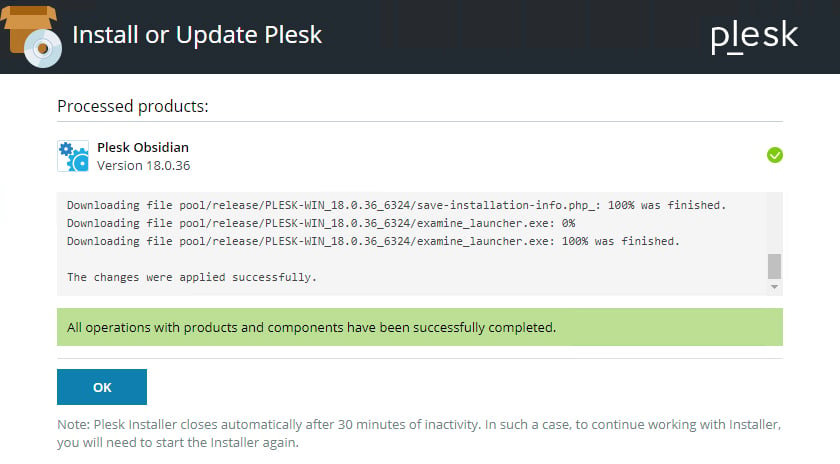
Plesk panel install સામાન્ય રીતે ઝડપી અને સરળ હોય છે. તમારી host કંપની auto-install વિષે step આપે છે, પણ તમને હાથથી પણ install કરી શકો છો. հիմના process:
- સર્વર પસંદ: Plesk Linux (જેમાં Ubuntu, CentOS, Debian), કે Windows OS support કરે છે. ગુરુત્વાકર્ષણ પહેલાં OS compatibility inspect કરો.
- ઇન્સ્ટોલ પેકેજ: Plesk website કે હોસ્ટ provider control panel પરથી install કરી શકો. ઘણા cloud platforms (AWS, Google Cloud વગેરે) લે Plesk ready image આપે છે.
- મુલ setup: શરુ install wizard license key, admin password અને email address poochશે. ખરેખર સીધી માહિતી દો.
- પ્લગઈન્સ પસંદ: Install સમયે WordPress Toolkit, Docker, Let’s Encrypt અને અન્ય plugin મેળવવા રસ છે.
- Install confirm: બધા settings બે ત્યાં Plesk install શરૂ થશે. પછી https://server-ip-address:8443 ખોલી, login થી પ્રવેશ કરી check કરો.
- Linux/Ubuntu/CentOS ઓટોમેટિક: આ command
sh <(curl https://autoinstall.plesk.com/one-click-installer || wget -O - https://autoinstall.plesk.com/one-click-installer) - Web ડિમોલ આવી ઇન્સ્ટોલ: https://get.plesk.com/ ઈ URL ઉપર server અથવા root પાસવર્ડ થઈ install ઉપાય .
ઇસ process બાદ તમે Plesk panel મુખ્ય જ વાપરી શકશો. login કર્યા પછી settingએ optimise કરો; server resource monitoring, backup plans અને security જરૂર inspect કરો.
Plesk Panel મૂળ સિસ્ટમ સેટિંગ
Plesk panel configuração માટે આ લિસ્ટ નવા યૂઝર્સ માટે મહત્વપૂર્ણ છે:
- Hosting packages બનાવવું
Plesk Panel માં મિલ હોસ્ટિંગ પેકેજ create કરવા , quota (disk, bandwidth), email accounts જથ્થા જ limit કરી શકાય . - Domain & DNS પગલાં
નવી ડોમેન ઉમેરો ત્યારે, DNS records (A, CNAME, MX વગેરે) તમામ edit કરશો. જમ panel આ settings edit કરી website move , subdomain add જ આસાન . - ડેટાબેઝ બનાવવું
Plesk database management સલાવ gui થી MySQL કે MSSQL ના db સેટ backup અને restore કરશો. - ઈ-મેલ સેટિંગ
Plesk Panel mail accounts અને forward manage કરે છે. SPF, DKIM, DMARC સેવા enable કરી email deliverability improve કરાશે.
સર્વર રિસોર્સ પરીક્ષણ
Plesk panel hosting માં resources monitor કરવું ખૂબ મહત્વ પૂરે છે. CPU, RAM, Disk real-time usage panel જોઇ શકાય ; performance problem મીટ ક્રિ શકાય .
ઓટોમેટિક અપડેટ્સ સેટિંગ
Plesk Panel WordPress, Joomla ની plugin માટે auto-update produc કરે છે. તેના update interval daily કે weekly શકાય ; critical patches auto install enable કરો.
Plesk Panel સુરક્ષા
તમારી સુરક્ષા માટે Plesk panel ની settings અત્યંત મુખ્ય છે. જુઓ :
- Firewall Rules: Plesk માં firewall panel થી unused port બંધી અને only required services allow કરો.
- Fail2Ban: Plesk Fail2Ban plugin થી wrong login tries detect માટે IP block કરે છે. Brute force વિરુદ્ધ protection .
- SSL/TLS Certificates: Let's Encrypt અથવા other SSL providers થી certificates HTTPS enable કરો ; security અને SEO improve કરો.
- Backup: Plesk backup panel થી auto/manual backup schedule કરો અને Google Drive Amazon S3 પર store કરો.
ઈ-મેલ અને ડોમેન મેનેજમેન્ટ
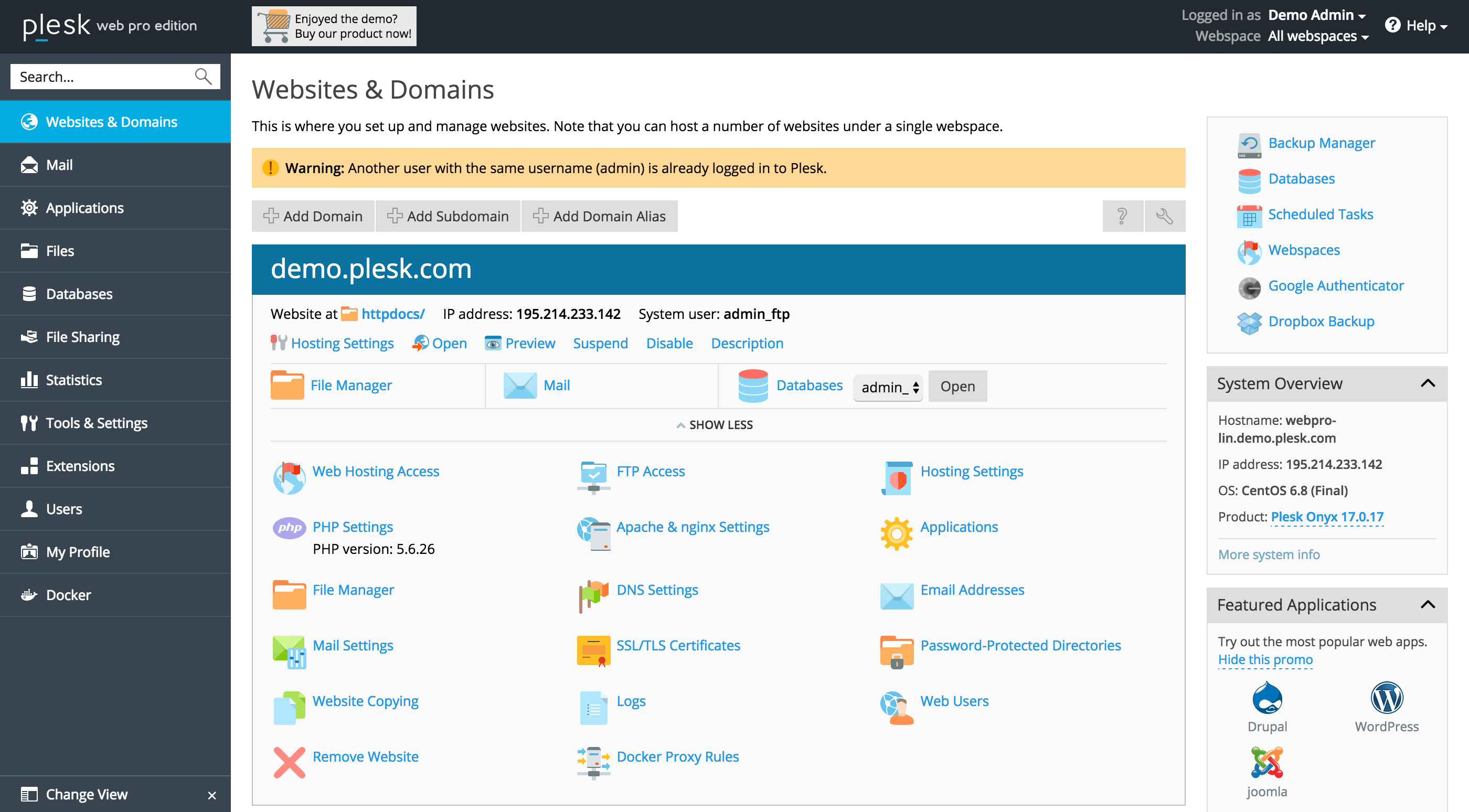
Plesk Panel email અને domain બનવી ખૂબ effortless થાય છે. દરેક ડોમેન માટે local email address configure forward limit define કરો.
જયારે DNS management માટે panel allows easy record edit , thus website move કે subdomain add hassle-free .
લાભ અને અપૂર્ણતાઓ
કંટ્રોલ પેનલ સારી પસંદ માટે લાભ-અપૂર્ણતા મહત્વ રાખે છે. Plesk Panel પાસે ગુણવત્તા તો છે, પણ perfect system પ્લસ limitations .
લાભ
- વપરાશકર્તા-મિત્ર UI: શરુ યૂઝર માટે ખાસ easy ; menus થી fast operations .
- Multi-platform Support: Windows અને Linux server ર્ચ મળે જુ .
- Plugin Ecosystem: WordPress Toolkit, Docker, Git, Let's Encrypt જેવી integration ના support .
- Security: Built-in security features—auto updates, Fail2Ban આ instrument નું .
અપૂર્ણતાઓ
- License cost: Plesk Panel usually monthly/yearly license fees ચે ; cPanel alternatives એક DirectAdmin, VestaCP cheap/free .
- Resource Consumption: Smaller servers માં Plesk comparatively more RAM/CPU consume કરે .
- Manual customisation hard: Panel settings માત્ર GUI થી change ; advanced customisation shell જ જરૂર ય.
વૈકલ્પિક પેનલ અને રીતો
Plesk panel hosting સિવાય control panal તક ના માટે alternatives :
- cPanel/WHM: Industry માં most-used solution ; user-friendly but price Plesk જ level .
- DirectAdmin: Budget-friendly license ; simple UI ઉપયોગ કરે .
- VestaCP: Open-source and free alternative ; plugin support limited .
- ISPConfig: Free source ; features good , but usage technical knowledge .
છે કે depend your needs and budget , panel choose કરો . Corporate-level manage ખાસ plugins ઉપયોગ મા ચાહો , તો Plesk Panel best.
આચરણના ઉદાહરણો
Plesk Panel actual ઉપયોગ samajo , some practical examples:
- Bulk Website Management: Agency ડમ server ં multiple websites host , single_panel થી manage .
- Auto WordPress Install: Online business grow ની મૂકે user WordPress Toolkit plugin use site deploy .
- Corporate Email Hosting provider DKIM, SPF panel થી enable , secure mail trafic .
વારંવાર પૂછાતા પ્રશ્નો (FAQ)
આ જગ્યા plesk panel install, plesk panel settings અને plesk panel hosting થી connected most-asked questions .
પ્ર: Plesk Panel માટે કઈ બદલતી જરૂરિયાતો રહે છે?
મૂળભૂત 1-2 GB RAM અને 1 CPU core/ server enough ; high traffic/sites માટે higher resources suggested .
પ્ર: Plesk Panel લુક અથવા થીમ બદલી શકાય છે?
હા, Plesk Panel default theme change અને color options તેથી customise કરી શકાય . Advanced look customisation cPanel સરખામણી birds .
પ્ર: install અથવા update વખતે error મલે તો રો ?
પ્રથમ Apache, Nginx, MySQL services work કરે છે કઈ ઇ ચકાસો . Mostly, version conflicts કે disk space low કારણ આવે છે . Plesk એમ્બ્રેસી ડોક્યુમેન્ટેશન inspect કરો અથવા હું સિસ્ટમ admin સી help લ્યો .
આ theme upper સંબંધિત અને official Plesk site અન્ન વિસ્તૃત resource .
પરિણામ અને સારાંશ
સારાંશરૂપે, Plesk Panel મિત્ર UI, multi-platform support અને plugin facility દ્વારા best control panel રૂપે જ . Shodh new-user કે mid/advanced સંબંધ manage કરણાર માટે ઈ panel workable . Plesk panel install અને plesk panel settings right માટે server management easy થાય છે . License cost અને resources despite તથા - આ વિષય માટે આ guide comprehensive Plesk panel hosting માટે .
હવે Plesk Panel professionally વાપરી દ્રવ website manage stabil , secure અને fast કરી શો . દેશ detailed info મા ફરી કે પોતાના panel switch કરો , alternatives inspect કરો .