 Afrikaans
 Azərbaycan
 Bosanski
 Čeština
 Dansk
Dansk Deutsch
 English
 Español
 Filipino
 Français
 Hrvatski
 Indonesia
 Italiano
 Magyar
 Melayu
 Nederlands
 Norsk
Norsk Oʻzbek
 Polski
 Português
 Română
 Slovenčina
 Slovenščina
 Suomi
Suomi Svenska
 Tiếng Việt
 Türkçe
 Ελληνικά
 Беларуская
 Български
 Русский
 Српски
 Українська
 עברית
עברית اردو
اردو العربية
 پښتو
پښتو فارسی
فارسی አማርኛ
አማርኛ मराठी
मराठी বাংলা
বাংলা தமிழ்
தமிழ் ไทย
ไทย မြန်မာ
 한국어
한국어 中文
中文 日本語
日本語

Introduction
Google accounts have become essential in our online lives, yet they can pose significant challenges for those who forget their passwords. Although we connect to various services like search history, Gmail, Drive, and more with a single password, recalling that password correctly isn't always easy. In this guide, we will provide effective solutions, advantages, disadvantages, and different methods for users declaring, I forgot my Gmail password. We'll also discuss steps you can take to speed up the Google password recovery process and securely regain access to your account.
1. What Is Google Password Recovery?
The “Google password recovery” process refers to a series of steps designed to help users regain access to their accounts when they forget their passwords. During this process, Google may ask for details linked to your account, such as a recovery phone number, alternative email address, security questions, or an old password you remember.
- Advantage: Quick and easy recovery with existing security methods.
- Disadvantage: The process may take longer if you don't have an alternative email or phone number.
For instance, if you have access to your computer or phone and have previously opened your Google account on a mobile device, the recovery process can be executed much faster. However, if you're unable to access these details, additional verification stages may be triggered.
2. Step by Step Method for Those Who Forgot Their Google Password
This section outlines the basic steps for individuals who find themselves saying I forgot my Gmail password.
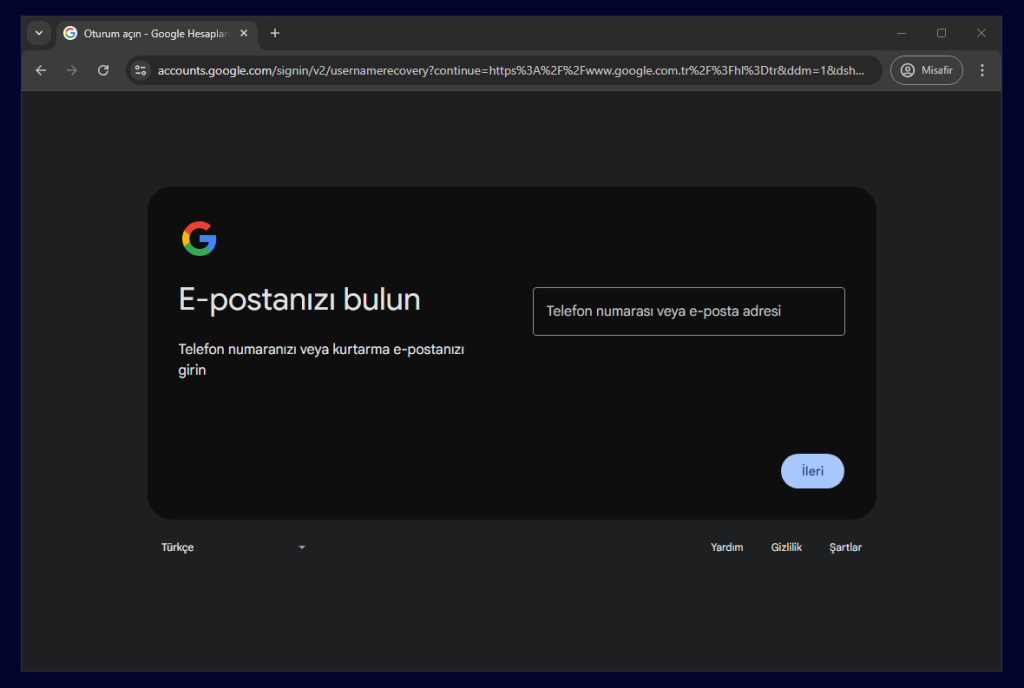
- Go to the Google Recovery Page
Official Google Password Recovery Document
Start here. You will be prompted to enter your username or the phone number associated with your account. - Security Verification
Try entering your alternative email or phone number linked to your Google account. This way, a verification code will be sent to that contact, allowing you to access your account. - Create a New Password
Once verification is complete, you will be prompted to set a new password. Choose a password that is hard to guess, using a mix of uppercase, lowercase letters, numbers, and special characters to secure your account.
The above steps cover the fundamental methods for quickly conducting Google password recovery.
3. Alternative Password Recovery Methods
In addition to Google's official recovery screen, you can try some alternative methods:
3.1. Learning Your Password From Browser Records
If you have logged into your account using the same browser repeatedly, your previously entered password may be stored in the “Saved Passwords” section of that browser. For example:
- Chrome: Navigate to “chrome://settings/passwords” to check saved passwords.
- Firefox: Access the password records through “Settings > Privacy & Security > Saved Logins.”
Advantage: This method is very quick.
Disadvantage: If the browser has been updated or if the cache has been cleared, you may not be able to retrieve the password.
3.2. Getting Info From An Open Account On Your Phone
If your account is still open on your phone as a Google password forgetter, you can access recovery options from the “Accounts” section in your phone settings or reset your password. You can initiate the process of creating a new password directly through your device, quickly resolving your I forgot my Gmail password issue.
4. Solutions for Those Who Forgot Their Google Password on Different Platforms
4.1. Using a Computer
If your account is open in a browser on your computer, you can follow the Google password recovery steps by going to Google's official recovery screen. Additionally, if you have previously saved a password, check the “Settings > Passwords” section.
4.2. From Mobile Devices
If you've logged into the Google/Gmail app on Android or iOS devices, you can add recovery email or phone numbers from “Settings > Google > Manage,” enabling you to reset your forgotten password. This method is often quick and practical.
5. Analyzing Advantages & Disadvantages of Forgotten Google Password
| Advantages | Disadvantages |
|---|---|
| Fast recovery options (phone, email, etc.) | The process may take longer if no alternative email or phone exists |
| Security measures make unauthorized access difficult | Technological issues (SIM card access, etc.) can pose additional barriers |
| Browser and device records simplify the process | Not every browser or device may save passwords |
6. Tips for Account Security
For those wondering, “I forgot my Gmail password; will this happen again?” there are some additional measures to enhance account security:
- Two-Step Verification: Your account cannot be accessed without a code sent to your phone or verification app.
- Recovery Email: Set up a different email address so you can quickly regain access if you forget your password.
- Regular Password Changes: Changing your password every few months keeps your account safer from attacks.
- Managing Browser Cache: Always log out on shared devices and avoid enabling the password save option.
7. Frequently Asked Questions (FAQ)
Question 1: My phone number has changed; can I still recover my account?
Answer: Yes, by clicking the “Use Another Method” option on the Google recovery screen, you can retrieve your account without the old phone number. Different verification methods such as an alternative email or a previous password are offered.
Question 2: What should I do if my browser or device didn’t save any records?
Answer: In this case, you will need to rely on Google's standard recovery methods. Access to recovery email and previous passwords becomes significant. If you cannot access those, Google may request additional information (such as when the account was last accessed, account creation date, etc.).
Question 3: If my account has been completely hacked and my information changed, what should I do?
Answer: You may need to contact official Google support to regain account security and fill out the “Account Hacked” form. If you have access to your previously added recovery email or phone number, you can expedite the process.
8. Related Articles Within the Site
If you're interested in other technical issues regarding your Google account and web solutions, you can check out our category here. This way, you can learn more about web security, site management, and additional digital tips.
9. Summary / Conclusion
In this guide, we covered the most practical methods, advantages, and disadvantages for individuals who forget their Google password. Essentially, using Google's recovery screen effectively, enabling recovery emails or phone numbers, and examining browser records are crucial steps in regaining access to your account. Additionally, to enhance security, implementing two-step verification and changing passwords regularly are recommended practices.
Ultimately, being prepared in advance for Google password recovery by defining at least one alternative recovery option surely makes things easier. This way, you can resolve issues like I forgot my Gmail password much more quickly and smoothly. Remember, strong passwords and regular checks will protect you from potential errors and wasted time.