 Afrikaans
 Azərbaycan
 Bosanski
 Čeština
 Dansk
Dansk Deutsch
 English
 Español
 Filipino
 Français
 Hrvatski
 Indonesia
 Italiano
 Magyar
 Melayu
 Nederlands
 Norsk
Norsk Oʻzbek
 Polski
 Português
 Română
 Slovenčina
 Slovenščina
 Suomi
Suomi Svenska
 Tiếng Việt
 Türkçe
 Ελληνικά
 Беларуская
 Български
 Русский
 Српски
 Українська
 עברית
עברית اردو
اردو العربية
 پښتو
پښتو فارسی
فارسی አማርኛ
አማርኛ मराठी
मराठी বাংলা
বাংলা தமிழ்
தமிழ் ไทย
ไทย မြန်မာ
 한국어
한국어 中文
中文 日本語
日本語

Optimizing WordPress, ensuring its security, and enhancing its SEO are fundamental elements that define the user experience of a website. In this guide, you’ll find all the technical details needed to make your site faster, more secure, and more visible in search engines. Whether you're running a small blog or a large e-commerce platform, you can succeed by leveraging the advantages of WordPress.
1. General Advantages and Disadvantages of WordPress
WordPress is one of the most widely used content management systems (CMS) worldwide, known for its flexibility, hundreds of theme and plugin options, and community support. However, with that flexibility come some disadvantages.
1.1 Advantages
- User-Friendly Interface: You can create pages and blog posts without needing coding knowledge.
2026 Development: With WordPress 6.6 and later, new Gutenberg blocks enable “drag & drop” functionalities, allowing easier and faster content creation through a visual editor. - Wide Selection of Plugins: Whether you need WordPress optimization, security, or SEO, you can find a suitable plugin for every need.
New Example: Popular speed and security plugins like Perfmatters and Patchstack Security have emerged since 2026. - Community Support: Official WordPress forums and communities quickly provide answers to many of your questions.
Practical Tip: Real-time support via group chats integrated with Slack has become more prevalent in 2026. - SEO Friendly Infrastructure: You can enhance your visibility in search engines, especially with SEO plugins like Rank Math or similar.
New Development: The 2026 versions of Rank Math and Yoast now offer AI-generated automatic meta descriptions and content analyses to users. - Scalability: It is suitable for both personal blogs and high-traffic corporate websites.
Concrete Example: WooCommerce sites handling over 250,000 monthly visitors are operating smoothly with managed hosting and CDN in 2026.
1.2 Disadvantages
- Plugin Conflicts: Using unnecessary or conflicting plugins can slow down your site or lead to errors.
New Tip: In 2026, “WP Migrate” and “Plugin Compatibility Checkers” can detect potential conflicts in a live testing environment ahead of time. - Update Monitoring: Keep themes, plugins, and the core WordPress version regularly updated to avoid security vulnerabilities.
Development: Automatic update options are more finely tuned in the 2026 release; a priority-setting feature for critical core updates has been introduced. - Performance Issues: Misconfigured themes/plugins or those that consume excessive resources can slow down the site.
Concrete Example: In 2026, “Query Monitor” and new version analysis plugins can monitor slow SQL queries and PHP processes in real-time.
2. WordPress Speed Optimization Techniques
Optimizing WordPress can benefit you in many ways, from improving user experience to enhancing SEO performance. Search engines rank faster-loading sites higher, and it also increases the time your visitors spend on your site.
2.1 Choosing a Lightweight and Fast Theme
Selecting a theme is one of the most critical steps in the WordPress optimization process. You should choose themes that are as cleanly coded as possible without extra visuals and features. For instance, popular themes like Astra, GeneratePress, or OceanWP stand out with their lightweight structure.
2026 Practical Tip: Always check for “Core Web Vitals” compliance when selecting a theme; the new Blocksy and Neve themes score particularly well with over 95 on Google Pagespeed initiatives.
Heavy, multipurpose themes (e.g., those with large sliders or unnecessary animation effects) can negatively impact your page loading speed. This increases visitors' wait times and raises the bounce rate.
Concrete Example: Using a lightweight theme can reduce mobile TTFB (time to first byte) to as low as 0.15 seconds, while heavier themes can exceed 0.8 seconds.
2.2 Cache Plugins
Cache plugins convert your dynamically generated WordPress pages into static HTML files, significantly reducing server load. You can choose from options like WP Rocket, W3 Total Cache, WP Super Cache, or LiteSpeed Cache based on what suits your site.
A properly configured cache plugin can increase your site speed by up to four times. For instance, don't forget to reduce HTTP requests by merging CSS and JS files using the “Minify” and “Combine” settings.
2026 Update: With WP Rocket 4.0, features like “Critical CSS” and “Delay JS Execution” have been introduced, significantly boosting your FCP and LCP scores. LiteSpeed Cache offers CDN + caching combinations with QUIC.cloud integration, reducing your mobile loading times.
Tip: After installing a cache plugin, measure performance with Google Pagespeed Insights and test the changes.
2.3 Image Optimization
If you have a blog or portfolio site, uploading high-resolution images in their raw form significantly hampers the WordPress optimization process. Using image compression plugins (e.g., Smush, Imagify, or ShortPixel), you can reduce image sizes without compromising quality.
You can see the difference in optimization in the following image:
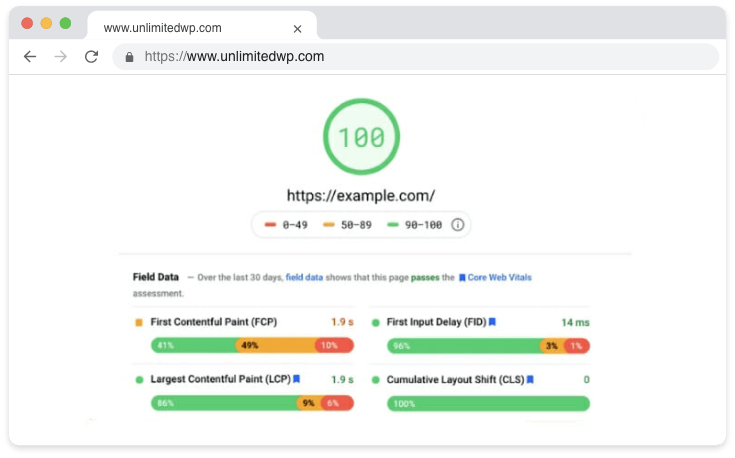
2026 Development & Tip: The WebP format became integrated into WordPress 6.6. Images are now automatically converted to WebP format, saving over 500 KB per page. Activate the “lazy loading” feature for your images to minimize first loading times.
2.4 Using a Content Delivery Network (CDN)
CDNs (Content Delivery Networks) speed up access for users by distributing your site's static files (CSS, JS, images, etc.) across servers around the globe, ensuring they access the data from the closest server. You might consider popular CDN services like Cloudflare or KeyCDN. This significantly boosts the speed for visitors coming from different countries.
New Development: In 2026, Cloudflare Zaraz enables management of third-party scripts (e.g., analytics, chat widgets) on the CDN, eliminating JS load delays.
Concrete Application: In mobile tests, the DOM load time held at 600 ms with a CDN can increase to 1500 ms without it.
2.5 Database Optimization
Over time, a WordPress database can fill up with unnecessary drafts, old revisions, and remnants of deleted posts. Plugins like WP-Optimize or Advanced Database Cleaner regularly clean the database to enhance performance.
New Tip for 2026: You can set up a weekly automatic cleaning schedule with the “Optimize Tables” feature. For WooCommerce users, optimizing transactional tables offers extra speed. Don't forget to delete old transient records with “Transient Cleaner.”
2.6 Limited Plugin Usage
Too many plugins can consume server resources and slow down the site. Disable or remove plugins that you do not genuinely need. If a plugin provides multiple functions, it may be wiser to opt for integrated solutions than separate plugins for each feature.
2026 Example: By using tools like Perfmatters and Asset CleanUp, you can control which plugin scripts load on a per-page basis, preventing unnecessary files from being called.
Practical Advice: Use the “Plugin Audit” plugin to receive automatic notifications for unused plugins.
3. WordPress Security: Protect Your Sites
The threats to WordPress security can result in your site being infected with malware or your data being stolen. Taking security precautions early can prevent problems from escalating.
3.1 Regular Updates
Core WordPress updates, themes, and plugins need to be regularly refreshed. These updates close critical security vulnerabilities. Pay attention to the alerts that appear in your site's admin panel and perform updates without delay.
2026 Update: With the “Rollback Update” option, if you encounter an error after an update, you can revert to the previous version with one click. In automatic update policies, you can now define a filter for “security updates only.”
Concrete Example: In July 2026, WordPress version 6.7 was released with a patch addressing critical XSS vulnerabilities.
3.2 Strong Password Policy
Simple passwords pose a significant risk in terms of WordPress security. Use secure passwords that mix uppercase and lowercase letters, numbers, and special characters. Also, do not use “admin” as the admin username; choose a unique and difficult-to-guess name instead.
2026 Solution: With plugins like WP Password Policies and Two Factor Authentication, you can enforce password requirements and provide extra security with 2FA.
Practical Advice: Add captcha validation to administrative logins and set session duration limits. Use the “Email login” feature to create a unique user identity.
3.3 Firewall and Attack Prevention
Plugins like Wordfence, iThemes Security, or Sucuri Security block harmful IP addresses, detect brute force attacks, and provide comprehensive security analyses. Such firewalls significantly enhance your WordPress security level.
2026 Innovation: The new versions of Patchstack and Sucuri have begun using AI-based algorithms to detect yet-to-be-announced attack types with their “Zero-day Vulnerability Scan” feature.
Concrete Example: In early 2026, the attack reports from Wordfence showed a 15% rise in API endpoint vulnerabilities, which were quickly controlled through updates.
3.4 Limiting Login Attempts
To limit malicious attempts to access your administration panel with various password entries, you can use plugins like Limit Login Attempts Reloaded. When a specific number of failed attempts is reached, the IP is blocked, and alerts are sent to administrators.
New Tip: In 2026, the Loginizer plugin allows adding entry limits by country and “POST endpoint controlled” entry limits.
Concrete Application: This plugin can automatically blacklist IPs attempting over 200 failed logins within the last 24 hours.
3.5 Disabling File Editing
Someone with external access can edit critical files from the Themes > Editor tab in the WordPress admin panel. You can disable this feature by adding the following code to your wp-config.php file:
define( 'DISALLOW_FILE_EDIT', true );
This will advance your WordPress security level one step further.
2026 Practical Tip: After disabling file editing, use the “File Integrity Checker” plugin to automatically scan for unauthorized changes in theme/plugin files.
Concrete Application: Monitor your log files during security incidents to detect suspicious changes instantly.
4. Effective WordPress SEO Settings
WordPress SEO optimization helps you rank higher in search engines. While a fast-loading and secure site is foundational for SEO success, paying attention to both on-page and off-page SEO elements is essential.
4.1 SEO Plugins: Rank Math and Alternatives
Rank Math is a popular choice among WordPress SEO plugins, offering a user-friendly interface and extensive analysis tools. It checks title tags, meta descriptions, and keyword density. Additionally, it includes features like XML sitemap generation and Schema markup.
New Feature in 2026: Rank Math PRO offers semantic keyword suggestions and internal linking suggestions in article analysis with its “Content AI.”
Concrete Application: The 2026 version of All in One SEO includes automatic support for “FAQ schema” and “HowTo schema,” enhancing the visibility of your FAQ and guide content.
Alternatively, Yoast SEO or All in One SEO are also commonly preferred. Depending on the plugin you choose, the details of the settings may vary, but the goal remains the same: to ensure search engines understand your site most accurately.
Tip: By using the latest version of your SEO plugin, you can instantly notify Bing and Yandex about indexing using the “IndexNow” API.
4.2 URL Structure and Permalinks
Using SEO-friendly URLs is essential. In your WordPress panel, follow Settings > Permalinks to activate the “Post Name” option for customization. For instance:
https://yoursiteaddress.com/wordpress-optimization-security-seo
Using dates, categories, or unnecessary parameters in URLs can complicate content-focused evaluations by Google and other search engines.
2026 Update: Automatic slug correction plugins can now convert Turkish character URLs into SEO-compliant English slugs automatically.
New Practical Tip: Create shortcuts in URLs by removing unnecessary “/tag/” and “/category/” additions to utilize a Clean URL architecture.
4.3 Meta Tags and Keyword Density
In WordPress SEO efforts, title and meta description are crucial elements that entice users to click on search results. Naturally incorporate your target keywords (e.g., “WordPress optimization,” “WordPress security,” “WordPress SEO”) into your title and description text. You should keep your keyword density around 1% to 1.5% of the article length.
2026 Tip: Use “Content AI” and “SEMRush Write Assistant” for automatic recommendations by checking meta description and content originality.
Concrete Application: Rank Math provides optimized meta description suggestions to enhance your click-through rate.
4.4 Internal and External Links
An internal linking strategy strengthens your site's architecture. You can provide an external link example to the Official WordPress Plugin Directory to leverage a high-authority source. Linking to another article of interest within your site is also beneficial for SEO.
2026 New Tip: You can perform automatic internal linking suggestions and link analysis with the “Internal Link Juicer” plugin.
External Link Advice: Remember to use the “rel=external noopener noreferrer” tag in external links.
5. Alternative Methods and Recommendations
5.1 Managed WordPress Hosting
Choosing “Managed WordPress Hosting” packages over standard shared hosting can provide significant performance and security advantages. Services such as optimizations on the server side, CDN integration, and automatic backups can help you achieve more professional solutions in both WordPress optimization and WordPress security.
2026 Update: Managed hosting now offers LiteSpeed + Redis cache + Object cache as a standard. Automatic failover and instant DNS updates have raised uptime guarantees to 99.98%.
5.2 Professional Firewalls and Anti-Malware Tools
If you want to take your site security a step further, investing in professional security and CDN solutions like Sucuri or Cloudflare Pro can be worthwhile. These services safeguard your site with more detailed attack prevention mechanisms and automatic scanning features.
New Recommendation for 2026: With Patchstack and Wordfence Premium, “Realtime Threat Intelligence” allows for real-time attack detection and quick intervention.
5.3 Professional SEO Consulting
Seeking support from an expert for guidance in digital marketing and WordPress SEO can sometimes yield accelerated results. In large-scale projects, particularly in highly competitive fields, analysis and strategic planning are crucial.
2026 Development: SEO consultants offer “Search Console API” compatible analysis reports and GPT-5 supported content strategy development services.
Practical Tip: When seeking SEO consulting, request specific reports on your site's backlink profile, technical SEO errors, and competitor analysis.
6. Frequently Asked Questions (FAQ)
Question 1: Is it risky to use multiple WordPress optimization plugins together?
Yes, using multiple caching plugins simultaneously can often cause conflicts. When multiple plugins perform similar tasks like page caching or minifying, errors and slowdowns can occur on your site. It is healthier to choose just one comprehensive caching plugin.
2026 Update: Test optimization plugins for conflicts using “Plugin Conflict Detector” before conducting live tests.
Question 2: Are free plugins sufficient for WordPress security?
Free plugins (like the free version of Wordfence) provide basic WordPress security measures. However, if you operate in a high-risk sector or handle critical data, the additional features of professional versions (advanced scanning, IP blocking, country blocking, etc.) can offer greater protection.
Additional Advice: Free plugins may limit “active threat notifications” and weekly security scans; premium solutions are ideal for important projects.
Question 3: Can you recommend a plugin for WordPress SEO other than Rank Math?
Yes, Yoast SEO and All in One SEO are also very popular alternatives. Both offer features like XML sitemap generation, page analysis, and Schema markup. Which one you choose depends on your site's needs and personal preference.
Concrete Suggestion: In 2026, “SEOPress” is also facilitating complex configurations with innovative AI support.
Conclusion and Summary
Work focused on optimizing WordPress, ensuring its security, and enhancing its SEO is critical for your website's success. By making the right choices in themes and plugins, regularly updating, optimizing your database, and implementing security measures, you can improve your search engine ranking, enhance user experience, and safeguard your site. Moreover, utilizing a CDN and performing advanced SEO analysis can put you ahead of your competition. Remember, continuous monitoring and regular maintenance are the fundamental paths to building a fast, secure, and SEO-friendly WordPress site.
In 2026, additionally: Regularly check your “Core Web Vitals” report on your WordPress site and invest in mobile compatibility (responsive design), accessibility, and AI-supported content optimization.
Additional Example: Adding functional chatbots or voice search integration (compatible with Google Voice Search) significantly enhances the user experience.
Congratulations on each improvement you make, and the advantages it will bring to your site! For more tips and specialized consulting, consider exploring WordPress community forums or professional support services. Additionally, you can further protect your site by reviewing our article on WordPress Security Plugins.
Additional Info: In 2026, the WordPress Turkey Community shares updates and solutions in its Discord channel and local meetup events.