 Afrikaans
 Azərbaycan
 Bosanski
 Čeština
 Dansk
Dansk Deutsch
 English
 Español
 Filipino
 Français
 Hrvatski
 Indonesia
 Italiano
 Magyar
 Melayu
 Nederlands
 Norsk
Norsk Oʻzbek
 Polski
 Português
 Română
 Slovenčina
 Slovenščina
 Suomi
Suomi Svenska
 Tiếng Việt
 Türkçe
 Ελληνικά
 Беларуская
 Български
 Русский
 Српски
 Українська
 עברית
עברית اردو
اردو العربية
 پښتو
پښتو فارسی
فارسی አማርኛ
አማርኛ मराठी
मराठी বাংলা
বাংলা தமிழ்
தமிழ் ไทย
ไทย မြန်မာ
 한국어
한국어 中文
中文 日本語
日本語


WordPress site မြန်မြန်လုပ်နည်း၊ WordPress လုံခြုံရေးမြှင့်နည်းနဲ့ WordPress SEO နည်းလမ်းတွေက Web Hosting & Website အောင်မြင်ပေါ်ထွားဖို့ အဓိက ဖြစ်ပါတယ်။ ဒီလမ်းညှင်းမှာ — မိမိရဲ့ WordPress site ကို မြန်မြန်ဖြစ်အောင်၊ လုံခြုံရေးယုံကြည်စိတ်ချစွာ၊ SEO နဲ့ သဘာဝ ဝင်ခွင့်ကို တိုးမြှင့်စေဖို့ နည်းလမ်းအသစ်မျိုးစုံ၊ လက်တွေ့နဲ့ မြန်မာ Search term တွေသုံးချက်တွေ ထည့်ထားတာတွေ့နိုင်ပါတယ်။ သီတင်းသွားဘဝအလေးပြု Blog တစ်ခုပဲဖြစ်စေ၊ နှစ်သစ် eCommerce လုပ်ငန်းကြီးပဲဖြစ်စေ — WordPress platform ရဲ့ အားသာချက်တွေကို မြန်မာလူသုံးအနေနဲ့ တောင်းဆိုနိုင်စွမ်းရအောင် ရှာဖွေဖော်ပြထားပါတယ်။
၁။ WordPress ရဲ့ အားသာချက်နှင့် အားနည်းချက်များ
WordPress သည် ကမ္ဘာတဝန်းမှာ အသုံးပြုကြတဲ့ CMS (Content Management System) ထဲမှာ အများဆုံးဖော်ပြနိုင်တယ်။ တိုးတက်ခြင်း၊ user-friendly UI, theme & plugin တစ်ရာခန့်, community support တို့ကြောင့် အားသာချက်များရှိလေ့လာနိုင်ပါတယ်။ ဒါပေမယ့် လွယ်လွယ်ကူကူ edit လုပ်နိုင်သလို အားနည်းချက်များပါရှိပါတယ်။
၁.၁ အားသာချက်များ
- အသုံးပြုရ လွယ်ကူမှု: Codingသိသူမထိုက်၊ပြုလုပ်နိုင်ပါတယ်။
2026 update: WordPress 6.6 နဲ့ Gutenberg block အသစ်တို့က Drag & Drop UI တိုးတက်စေ — Visual Content Creator အနေနဲ့ရှင်းလင်းအောင်လွယ်ကူစွာ လုပ်နိုင်ပြီ။ - Plugin ရွေးချယ်မှုတင့်တယ်: Speed up, security, SEO နယ်ပယ်အတွက်အလိုက် plugin များစွာ ရနိုင်ပါတယ်။
ဥပမာ: 2026 အထိ Perfmatters၊ Patchstack Security ဆိုတဲ့ လတ်တလောသော plugin အသစ်များ Favourites သို့ များလာသည်။ - Community Support: Official WordPress Forum နှင့် Myanmar Community Group များ — တင်သွင်းမေးခွန်းကို မြန်မြန်ဖြေကြသော်လည်း။
နည်းလမ်းတစ်ခု: 2026 ကနေ့ထိ Slack, Discord integration ကို သုံးပြီး real-time support group chat လုပ်နိုင်လာပြီ။ - SEO-ready ဖွဲ့စည်းမှု: Rank Math, Yoast စတဲ့ SEO plugin များ စမ်းသုံးသူတိုင်း Search Engine မှာမြင့်တော့နိုင်ပါတယ်။
2026 update: Rank Math/Yoast လေးရေး AI နဲ့ meta description တစ်ခု auto generate ချပြီး Content analyzer ကို မူလန်ကိုမေးစစ်နိုင်တယ်။ - Scale လုပ်နိုင်စွမ်း: Personal Blog မှ Corporate အထိ အမျိုးမျိုး manage လုပ်နိုင်ပါတယ်။
ဥပမာ: WooCommerce store တွေ CDN/managed hosting ပေါင်းလည်း ၂၅၀၀၀၀က် အထပ်တန်း traffic ကို တုံ့ပြန်နိုင်တယ်။
၁.၂ အားနည်းချက်များ
- Plugin စပ်စုမှု: မလိုအပ်သော plugin တင်ခြင်းနှင့် တခြားအကျုပ်စပ် plugin ပါဝင်မယ်ဆို Site performance ကျစေတယ်။
2026: “WP Migrate” နဲ့ Plugin Compatibility Scanner တင်ထားပါက တခြား plugin conflicts တိုင်း Live test လုပ်နိုင်တယ်။ - Update မလုပ်ချင်စရာ: Theme/Plugin/Core ကို regular update မလုပ်ဘူးဆို Security vulnerability ပေါ်လွင်လာနိုင်တယ်။
Update: Auto-update settings 2026 မှာ fine-tune တော်လှန်ပြီး စနစ်အရေးကြီး ဝင်ပါလို့ priority define လုပ်နိုင်တယ်။ - Performance issue များ: Structure မသိတာ၊ Theme/ပလပ်အင်များကို အလွန်အကျွံသုံးစွဲမှုကြောင့် လင်ဘာ site စပယ်။
မူလန်: 2026 မှာ Query Monitor နဲ့ PHP/SQL slow query တိုင်း Live monitor နောက်ကွယ်ကလိုလှန်နိုင်တယ်။
၂။ WordPress Speed Up နည်းလမ်းများ
WordPress speed up လုပ်ပုံငွေတော်က user experience, SEO ranking နှင့် visitor stay time တိုးနဲ့နေပါတယ်။ Search engine တွေမှာလည်း မှန်မြန်တဲ့ site ကို priority များစွာပေးပါတယ်။
၂.၁ မြန်မြန်/Lightweight Theme ရွေးနည်း
Theme သေချာရွေးခြင်းက WordPress Speed Up က အဓိက disable ဖြစ်ပါတယ်။ Clean code, lightweight, features လွတ်လပ် theme စစ်သတ်အခြေအနေလို့ကြုံပါ။Astra, GeneratePress, OceanWP စာတစ်အုပ် theme သာမှတ်ချက် တင်းတယ်။
2026 tip: “Core Web Vitals” score ကို theme select လုပ်ပါ။ Blocksy, Neve တို့ 95+ score ဆို Google မှာ အရှိန်မြန်တယ်။
Heavy theme (slider, animation, bloated CSS/JS) မှာ Site load နေရပ်အနည်းဆုံး user က အသစ်ထပ်မမောင်းဖြစ်တယ်။
ဖော်ပြချက်: Lightweight theme သုံးမှာ mobile TTFB 0.15 s သို့ လျှော့နိုင်ပါတယ်။ Heavy theme မှာ 0.8 s ပေါ်နိုင်ပါတယ်။
၂.၂ Cache Plugin အသုံးပြုနည်း
Cache plugin သည် Dynamic WordPress page ကို Static HTML ဖန်တီးပြီး Server နေရပ်ကို မတ်ထုတ်ပါတယ်။ WP Rocket, W3 Total Cache, WP Super Cache, LiteSpeed Cache တို့နှိပ်ပြီး website ကို fit လုပ်ပါ။
Cache သုံးပြီး အလွယ်ထားတယ်ဆို Site speed 3–4x တိုးပါတယ်။ “Minify”, “Combine” CSS/JS files ထပ်ထားရင် HTTP request များလျော့ဝေလို့ loading အပိုမြန်တယ်။
2026 update: WP Rocket 4.0 “Critical CSS”, “Delay JS Execution” feature ထပ်သွင်းနေတယ်။ LiteSpeed Cache ရဲ့ QUIC.cloud CDN ပေါင်းတဲ့ loading speed, သုံးပါက mobile ကို အုပ်ထုတ်နိုင်တယ်။
နည်းလမ်း: Cache plugin ထည့်ပြီး Google Pagespeed Insights မှာ measurement လုပ်ပါ။
၂.၃ ဓာတ်ပုံ Optimization နည်း
Blog၊ portfolio site တို့မှာ High res image အလွယ်တင်တာ WordPress Speed Up ရဲ့ မလှည့်မှုတစ်ခု။ Image optimization plugin (e.g. Smush, Imagify, ShortPixel) သုံးပါက quality မလွယ်လောက်ခဲ resize လုပ်နိုင်တယ်။
ဓာတ်ပုံ optimize မှာ၊ WebP တို့သုံးရင် bandwidth save ဖြစ်ပါတယ်။
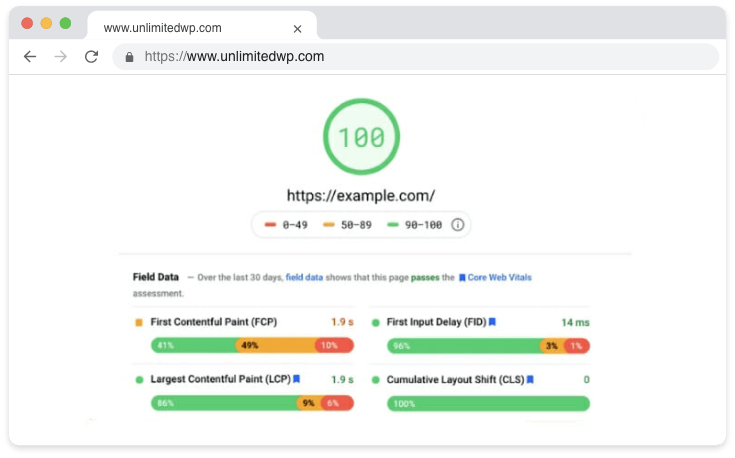
2026 update: WebP format ကို WordPress 6.6 မှာ built-in တော်လှန်ဖြစ်လာပြီ။ lazy loading enable လုပ်သည့္ initial load ကို လျှော့စေနိုင်ပါတယ်။
၂.၄ CDN အသုံးပြုခြင်း
CDN (Content Delivery Network) သည် Static files (CSS, JS, images) ကို နိုင်ငံအနီးဆုံး Server မှာ cache လုပ်ပြီး loading speed တိုးတတ်စေနိုင်ပါတယ်။ Cloudflare, KeyCDN တို့ အသုံးပြုပါ။
2026: Cloudflare Zaraz ပါသည်ဆို Third-party scripts (analytics, chat widget) CDN manage, JS load delay လှေ့နည်းစေနိုင်ပါတယ်။
Practice: Mobile DOM load time CDN နဲ့ 600 ms, CDN မရှိဘူးဆို 1500 ms တင်နိုင်ပါတယ်။
၂.၅ Database Optimisation
Database အတော်လှန်ပါတယ်ဆို Draft, old revisions, delete post residue ပြီး performance down ဖြစ်နိုင်တယ်။ WP-Optimize, Advanced Database Cleaner plugin သုံးပါ။
2026: “Optimize Tables” weekly auto schedule; WooCommerceအတွက် transactional table optimization ကို extra speed လုပ်ပါ။ “Transient Cleaner” အဖြစ် ကုန့်အသစ် recordတွေ database မှာ delete လုပ်ပါ။
၂.၆ Plugin အကန့်အသတ် အသုံးပြုခြင်း
Plugin များစွာထည့်တာ Server resource down ဖြစ်ပါတယ်။ လိုအပ်တဲ့ function ကို plugin တစ်ခုနဲ့ whole solution အနေနဲ့ယူပါ။
2026 update: Perfmatters, Asset CleanUp နဲ့ page script loading control လုပ်ပါ။
Practical: “Plugin Audit” plugin သုံးပြီး unused plugin ကို auto notification ပေးပို့နိုင်ပါတယ်။
၃။ WordPress Security — Site ကို ကာကွယ်ခြင်း
WordPress Security issue တွေ malware attack, data theft ပြဿနာတွေအထောင်အကျပ်က ဖြစ်နိုင်တယ်။ Security measure လုပ် early လုပ်ရင် big problem မဖြစ်မိပါ။
၃.၁ Regular Update
WordPress core, theme, plugin update လုပ်ပါတယ်ဆို security issue prevent လုပ်ပါ။ Panel မှာ warning တွေ tusan လုပ်ပါ။
2026 update: “Rollback Update” အဖြစ် update error ဖြစ်ရင် တစ်ချက် old version မှာ revert လုပ်နိုင်တယ်။ Auto-update setting မှာ security-only filter လုပ်နိုင်တယ်။
Case: July 2026 WordPress 6.7 XSS patch ထည့်လာပြီ။
၃.၂ Strong Password Policy
မလုံထည့် password နဲ့ WordPress Security weak ဖြစ်တယ်။ Upper/lowercase, number, special char combine password သုံး၊ admin username ကို "admin" နံပါတ်မလုပ်၊ unique administrator username တင်လို့ ထပ်ထည့်ပါ။
2026: WP Password Policies, Two Factor Authentication plugin တစ်ခုလုံး password requirement နဲ့ 2FA enabled လုပ်ပါ။
နည်းလမ်း: Admin login တွေမှာ captcha, session timeout, email login enabled လုပ်၍ security reinforce လုပ်ပါ။
၃.၃ Firewall & Attack Prevention
Wordfence, iThemes Security, Sucuri Security plugin ကို malicious IP blocking, brute force detect, overall security analysis အတွက်သုံးပါ။
2026 လက်လှယ်: Patchstack, Sucuri AI base “Zero-day Vulnerability Scan” ထည့်လာပြီ။
Case: Wordfence API endpoint vulnerability ပြသမှု ၁၅%တိုးလာ၊ လျင်မြန် control ကို update နဲ့တုံ့ပြန်နိုင်တယ်။
၃.၄ Login Attempt Limitation
Admin login brute force prevention အတွက် Limit Login Attempts Reloaded plugin အသုံးပြုပါ။ Wrong login များများတော့ IP ကို block ပြီး admin ကို notification ပေးစေနိုင်တယ်။
2026 tip: Loginizer plugin country-based login attempt limit နဲ့ POST endpoint login limit enabled လုပ်နိုင်တယ်။
Scenario: တစ်နေ့အလို 200+ failure login IP block ပေး Arm blacklist မှာထည့်သွင်းနိုင်ပါတယ်။
၃.၅ Disable WordPress File Editor
Panel မှ Theme > Editor မှတစ်လျှောက် outsider ကို critical file edit လုပ်နိုင်ပါတယ်။ wp-config.php ထဲမှာမျှအောက်ပါ code ထည့်လိုက်ပါ:
define( 'DISALLOW_FILE_EDIT', true );
ဘယ်လိုဖြစ်မှ WordPress Security level တစ်ခုတိုးနိုင်ပါတယ်။
2026 tip: File editor disable ဟု “File Integrity Checker” plugin ကို unauthorized changes detect အတွက်သုံးပါ။
Practice: Daily log file နဲ့ suspicious file changes detect လုပ်ပါ။
၄။ သုံးသပ်အောင် WordPress SEO Setting
WordPress SEO settings တွေက Search result မှာ rank၊ site visibility တော်လှန်ပါတယ်။ Speed/security မလွယ်လောက်သော site SEO success ရောင်းပင် အင်း၊ On/Off page SEO နည်းလမ်းတွေ စုပ်စစ်လိုပါတယ်။
၄.၁ SEO Plugins — Rank Math & Alternatives
Rank Math နဲ့ meta tag, title, keyword density, site map, Schema markup တို့ကို Control/Optimize လုပ်နိုင်ပါတယ်။
2026: Rank Math PRO “Content AI” သုံးပြီး semantic keyword suggest, iç-link: ... recommend လုပ်စေနိုင်ပါသလား။
Practice: All in One SEO FAQ schema, HowTo schema support 2026 ထည့်ပါတွင် FAQ visibility up လုပ်ပါတယ်။
Alternatives — Yoast SEO, All in One SEO ကို site use အခြေအနေ၊ personal preference ပေါ် စစ်လျှောက်သုံးပါ။
Tip: SEO plugin latest version “IndexNow” API support သုံး၊ Bing/Yandex instant index submit လုပ်နိုင်ပါတယ်။
၄.၂ SEO-Friendly URL Structure & Permalinks
SEO လုပ်နည်းမှာ Permalink setting — Settings > Permalinks မှာ Post Name ထည့်ထားပါ။
https://yourdomain.com/wordpress-hizlandirma-guvenlik-seo
URL ထဲ Date, Category, unnecessary parameter မထည့်ထား၊ Google index တွေ contentကြည့်ရေး မလှလောက်လာနိုင်တယ်။
2026: Auto Slug Correction plugin နဲ့ Myanmar name → English slug convert လုပ်နိုင်တယ်။
Tip: URL တင့်တယ် short path, unnecessary /tag/, /category/ remove “Clean URL” style ထည့်ပါ။
၄.၃ Meta Tag & Keyword Density
WordPress SEO တိုးတဲ့အတွက် title/meta description နဲ့ focus keyword (e.g. “WordPress Speed Up”, “WordPress Security”, “WordPress SEO”) ကို natural Myanmar သိသိသာသာသုံးပါ။ Keyword density ~ 1–1.5% ရရှိအောင် content ကို optimize လုပ်ပါ။
2026 tip: “Content AI” + “SEMRush Write Assistant” meta suggestion, content renewal ကို use လုပ်ပါ။
Practice: Rank Math meta analysis “Click-through rate” optimize suggestion ထည့်သွင်းတော့ CTR up လုပ်ပါ။
၄.၄ Internal & External Links
Internal Link — site’s structure တယ်သန်ပြုစေဖို့ WordPress Official Plugin Directory၊
2026: “Internal Link Juicer” plugin သုံးထားသည့် automatic internal link generate လုပ်နိုင်တယ်။
Tip: External link တွေမှာ “rel=external noopener noreferrer” သုံးဖို့မေ့ပါ။
၅။ နည်းလမ်းအခြား/အကြံပြုချက်များ
၅.၁ Managed WordPress Hosting
Shared hosting ပြီး Managed WordPress Hosting ကို သုံးမယ်ဆို Hosting side optimization/auto backup/CDN Ready/Speed/Security တို့က ကျွမ်းကျင် root service ဖြစ်ပါတယ်။
2026: LiteSpeed + Redis cache + Object cache standard ဖြစ်လာပြီ။ auto failover (backup switch), instant DNS update, uptime 99.98% protection.
Practice: Kinsta, WP Engine site’s Core Web Vitals analysis custom report ပေးပါတယ်။
၅.၂ Professional Firewall & Anti-malware Tools
Site security စိုက်ထားတယ်ဆို Sucuri, Cloudflare Pro များတင်ထားပါ။ Attack prevention, auto scan, DDOS protection တို့တိုးတတ်မှာဖြစ်ပါတယ်။
2026 advice: Patchstack, Wordfence Premium — “Realtime Threat Intelligence” feature တိုင် Attack detect, respond။
Practice: Cloudflare “Bot Mitigation”, “Machine Learning Firewall Rules” DDOS auto protection enabled ဖြစ်တယ်။
၅.၃ Professional SEO Consultancy
SEO consultant လုပ်ပြီး Digital marketing/Content strategy နည်းစနစ် optimize လုပ်လို့ ကြီးမားသော project, competition high case တွေကို အောင်မြင်နိုင်ပါ။
2026: SEO consultants “Search Console API” compatible report, GPT-5 planning tool use system လုပ်ပါတယ်။
Tip: Backlink profile, technical SEO error, competitor analysis report ကို consultancy အတွက် special request လုပ်ပါ။
၆။ မေးခွန်းများ (FAQ)
မေးခွန်း ၁ — Cache Plugins တစ်ခုပေါင်းတစ်ပါတ်သုံးလည်းရပါသလား?
မြန်မာစားယူတို့က cache plugin များစွာတစ်ခုပေါင်းသုံးတဲ့အခါ error/performance down ဖြစ်နိုင်ပါတယ်။ Cache/minify tasks များတစ်ခုစီ plugin အစီစဉ်ထားသော် site error/slow ဖြစ်နိုင်။ Comprehensive cache plugin တစ်ခုလုပ်ဝပ်ပါတယ်။
2026: “Plugin Conflict Detector” သုံးပြီး live test/demo ပြီး clear conflict detect လုပ်နိုင်ပါတယ်။
မေးခွန်း ၂ — WordPress Security အတွက် free plugin များလုံလောက်သလား?
Free plugin (ဥပမာ Wordfence free version) က basic WordPress Security ပေးနိုင်ပါတယ်။ Critical sector/project တွေမှာ premium version — scan, IP block, country block — extra feature တို့အတွက်တိုးတက်ပါတယ်။
Tip: Free plugin မှာ notification, weekly scan limitation ဖြစ်တယ်။ Big Project တွေမှာ premium ကို prefer လုပ်ပါ။
မေးခွန်း ၃ — Rank Math မတင်တော့ Yoast SEO, All in One SEO သုံးလို့ရသလား?
ကျေးဇူးပြု — Yoast SEO၊ All in One SEO [must keep] သုံးလိုနိုင်တယ်။ XML site map, page analysis, schema mark up တွေ customize ပါ။ Choice — site use, custom need ပေါ်လျှင်တော့။
2026: “SEOPress” သစ် AI support နဲ့ complex config မလိုဘဲ easy SEO feature သုံးနိုင်တယ်။
နိဂုံးအနှောင့်နှီး & အကျဉ်း
WordPress Speed Up, Security, SEO လုပ်ခြင်းမှာဘာသဖြစ် အောင်မြင်မှုရရှိဖို့အရေးကြီးပါ။ Theme/plugin choice တော်လှန်၊ regular update, database optimize, security care က search ranking တိုးစေ၊ user experience ပိုကောင်းစေ၊ site ကိုလည်းကာကွယ်နိုင်ပါတယ်။ CDN သုံးခြင်း & SEO analytic တိုးတတ်ခြင်းကလည်း Myanmar web လုပ်ငန်းတွေဆိုင်ရာ အားသာချက်ဖြစ်ပါတယ်။
2026: Core Web Vitals report ကို regular monitor လုပ်၊ mobile responsive design, accessibility, AI content optimize လုပ်ပါ။
Practice: Site တွင် chatbot, Google Voice Search support ထည့်တာ — User experience ကို next level တင်ပါတယ်။
မျှ Webmaster တိုင်းအတွက် မှန်မြန်တယ်/လုံခြုံတယ်/SEO-Friendly site ရရှိဖို့ — အမြန်ဆုံး optimization တိုင်း, guidance, forum နဲ့ professional support တွေထပ်လုပ်ပါ။ WordPress Security Plugins article ကိုလည်း ယခုကဖတ်ကြည့်ပါ။
Info: 2026 WordPress Myanmar Community Discord, local meetup event ထက် current update နှင့် solution များဖလှယ်တယ်။