 Afrikaans
 Azərbaycan
 Bosanski
 Čeština
 Dansk
Dansk Deutsch
 English
 Español
 Filipino
 Français
 Hrvatski
 Indonesia
 Italiano
 Magyar
 Melayu
 Nederlands
 Norsk
Norsk Oʻzbek
 Polski
 Português
 Română
 Slovenčina
 Slovenščina
 Suomi
Suomi Svenska
 Tiếng Việt
 Türkçe
 Ελληνικά
 Беларуская
 Български
 Русский
 Српски
 Українська
 עברית
עברית اردو
اردو العربية
 پښتو
پښتو فارسی
فارسی አማርኛ
አማርኛ मराठी
मराठी বাংলা
বাংলা தமிழ்
தமிழ் ไทย
ไทย မြန်မာ
 한국어
한국어 中文
中文 日本語
日本語

If you're searching for a comprehensive guide on FiveM server setup steps and FiveM server settings, you're in the right place! In this article, we will walk you through the server installation process, configurations, advantages, disadvantages, and alternative methods step-by-step to ensure your FiveM RP experience runs smoothly.
First and foremost, you'll need to purchase a suitable package from our virtual server services.
What is a FiveM Server?
FiveM is a modification platform that allows you to set up private servers for Grand Theft Auto V (GTA V). With this platform, you can create custom rules, mods, maps, and scenarios using FiveM server settings. Especially popular in FiveM RP (Role Play) communities, FiveM enables you to take the multiplayer experience of GTA V to an entirely different level.
Requirements for Server Setup
- Server Hardware: It is recommended to have a high processing power (at least 4 cores), 8 GB or more RAM, and a fast SSD.
- Operating System: You can use Windows Server or Linux (such as Ubuntu, Debian, etc.).
- GTA V License: Having an original Grand Theft Auto V license is essential.
- FiveM Artifacts: You can download them from FiveM's official site or the FiveM Documentation.
FiveM Server Setup Steps
This section will outline the general framework for FiveM server setup steps. If you follow the process correctly, you can have an active server in no time.
1. Download the Server Files
First and foremost, you need to acquire the “FiveM Server Artifacts” files from the official FiveM website. These files contain the essential components necessary for your server to run. Then:
- If you are using Windows, you can extract the downloaded archive to a folder like “C:\FXServer\”.
- If you are on Linux (for example, Ubuntu), extracting the archive to “/home/fxserver/” is a common method.
2. Configure the Server.cfg
The server.cfg file within the installation directory is the most crucial part regarding the “FiveM server settings.” In this file:
- Server Name (sv_hostname): Give your server a visible name.
- Max Player Slots (sv_maxclients): Depending on your community size, you can set it to 32, 64, or more slots.
- RCON or txAdmin Configuration: Set the ports and passwords for RCON or txAdmin tools for remote management.
- License Key (sv_licenseKey): Add the license key you created via FiveM Keymaster.
- Resources (Resources): Specify which scripts you want to load with “start resourceName” lines.
These are the most commonly used settings within the server.cfg. Depending on your server's purpose, you can activate additional packages (e.g., a FiveM RP script, an economy package, etc.).
3. Port Settings and Security
By default, FiveM uses port 30120. You need to open this port in your server’s firewall (Windows Firewall or iptables). Additionally, taking extra security measures for DDoS protection is crucial for maintaining your server's stability.
4. Start-Up and Test
Once the server.cfg file and port settings are complete, you can run your server using a command like “run.bat” (Windows) or “bash start.sh” (Linux) within the installation directory. Then, open the FiveM client and try to connect using the IP address or server name by pressing the F8 key.
Detailed Review of FiveM Server Settings
FiveM server settings are very flexible and can be tailored to meet various needs. Especially in FiveM RP servers, roleplay-specific scripts and economy-based systems play a significant role.
Basic Settings for Role Playing (RP)
- Character Creation: Add scripts that allow players to create different character profiles.
- Law and Order Scripts: Enhance the role-playing experience with scripts that manage state institutions like police and ambulances.
- Economy System: Use ESX or QB-Core based scripts to create a realistic environment with elements like earning, spending, and taxation.
Performance and Optimization
To ensure your server runs smoothly, FiveM server settings should be optimized correctly. Here are some suggestions:
- Avoid Unnecessary Scripts: Disable mods and files that you are not using.
- Stay Updated: Always update when new versions of FiveM are released and ensure you're using the latest artifacts version on the server side.
- Monitor Server Resource Usage: Regularly check CPU and RAM usage. If loads are high, you may need to allocate more resources or consider a more powerful host.
Advantages and Disadvantages
Understanding the FiveM server setup steps and FiveM server settings can help you weigh the advantages and disadvantages that may influence your decision.
| Advantages | Disadvantages |
|---|---|
| Unique Gaming Experience (RP, custom mods, scripts, etc.) | Technical Setup and Configuration Challenges |
| Community Management and Social Interaction | Requires Regular Maintenance & Updates |
| Full Control over the Server | High Hardware Cost (for large communities) |
| Extensive Mod Support | Potential Compatibility Issues |
Alternative Methods and Hosting Options
Instead of managing the setup yourself, you might consider opting for hosting services tailored for FiveM RP. Various platforms offer the following options:
- Shared Hosting: Easy setup, but with limited resources.
- Virtual Private Server (VPS): More configuration options, moderately priced.
- Dedicated Server: Full control and high performance, costly but ideal for high user capacities.
For instance, as we've shared on our own blog, hostragons is among the popular hosting companies. You can determine the most suitable option for your needs by comparing speed, price, and technical support options.
Concrete Example: Windows vs Linux?
You can run your FiveM server on either a Windows or a Linux-based server. To clarify with a concrete example:
- Windows Server: There are more setup guides available, and the graphical interface is user-friendly. However, there is a licensing cost.
- Linux Server: Resource usage tends to be more efficient, with lower costs. However, familiarity with terminal commands is necessary.
If you have no prior experience with Linux, starting with Windows may ease the setup process. Later, if you're looking to optimize for performance or cost, transitioning to Linux is a possibility.
The image above shows an example directory structure for FiveM server setup steps.
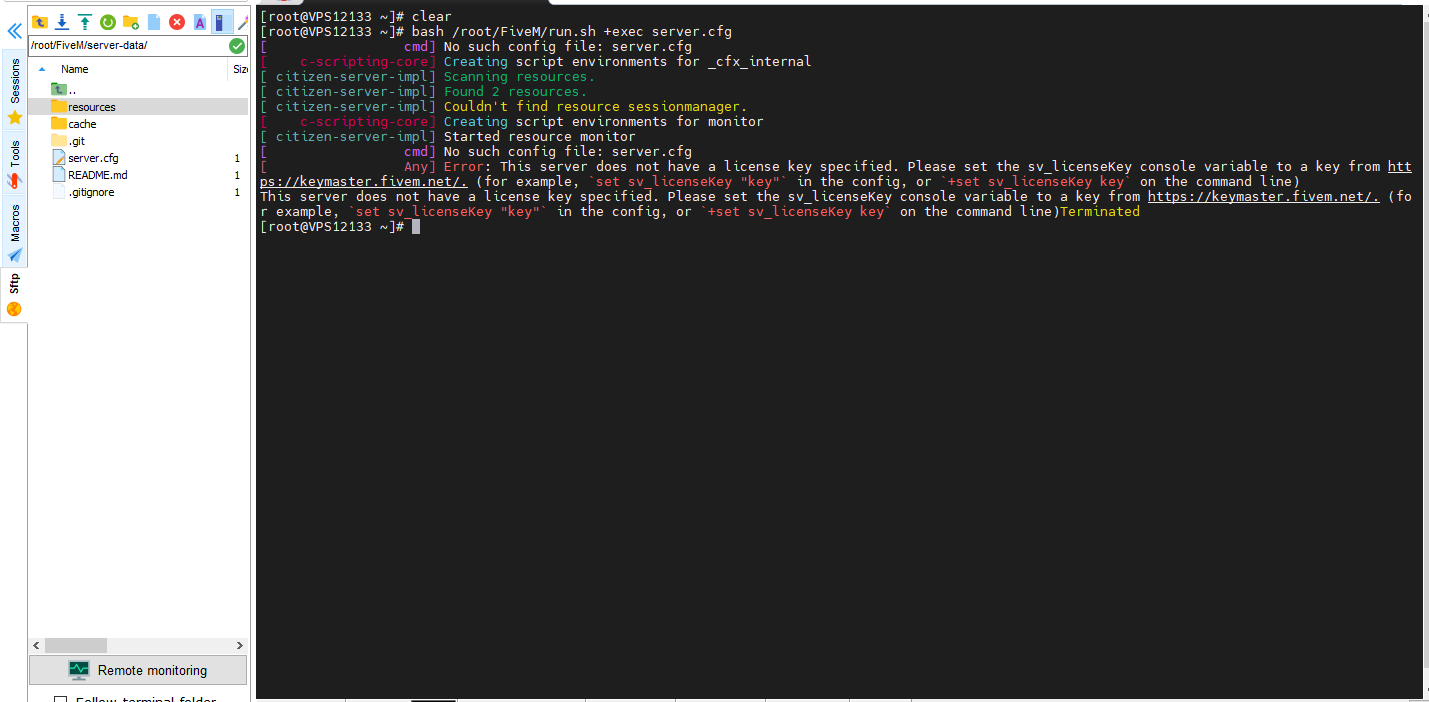
This image also shows the FiveM server settings screen and provides an example of how the lines should be organized in “server.cfg.”
Frequently Asked Questions
- Why is a license key necessary for server setup?
It is needed to ensure recognition and validation of your server by FiveM. It should be generated via Keymaster and added to the line “sv_licenseKey” in server.cfg. - Which hosting package should I choose?
This varies depending on the size of your community. Shared hosting may suffice for small groups of friends; for larger audiences, opt for a dedicated server or a strong VPS. - How can I use different script packages simultaneously?
By adding “start scriptName” lines to “server.cfg,” you can activate multiple packages at once. However, watch out for potential compatibility issues.
Conclusion
In this guide, we touched on the fundamental points you need to know about FiveM server setup steps and FiveM server settings. While FiveM RP servers offer an exciting experience, you must be diligent regarding technical setup and maintenance. Whether you use Windows or Linux, regular updates and optimization are essential to enhance your server performance and player satisfaction. After completing your setup, don't forget to incorporate role-playing scenarios, economic systems, and custom mods to enrich your community. Enjoy your gaming!