 Afrikaans
 Azərbaycan
 Bosanski
 Čeština
 Dansk
Dansk Deutsch
 English
 Español
 Filipino
 Français
 Hrvatski
 Indonesia
 Italiano
 Magyar
 Melayu
 Nederlands
 Norsk
Norsk Oʻzbek
 Polski
 Português
 Română
 Slovenčina
 Slovenščina
 Suomi
Suomi Svenska
 Tiếng Việt
 Türkçe
 Ελληνικά
 Беларуская
 Български
 Русский
 Српски
 Українська
 עברית
עברית اردو
اردو العربية
 پښتو
پښتو فارسی
فارسی አማርኛ
አማርኛ मराठी
मराठी বাংলা
বাংলা தமிழ்
தமிழ் ไทย
ไทย မြန်မာ
 한국어
한국어 中文
中文 日本語
日本語

In the world of web hosting, the DirectAdmin installation process has gained popularity for its management capabilities and user-friendliness, playing a crucial role in both performance and security. This guide aims to provide a comprehensive overview of DirectAdmin settings and various configuration methods, while also diving deep into tips for utilizing the DirectAdmin panel. By thoroughly addressing possible advantages, disadvantages, alternative solutions, and potential questions, we aim to help you achieve a flawless system management experience.
What Is DirectAdmin and Why Is It Preferred?
DirectAdmin is a secure and user-friendly DirectAdmin panel software used for managing web hosting environments. It is particularly popular on Linux-based servers. Thanks to its user-friendly interface, low resource consumption, and extensive plugin ecosystem, it’s favored by many developers and system administrators.
- User-Friendly: The interface design is suitable for everyone, from beginners to experienced admins.
- Easy Installation: The DirectAdmin installation process is straightforward, with step-by-step guidelines to follow.
- Variety of Features: It offers many services like email management, DNS configuration, and database management all in one panel.
- Resource Usage: It maintains high server performance with low RAM and CPU usage.
Preparations Before Installing DirectAdmin
For a successful DirectAdmin installation, you should check some necessary configurations in advance. Proper planning reduces time losses and prevents possible errors.
Server Requirements
DirectAdmin generally works seamlessly on distributions such as CentOS, CloudLinux, Ubuntu, or Debian. While the minimum requirements of your server may vary depending on your operating system and the size of the sites you will host, you should consider the following factors:
- CPU and RAM Capacity: It should be adequate based on the number of users.
- Storage: SSD or similar fast disk types are recommended.
- Internet Connection: Sufficient bandwidth supports smooth panel usage.
- Firewall Settings: Ensure that the ports used during installation are open.
IP Address and Licensing
DirectAdmin requires a license to function. You must have a static IP address and a valid license for each DirectAdmin panel installation. Once you obtain the license key, you can easily add it to the relevant section within DirectAdmin settings.
Steps to Install DirectAdmin
If you’re sure your server is ready, you can complete your DirectAdmin installation by following these simple steps:
1. Updating the System
In the beginning, it is recommended to update all packages according to the Linux distribution you are using. For example, if you are using CentOS, you can start with this command:
yum update -y
2. Installing Necessary Packages
DirectAdmin requires various libraries to function properly. You can install these libraries with a single command or allow them to be installed automatically during setup. However, it’s important to act according to your documents and the requirements of your server.
3. Downloading the DirectAdmin Installation Package
Obtain the installation files from the official source or through DirectAdmin.com (external link). Then, use the command below to download the file via SSH:
wget https://www.directadmin.com/setup.sh
chmod +x setup.sh
./setup.sh
4. Entering License and Setting Information
The installation wizard will ask you to enter your license key and basic DirectAdmin settings information. Critical information such as your IP address, server name (hostname), and DNS addresses will be requested at this stage. Make sure you enter all information correctly.
5. Configuring Services
After the installation is complete, email services, DNS, database management, firewalls, and other services will start with default settings. At this stage, you can make configuration changes according to your specific needs. For example, you can activate a specific DirectAdmin panel plugin or change the default PHP version.
Example Installation Scenario:
Let’s assume you aim to use PHP 8.1 and MySQL 8 on your server. It is quite easy to create default configurations by selecting these versions during the DirectAdmin installation wizard. Later, you can optimize your system with custom php.ini files or MySQL settings.
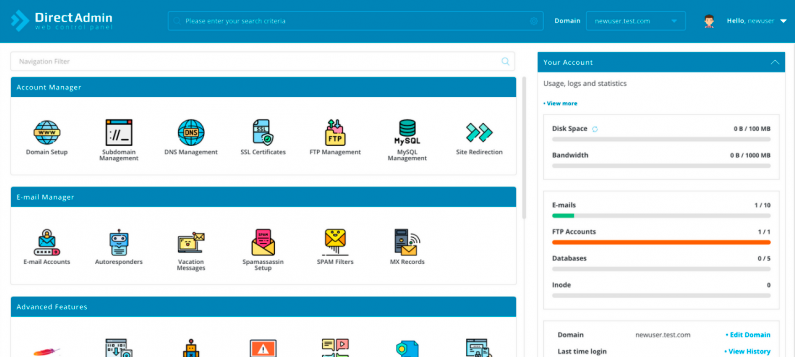
DirectAdmin Settings: Additional Details
There are many options within DirectAdmin settings that offer ease of use. Properly configuring these settings ensures the security and efficiency of your system.
DNS Management
By default, DirectAdmin enables its own DNS server. If you’re not using an external DNS service, you can edit your domain records like A, MX, CNAME, TXT, etc., using the DNS management interface of the panel.
Email Settings
You can manage email creation, spam filtering, and forwarding options with just a click via the DirectAdmin panel. Be sure to implement additional settings for spam protection.
Database Management
DirectAdmin is typically integrated with database engines like MySQL/MariaDB. It offers users an easy way to create databases and allows the integrated use of tools such as phpMyAdmin.
Firewall and Security
In addition to the built-in security features that come with DirectAdmin, additional security software like CSF (ConfigServer Security & Firewall) can be integrated into your system. You can easily implement measures like port management and intrusion prevention through the panel.
Advantages and Disadvantages
Like any system, DirectAdmin has its own pros and cons. After carefully reviewing this section, you can better assess its suitability for your project.
Advantages
- Resource Usage: It consumes less RAM and CPU compared to similar panels.
- User-Friendly Interface: Its simple and intuitive design offers a quick adaptation opportunity.
- Easy Scalability: You can add extra features and plugins as needed.
- Cost-Effective: Generally, it has cheaper license options compared to other commercial panels on the market.
Disadvantages
- License Requirement: It requires additional costs as it is not a free panel.
- Plugin Support: It is noted that it doesn't have as extensive a plugin ecosystem as cPanel, although it is continuously developing.
- Documentation: Official documentation may sometimes be insufficient, and community support may be needed.
Different Methods and Alternative Solutions
The DirectAdmin installation option may not be suitable for you, or you might need a different panel. In this case, you can consider the following alternatives to make the best decision for your business:
- cPanel & WHM: One of the most popular web hosting panels in the market, but it tends to be more expensive.
- Plesk: A control panel compatible with both Windows and Linux systems that offers a wide range of features.
- VestaCP or CyberPanel: Open-source, free alternatives. However, they may sometimes be limited in technical enhancements and community support.
Example Application Scenario
Let’s assume you are a web hosting company looking to install DirectAdmin on a new server. You will utilize the DirectAdmin panel interface to enable your customers to manage their sites quickly. After completing the installation steps, default services (Apache, Nginx, PHP, etc.) will come online. Subsequently, based on specific needs, you will be able to adjust DNS records, add SSL certificates with a single click, and manage databases through DirectAdmin. In this scenario, achieving an optimal configuration in terms of both speed and user experience is quite straightforward.
You can also check out our article on website security, where we discuss how to minimize cyber attack risks when using DirectAdmin (internal link).
Frequently Asked Questions
Question 1: How Long Does DirectAdmin Installation Take?
A properly configured server can typically finish the DirectAdmin installation process in 15-30 minutes. The duration may vary depending on the server speed, internet connection, and package updates.
Question 2: How Can I Enhance Security with DirectAdmin Settings?
You can enhance security through DirectAdmin settings by using firewalls (CSF), strong password policies, and subdomain configurations. Regular backups also help prevent potential data loss.
Question 3: How Is the Cost of a DirectAdmin License Determined?
The cost of a DirectAdmin panel license is typically offered with monthly or yearly subscription models. The pricing level may vary based on your package choice and the number of IP addresses. There are generally more economical options available, especially for bulk license purchases.
Conclusion
In this article, we shared comprehensive information regarding DirectAdmin installation and DirectAdmin settings. With its relatively easier learning curve and low resource consumption, DirectAdmin becomes a suitable choice particularly for medium-sized and small businesses. However, it may be beneficial to consider different panels when dealing with large-scale projects or needing advanced features. Overall, the user-friendly interface and quick configuration process of DirectAdmin, when combined with security and performance factors, provide a highly effective solution. By meticulously following the installation steps, you can comfortably manage all your hosting management processes through the DirectAdmin panel.