 Afrikaans
 Azərbaycan
 Bosanski
 Čeština
 Dansk
Dansk Deutsch
 English
 Español
 Filipino
 Français
 Hrvatski
 Indonesia
 Italiano
 Magyar
 Melayu
 Nederlands
 Norsk
Norsk Oʻzbek
 Polski
 Português
 Română
 Slovenčina
 Slovenščina
 Suomi
Suomi Svenska
 Tiếng Việt
 Türkçe
 Ελληνικά
 Беларуская
 Български
 Русский
 Српски
 Українська
 עברית
עברית اردو
اردو العربية
 پښتو
پښتو فارسی
فارسی አማርኛ
አማርኛ मराठी
मराठी বাংলা
বাংলা தமிழ்
தமிழ் ไทย
ไทย မြန်မာ
 한국어
한국어 中文
中文 日本語
日本語

ਤਜ਼ੀਨੁ
Linux SSH Key ਹਟਾਉਣ ਦਾ ਵੱਖਰਾ ਮਹੱਤਵ ਹੈ—ਖਾਸ ਕਰਕੇ ਜਦੋਂ SSH ਕੁੰਜੀ ਨੂੰ ਹਟਾਉਣ ਜਾਂ ਵੱਖੇ ਕਰਨਾ ਲਾਜ਼ਮੀ ਹੋ ਜਾਵੇ। ਜੇ ਤੁਸੀਂ ਆਪਣੀ SSH ਸੁਰੱਖਿਆ ਸੰਰਚਨਾ ਵਧਾਉਣ ਜਾਂ ਬਦਲਣਾ ਚਾਹੁਦੇ ਹੋ, ਕੀ/ਨਾ-ਚਾਹੀਦਾ keys ਹਟਾਉਣਾ ਇੱਕ Risk Control ਹੈ। ਇਹ ਗਾਈਡ ਵਿਚ, SSH keys ਨੂੰ ਹਟਾਉਣ ਦੇ ਵੱਖ-ਵੱਖ ਤਰੀਕੇ, ਫਾਇਦੇ-ਨੁਕਸਾਨ ਤੇ ਕੁਝ ਅਲਟਰਨੇਟਿਊ ਹੱਲ ਡਿਸਕਸ ਕਰਨਗੇ। ਵਧੇਰੇ ਚੋਣਿਆਂ ਦੇ ਹੱਲ, ਪਰੈਕਟੀਕਲ ਐਕਸ਼ਨ ਤੇ FAQ ਵੀ ਮਿਲਣਗੇ।
1. SSH Key ਕੀ ਹੈ ਤੇ ਕਦ੍ਹਾ ਹਟਾਉਣਾ ਲਾਜ਼ਮੀ ਹੁੰਦਾ?
SSH (Secure Shell) ਹੋਰ ਟੈਕਨੋਲੋਜੀਆਂ ਵਿਚੋਂ ਇੱਕ ਹੈ—ਇਹ ਤੁਹਾਨੂੰ ਦੂਰ-ਸਰਵਰ ਨਾਲ ਸੁਰੱਖਿਅਤ ਸਰਕਾਰੀ-ਸੰਭਵ ਕਨੈਕਸ਼ਨ ਦਿੰਦਾ ਹੈ। "Key Based Authentication" ਬਹੁਤ ਪਸੰਦੀਦਾ ਅਤੇ ਸੁਰੱਖਿਅਤ ਉਪਾਅ ਹੈ। ਪਰ, Linux ਤੇ SSH Key ਹਟਾਉਣ ਵਿਕਲਪ ਤੁਹਾਨੂੰ ਚਾਹੀਦਾ:
- Security: ਜੇ ਤੁਹਾਡੀ ਕਲੈਦ leaked/worn-out algorithm-based ਬਣੀ ਹੋ, ਜਾਂ ਤੁਹਾਨੂੰ ਤੇਜ਼ਨਾਂ ਦਾ ਸ਼ੱਕ ਹੈ।
- ਕੰਮ ਕਰਨ ਵਾਲਾ ਬਦਲਭ: Server ਮਲਕ ਚੇਂਜ, ਟੀਮ ਵਿਚ ਨਵਾਂ ਆਇਆ, ਜਾਂ ਕੰਮ ਛੱਡ ਰਹੇ ਵਿਅਕਤੀ ਦੀ Access Remove ਕਰਨੀ ਹੋਵੇ।
- ਨਵੀਂ Structure: ਜਿਵੇਂ Ed25519/stronger Algorithm ਲਈ ਕੰਮ ਜਾਰੀ ਕਰਨਾ ਜਾਂ SSH Security Configuration ਕਰਨੀ ਹੋਵੇ।
SSH key remove, Risk ਸਥਿਤੀਆਂ ਲਈ ਹੀ ਨਹੀਂ, ਹੋਰ security policy ਦੇ ਸਿਰਦਾਰੀ ਹਿੱਸੇ ਦੇ ਵਜੋ ਵੀ Regular ਕਰਨਾ ਚੈਹੀਦਾ। Unused/old keys ਨੂੰ ਹਟਾ ਕੇ ਤੁਸੀਂ cyber-attacks ਦੀਆਂ ਲਗੜੀਆਂ ਘਟਾ ਸਕਦੇ ਹੋ।
2. SSH Key ਹਟਾਉਣ ਦੀ ਪ੍ਰਕਿਰਿਆ
SSH Key ਹਟਾਉਣਾ ਲਈ ਦੋ ਧੁਨੀਆਂ ਨੂੰ ਧਿਆਨ ਵਿਚ ਰਖੋ:
- ਲੋਕੇਲ Keys ਹਟਾਉਣਾ:
~/.ssh/ਫੋਲਡਰ ਵਿਚ stored private/public keys ਨੂੰ delete ਕਰਨਾ। - Remote Server Keys Remove:
~/.ssh/authorized_keysਵਿਚ stored row/s ਨੂੰ server ਤੇ edit/clean ਕਰਨਾ।
ਇਹ ਦੋਵੇਂ ਤਰੀਕੇ ਇੱਕ-ਸਮਾਂ ਕਰਨਾ ਚੈਹੀਦਾ। ਲੋਕੇਲ keys remove ਕਰਕੇ ਵੀ, ਜੇ server ਤੇ authorized_keys info ਰਿਹ ਜਾਂਦੀ, Hack ਹੋਣ ਦਾ Risk ਵਧ ਜਾਂਦਾ।
2.1 ਲੋਕੇਲ ਕੀ ਹਟਾਉਣਾ
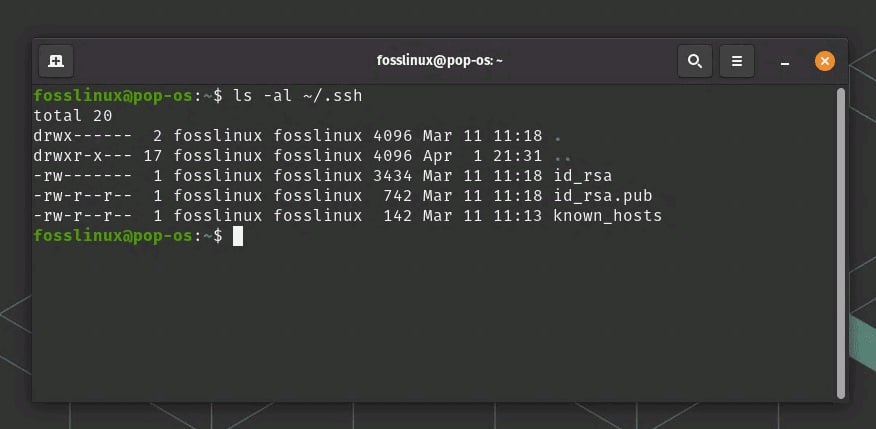
Linux/macOS ਤੇ SSH key pairs ਕਿਤੇ ~/.ssh ਵਿਚ ਮਿਲਦੇ ਹਨ। ਕੁਝ ਨਮੂਨੇ:
~/.ssh/id_rsa(Private Key)~/.ssh/id_rsa.pub(Public Key)~/.ssh/id_ed25519(Private Key)~/.ssh/id_ed25519.pub(Public Key)
Delete ਕਰਨ ਸਮੇਂ, naming custom ਹੋ ਸਕਦੀ ਹੈ (mycustomkey ਤਰੀਕੇ ਨਾਲ), ਤਾਂ fix file remove ਕਰੋ। Commands ਇਉਂ:
cd ~/.ssh/
rm id_rsa id_rsa.pub
# ਜਾਂ
rm id_ed25519 id_ed25519.pub
ਨਵਾਂ project/sharing ਕਰਨਾ ਹੋਵੇ, keys remove ਕਰਨਾ ਮਿਹਤਾਸ ਚੈਹੀਦਾ। ਜੇ ਇੱਕ server ਨੂੰ ਕਈ keys ਨਾਲ Access ਹੋਵੇ, ਤਾਂ carefully identify ਕਰੋ।
2.2 ਸਰਵਰ ਤੇ ਕੀ ਹਟਾਉਣਾ
Server Side Linux SSH Key Remove ਦਾ step: ਜਦ ਤਾਂ server ਤੇ login ਹੋ ਕੇ, ~/.ssh/authorized_keys edit ਕਰੋ। ਥਲ ਤੇ command ਹੈ:
# Server login
ssh [email protected]

# authorized_keys file edit ਕਰੋ
nano ~/.ssh/authorized_keys

# Remove row, ਜਿਹੜਾ public key match ਕਰਦਾ
id_rsa.pub ਦੀ ਹੇਠ row authorized_keys file ਵਿਚ ਹੁੰਦੀ। ਖੋਜੋ, ਲਵੋ, file save ਕਰੋ। Access remove ਹੋ ਜਾਵੇਗੀ।
2.3 Special Method: ssh-copy-id Reverse
ssh-copy-id key add ਕਰਨ ਲਈ ਯੂਜ਼ ਹੁੰਦੀ। Remove ਲਈ direct command ਨਹੀਂ। ਪਰ ਜੋ key add ਹੋਈ, ਉਸ ਨਾਲ match ਸਰਵਰ authorized_keys file edit ਕਰੋ, row ਲਵੋ। ਜਾਂ edit script/batch run ਕਰਕੇ clean ਕਰੋ।
3. Linux SSH Key ਹਟਾਉਣ ਦੇ ਫਾਇਦੇ ਤੇ ਨੁਕਸਾਨ
Har process ਦੇ fatah-ਨੁਕਸਾਨ ਜਾਣਨਾ Risk avoid ਕਰਨ ਲਈ helpfull। SSH key remove ਦੇ pros-cons:
3.1 ਫਾਇਦੇ
- Security Boost: Leak/unused keys remove, attack surface ਘਟਾਉਂਦੇ ਹੋ।
- Clear Management: Team members ਜਾਂ ਰਿਟਾਇਰ ਹੋਏ ਦੇ access cut-off.
- Update Regularly: Latest crypto algorithm use ਲਈ keys update/hatao.
3.2 ਨੁਕਸਾਨ
- Wrong Key Delete: Accidentally correct file remove—server access break.
- Temporary Access Loss: Beginner user reconnecting ਵਿਚ ਰੁਕਾਵਟ ਆ ਸਕਦੀ।
- Workload: Multiple servers ਲਈ manual remove karna time-consuming.
ਇਸ ਲਈ, remove/deactivate keys ਸਮੇਂ strategy/focus rakhna, proper documentation/rollback plan ਪਾਸੇ ਰੱਖੋ।
4. Alternative ਜਾਂ Extra ਤਰੀਕੇ
SSH keys remove ਨੇ ਇਲਾਵਾ, ਹੋਰ approaches ਇਕ-ਬਾਰ try ਕਰ ਸਕਦੇ ਹੋ। ਮੁੱਖ ਤਰੀਕੇ easy/flexible use ਲਈ:
4.1 Passphrase ਉਨਤੀ
SSH Security Configuration ਇਕੱਲੀ passphrase update/deep ਕਰਨਾ ਚੌਂਦੇ ਹੋ, ssh-keygen -p ਨਾਲ key ਚੇ password changing ਬੜੀ ਸੁਰੱਖਿਅਤ choice। keys remove ਕੀਤੀ ਬਿਨਾ ਵੀ security level wadh jaanda।
4.2 Key Revocation List (KRL)
KRL (Key Revocation List), OpenSSH 6.2+ ਤੇ, expire/invalidate keys list ਰੱਖਣਾ possible। ssh-keygen -k -f revoked_keys ਨਾਲ KRL files ready ਹੋ, authorized_keys/check ਨਾਲ block ਹੋ ਸਕਦੇ।
4.3 SSH Configuration File ਨਾਲ ਬਲੌਕ ਕਰਨਾ
/etc/ssh/sshd_config file edit, ਕੁਝ users/keys deactivate/block ਕਰ ਸਕਦੇ। PasswordAuthentication no strict mode enable, DMZ/test environment ਲਈ custom policy use ਕਰੋ। Note: ਇਹ access-protocol adjust ਕਰਦਾ, key ਦਾਇਰ remove ਨਹੀਂ।
5. ਪ੍ਰੈਕਟੀਕਲ ਉਦਾਹਰਨ ਤੇ Tips
ਆਪਣੀ system ਦੇ ਹਿਸਾਬ ਨਾਲ ਕਿਵੇਂ ਕਰਨਾ, ਇਸ ਪ੍ਰਕਾਰ:
- Developer Team: 5 ਵਿਅਕਤੀਆਂ ਵਾਲੀ ਟੀਮ, ਜਿਾਕੰਮ ਛੱਡ (left) ਹੋਏ ਤੇ authorized_keys file ਤੋਂ, just ਉਸ ਦੀ line remove ਕਰੋ; end user local machine ਤੇ private key ਵੀ delete ਕਰੋ।
- Server Transfer: Old infrastructure ਦੇ ਏਲ keys remove; new system ਤੇ new keysede access. Risk minimize।
- Emergency: ਜਿਵੇਂ key leak ਹੋਈ/suspected, Turant Linux SSH Key Remove karo, unauthorized access cut. ਵਧਾਏ ਜਾਣ ਲਈ ਨਵੀਂ key generate ਕਰੋ।
eh saadi examples vadh-de-risk/de-control show karde ਹਨ।
6. ਬਾਹਰਲੇ ਤੇ ਅੰਦਰੂਨੀ ਲਿੰਕ
SSH ਜਾਣਕਾਰੀ detail ਲਈ OpenSSH Official Site (DoFollow) documentations consult ਕਰੋ।
ਅਸੀਂ Linux category ਵਿਚ ਹੋਰ config/sample guides ਦੀ ਭੀ ਕਵਰੇਜ਼ ਰੱਖਦੇ ਹਾਂ।
7. Summary ਤੇ Final
Linux SSH Key ਹਟਾਉਣਾ—ਇਹ step security, management ਲਈ must ਹੀ ਹੈ। ਫੇਰ, team member change/departure, overall control/deep update, SSH key remove ਕਰਨਾ risk avoid/decentralize. Process ਵਿਚ main steps: Local keys remove, server authorized_keys edit/remove rows.
Proper planning, written SSH Security Configuration policy, team co-ordination must ਚੈਹੀਦੀ। Naye cryptographic algorithm use, schedule policy check, unused/deprecated keys remove; cyber attack face/delegate shield। ਨੋਟ: ਛੋਟਾ flaw data leak/attack cause ਕਰ ਸਕਦਾ।
ਸ਼ਾਹੀ ਸਵਾਲ-ਜਵਾਬ (FAQ)
1. Linux SSH Key ਹਟਾਉਣ ਲਈ session ਚਾਹੀਦਾ?
ਵਧੇਰੇਮਹਿੱਤਵ: Server access/session ਚੱਲ ਰਿਹਾ ਹੋਵੇ ਤਾਂ keys easily remove/edit। authorized_keys row, local ~/.ssh files remove. Root console alternate method ਲਈ session ਜ਼ਰੂਰੀ ਨਹੀਂ।
2. SSH Key ਹਟਾਉਣ ਤੋਂ ਬਾਅਦ Login ਦੇ ਲਈ ਕੀ ਕਰਨਾ?
Old key remove ਹੋਵੇ—login stop. ਜੇ SSH Security Configuration ਤਿਆਰ ਹੋ; ssh-keygen new keys create ਕਰੋ, server authorized_keys file ਵਿਚ new public key add ਕਰੋ।
3. ਏਕ ਕੀ ਵੀ-ਹਰ ਸਰਵਰ ਚ ਹਟਾਣੀ ਚਾਹੀਦੀ?
ਜੇ ਤੁਸੀਂ key full remove/deactivate ਕਰਲਾ; ਤਾਂ, ਹਰ server ਤੇ authorized_keys file edit/remove ਕਰੋ। ਨਹੀਂ ਤਾਂ, access sidebar/deactivate all keys avoid ਹੋਵੇ।