 Afrikaans
 Azərbaycan
 Bosanski
 Čeština
 Dansk
Dansk Deutsch
 English
 Español
 Filipino
 Français
 Hrvatski
 Indonesia
 Italiano
 Magyar
 Melayu
 Nederlands
 Norsk
Norsk Oʻzbek
 Polski
 Português
 Română
 Slovenčina
 Slovenščina
 Suomi
Suomi Svenska
 Tiếng Việt
 Türkçe
 Ελληνικά
 Беларуская
 Български
 Русский
 Српски
 Українська
 עברית
עברית اردو
اردو العربية
 پښتو
پښتو فارسی
فارسی አማርኛ
አማርኛ मराठी
मराठी বাংলা
বাংলা தமிழ்
தமிழ் ไทย
ไทย မြန်မာ
 한국어
한국어 中文
中文 日本語
日本語

ਆਧੁਨਿਕ ਕੰਪਿਊਟਰ ਸਿਸਟਮਜ਼ ਦੀ ਪ੍ਰਦਰਸ਼ਨਤਾ ਵਿੱਚ ਨਵੇਂ ਪੱਧਰ ਤੇ ਵਾਧਾ ਲਿਆਉਣ ਦੇ ਲਈ ਮਲਟੀ-ਪ੍ਰੋਸੈਸਰ ਅਤੇ NUMA (Non-Uniform Memory Access) ਮਿਰੀਮਾਰੀਆਂ ਨਿਯਮਤ ਮਹੱਤਵ ਰੱਖਦੀਆਂ ਹਨ। ਇਸ ਬਲੌਗ ਵਿੱਚ ਅਸੀਂ ਵੇਖਦੇ ਹਾਂ ਕਿ "ਓਪਰੇਟਿੰਗ ਸਿਸਟਮਜ਼" ਵਿੱਚ ਮਲਟੀ-ਪ੍ਰੋਸੈਸਰ ਸਹਾਇਤਾ ਕੀ ਹੁੰਦੀ ਹੈ, NUMA ਮੀਮਾਰ ਜਾਂ ਮੂਲ ਆਰਕੀਟੈਕਚਰ ਕਿਵੇਂ ਕੰਮ ਕਰਦੀ ਹੈ, ਇਹ ਕਿਉਂ ਵਧੇਰੇ ਗੰਭੀਰ ਹੈ, ਅਤੇ ਕਿਹੜੇ ਓਪਰੇਟਿੰਗ ਸਿਸਟਮਜ਼ ਇਹ ਸਹਾਇਤਾ ਦਿੰਦੇ ਹਨ। NUMA ਸੰਬੰਧੀ ਆਮ ਗਲਤਫਹਮੀਆਂ, ਕਾਰਗਰਤਾ ਵਾਧਾ, ਚੰਗੇ-ਮੰਦੇ ਪੈਲੂ, ਸੁਰੱਖਿਆ ਪਰ ਚਰਚਾ ਤੇ ਇਸ ਮੀਮਾਰ ਦੀ ਭਵਿੱਖੀ ਦਿਸਾ ਦਾ ਆਲੋਚਨਾ ਮਿਲੇਗੀ। ਮਲਟੀ-ਪ੍ਰੋਸੈਸਰ ਵਾਪਰਣ ਲਈ ਤੁਹਾਨੂੰ ਵਧੇਰੇ ਸੁਝਾਅ, ਰਿਸਕ ਅਤੇ ਸਹੀ ਤਰੀਕਾ ਸਮਝਾਇਆ ਗਿਆ ਹੈ।
ਜਾਂਚ: ਓਪਰੇਟਿੰਗ ਸਿਸਟਮਜ਼ ਵਿੱਚ ਮਲਟੀ-ਪ੍ਰੋਸੈਸਰ ਸਹਾਇਤਾ
ਆਜਕੱਲ, ਤਕਨੀਕੀ ਇਨਕਲਾਬ ਬਹੁਤ ਤੇਜ਼ੀ ਨਾਲ ਹੋ ਰਹੀ ਹੈ, ਕੰਪਿਊਟਰ ਅਤੇ ਖ਼ਾਸ ਕਰਕੇ ਸਰਵਰ/ਡਾਟਾ ਸਟੋਰੇਜ/ਵੱਡੇ-ਡਾਟਾ ਐਪਲੀਕੇਸ਼ਨਾਂ ਵਿੱਚ ਕਾਰਗਰਤਾ, ਵਧਤ ਮਾਨਕ਼ਾਂ ਤੇ ਪਹੁੰਚ ਰਹੀ ਹੈ। ਇਕਲੇ CPU ਦੀਆਂ ਹੱਦਾਂ ਆਉਂਦਿਆਂ "ਓਪਰੇਟਿੰਗ ਸਿਸਟਮ" ਦੇ ਮਲਟੀ-ਪ੍ਰੋਸੈਸਰ ਸਹਾਇਕ ਆਰਕੀਟੈਕਚਰਾਂ ਕਾਰਗਰਤ ਬਣਾਉਂਦੀ ਹੈ। ਇਹ ਮਾਡਲ, ਹਾਰਡਵੇਅਰ ਨੂੰ ਵਧੇਰੇ ਸੱਚਯੀ ਜਾਂ ਬਿਹਤਰ ਮਿਲਣ, ਪ੍ਰਦਰਸ਼ਨ ਤੇ ਹਿੱਤ ਨੂੰ ਵਧਾਉਂਦੀ ਹੈ।
ਇੱਕ ਓਪਰੇਟਿੰਗ ਸਿਸਟਮ ਜਦੋਂ ਮਲਟੀ-ਪ੍ਰੋਸੈਸਰ ਨੂੰ ਸਿਸਟਮ ‘ਚ ਸੰਯੁਕਤ ਚਲਾਉਣ ਦੀ ਸਮਰਥਾ ਰੱਖਦਾ ਹੈ ਤਾਂ, ਮੁੱਲ/ਮੌਕੇ ਓਪਰੇਟਿੰਗ ਸਿਸਟਮ ਵਤਰਦੀ ਆਉਂਦੇ ਪਰਲੇਲ ਕੰਮ ਕਰਵਾਉਦਾ ਹੈ। ਤੇ ਕੰਮ ਦਾ ਹਿੱਸਾ ਸਾਰੇ CPU's ਵਿੱਚ ਸਤਰੂਪਤਾ ਨਾਲ ਵੰਡਦਾ ਹੈ। ਇਸਦੀ ਖਾਸ ਲੋੜ ਵਧੀਕ ਲੋੜੀਦੇ, ਹੌਂ ਉੱਚ ਪਰਫਾਰਮੈਂਸ ਵਾਲੀਆਂ ਐਪਲੀਕੇਸ਼ਨਾਂ ਵਿਖੇ ਪੈਸ ਆਉਂਦੀ ਹੈ।
- ਪਰਦਰਸ਼ਨ ਵਾਧਾ: ਵੱਡੇ-ਡਾਟਾ, ਵੱਡੀਆਂ ਐਪਾਂ ਪਰਲਲ ਚੱਲਣ ਜਾਂ ਸਕਦੇ ਹਨ।
- ਅਚੋਕੇ ਸੁਚੇਤਤਾ: ਇੱਕ CPU ਵਿੱਚ ਵੱਡੀ ਸਮੱਸਿਆ ਆ ਜਾਣ ਤੇ ਦੂਜੇ ਪ੍ਰੋਸੈਸਰ ਸਿਸਟਮ ਨੂੰ ਚਲੂ ਰੱਖਦੇ ਹਨ।
- ਸਮਰਥੇ ਰੀਸੋਰਸ ਬਖ਼ਸ਼ੀ: ਬਹੁ-ਪ੍ਰੋਸੈਸਰ ਵਿੱਚ ਬੋਝ ਬਰਾਬਰੀ ਨਾਲ ਵੰਡ ਕੇ, ਰੀਸੋਰਸ ਕਦਰਯੋਗ ਵਰਤਦੇ ਹਨ।
- ਵਾਧੂ ਪੈਮਾਨਾ: ਲੋੜ ਹੋਣ ਤੇ, ਹੋਰ CPU ਜੋੜ ਕੇ ਪ੍ਰਦਰਸ਼ਨ ਵਧਾਇਆ ਜਾ ਸਕਦਾ ਹੈ।
- ਖਰਚਾ ਪਸੰਦ: ਉੱਚ ਪਰਫਾਰਮੈਂਸ ਲਈ ਕੁਝ ਹੀ ਪਰੋਸੈਸਰ ਚਾਹੀਦੇ, ਉੱਚ-ਕੁਆਲਟੀ ਵਾਲੀ ਹਾਰਡਵੇਅਰ ਨਾਲ ਵੀ ਉੱਚ ਨਤੀਜੇ ਮਿਲਦੇ ਹਨ।
ਮਲਟੀ-ਪ੍ਰੋਸੈਸਰ ਹਾਰਡਵੇਅਰ ਨੂੰ ਉੱਚ ਦਰਜ਼ਾ ਤੇ ਚਲਾਉਣ ਲਈ ਓਪਰੇਟਿੰਗ ਸਿਸਟਮ ਨੂੰ ਉਹ ਮੀਮਾਰ ਸਹਾਇਕ ਚਾਹੀਦੀ; ਯਥਾਰਥਵਾਦੀ ਪ੍ਰਬੰਧਨ (memory/data traffic, inter-CPU communication, ਤੱਤ-ਬੁਨਿਆਦ) ਕਰਨਾ ਪੈਂਦਾ। NUMA ਜਿਵੇਂ Non-Uniform Memory Access ਆਰਕੀਟੈਕਚਰ ਇੱਥੇ ਸਾਰਥਿਕ ਚਿਰਜਾ ਕਰਦੀਆਂ ਹਨ—ਕੀਵੀਂ, ਹਰ CPU ਨੂੰ ਆਪਣੀ local memory zone ਤੇ ਤੁਰੰਤ (tezi) ਐਕਸੈਸ ਮਿਲਦੀ, ਜਦਕਿ shared memory ਲਈ wait ਕਰਨਾ ਪੈਂਦਾ। ਜਿੰਨਾ data locality optimize ਕਰੀਦੇ, ਉਨਾਂ latency ਘੱਟ ਹੁੰਦੀ ਤੇ ਪ੍ਰਦਰਸ਼ਨ ਵਧਦਾ ਹੈ।
ਮਲਟੀ-ਪ੍ਰੋਸੈਸਰ ਆਰਕੀਟੈਕਚਰ ਦੀਆਂ ਮੂਲ ਸੰਯੁਕਤੀਆਂ
| ਸੰਯੁਕਤੀ | ਵਿਆਖਿਆ | ਰੋਲ/ਮੁੱਤਾਂਜਾ |
|---|---|---|
| CPU (ਇਸ਼ਲੇਮਕਾਂ) | ਸਿਸਟਮ ਦੀ ਮੁੱਖ ਗਣਨਾ ਕਰਨ ਵਾਲੀ ਇਕਾਈ | ਜਿੰਨਾ ਤੇਜ਼ ਯਥਾਰਥ, ਉਤਨਾ ਤੇਜ਼ ਆਉਂਦੇ ਨਤੀਜੇ |
| RAM (ਬੈਲੇਕ) | CPU ਲਈ ਆਸਾਨ ਐਕਸੈਸ ਵਾਲਾ ਡਾਟਾ ਸਟੋਰੇਜ | ਤੇਜ਼ ਡਾਟਾ ਰੀਟਰਾਇਵਲ, ਸਮਰਥੇ computation |
| Motherboard | ਹਰ hardware ਸੰਯੁਕਤੀ ਨੂੰ ਮਿਲਾਉਣ ਵਾਲਾ ਪਲੇਟਫ਼ਾਰਮ | ਕੰਪਿਊਟਰ ਰੀਸੋਰਸ ਜਾਂ ਡਾਟਾ ਫਲੋ ਨੂੰ ਪੋਸਣ ਜਾਂਦੀ |
| Operating System | ਹਾਰਡਵੇਅਰ ਤੇ ਐਪਾਂ ਸੰਯੁਕਤ ਰੱਖਣ ਵਾਲਾ ਸੋਫਟਵੇਅਰ | ਮਲਟੀ-ਪ੍ਰੋਸੈਸਰ ਸਹਾਇਤਾ ਨਾਲ, CPU ਵਧੀਕ ਬਖ਼ਸ਼ਦੀਆਂ ਚਲਾ ਸਕਦੀ |
ਓਪਰੇਟਿੰਗ ਸਿਸਟਮ ਵਿੱਚ ਮਲਟੀ-ਪ੍ਰੋਸੈਸਰ ਸਹਾਇਤਾ, ਆਧੁਨਿਕ ਕਮਪਿਊਟਿੰਗ ਦਾ ਅਟੂਟ ਹਿੱਸਾ—ਡਾਟਾ-ਅਧਿਆਨ, ਉੱਚ-ਪਦ-ਤੇ-ਲੋੜੀਦੇ, ਤੇ, ਹਾਰਡਵੇਅਰ/ਸੋਫਟਵੇਅਰ ਸਹੀ ਸੰਯੁਕਤਤਾ ਦੀ ਲੋੜ ਹੈ।
NUMA ਮੀਮਾਰ ਕਿ ਹੈ ਤੇ ਕਿਉਂ ਲੋੜੀਂਦੀ?
ਮਲਟੀ-ਪ੍ਰੋਸੈਸਰ ਸਿਸਟਮਜ਼ ‘ਚ NUMA, ਵਿਅਕਤੀਗਤ memory access latency optimal ਕਰਕੇ ਨਵੇਂ ਪੱਧਰ ਦੀ ਕਾਰਗਰਤਾ ਲਿਆਉਂਦਾ ਹੈ। SMP (Symmetric Multiprocessing) ਜਾਂ simple shared memory ਸਿਸਟਮ ‘ਚ ਸਾਰੇ CPU single memory pool ਦੀ ਅੰਤਰਾ ਤੇ ਵਰਤੇ ਜਾ ਸਕਦੇ, NUMA ‘ਚ ਹਰ CPU ਨੂੰ ਆਪਣੀ local RAM ਮਿਲਦੀ; ਤੇ local RAM ਵਿੱਚ ਇੱਕ CPU ਤੇਜ਼ੀ ਨਾਲ ਐਕਸੈਸ ਕਰਦਾ, ਜਦਕਿ ਦੂਜੇ CPUs ਦੀ RAM ਤੇ ਪਹੁੰਚ ਛੇਤੀ ਨਹੀਂ। ਜਾਂ ਘਣੇ ਕੰਮ/ਵੱਡੇ-ਡਾਟਾ ਵਾਲੀ ਐਪਾਂ ਵਿਖੇ, NUMA ਦਾ ਮਤਲਬ latency ਘੱਟ, throughput ਵਧਾ।
NUMA ਆਰਕੀਟੈਕਚਰ ਦਾ ਮਤਲਬ, ਹਰ CPU ਦੀ local memory ਤੇ, direct/fast access; ਅਤੇ ਹੋਰ CPUs ਦੀ memory ਤੇ access, latent/slower। ਇਸਦੇ ਨਤੀਜੇ, sunucular, HPC, big data applications, rendered/analysis jobs ਲਈ ਤਾਂ – ਵਾਧਾ, scalability, memory bandwidth, ਤੇ, overall throughput!
NUMA ਕੋਰ-ਵਿਸ਼ਿਸ਼ਤਾ
- Local Memory Access: ਹਰ processor ਲਈ specific memory
- Remote Memory Access: ਹੋਰ processor memory ਵੀ reach, latency high
- Scalability: system expansion (CPUs/memory) as needed
- Memory Management: OS optimizes placement/access
- Node-based Structure: Processor+memory makes NUMA node
NUMA ਵਿਖੇ, memory management ਓਖਾ ਹੋ ਜਾਂਦਾ—OS ਨੂੰ ਚਾਹੀਦਾ ਕੀ, data locality ਨੂੰ optimize ਕਰੇ, work-threads/node memory proximity match ਕਰੇ। Local memory-use ਵਧਾ ਕੇ, remote access ਜਿਆਦਾ ਹੋਵੇ ਨਾ—ਯਥਾਰਥ latency, overall efficiency!
NUMA Versus SMP Architectures
| ਵਿਸ਼ਿਸ਼ਤਾ | NUMA | SMP |
|---|---|---|
| Memory Access | Local+Remote, latency differs | Uniform Memory Access |
| Scalability | High | Limited |
| ਪ੍ਰਦਰਸ਼ਨ | Large datasets, high performance | Best for small, simple workloads |
| Complexity | High | Low |
NUMA ਦੀ ਲੋੜ, ਵਿਅਕਤੀਗਤ optimised workloads (database servers, virtualizations, scientific calculations) ਲਈ; ਜਿੱਥੇ hardware resources localised/stretched efficiently serve; optimisation, application design, ਤੇ, OS interaction match ਹੋਣ ਜਰੂਰੀ। NUMA node configuration/placement synchronised ਹੋਣ ਚਾਹੀਦੇ।
ਮਲਟੀ-ਪ੍ਰੋਸੈਸਰ ਸਹਾਇਕ ਓਪਰੇਟਿੰਗ ਸਿਸਟਮਜ਼
ਮਲਟੀ-ਪ੍ਰੋਸੈਸਰ ਸਹਾਇਤਾ, ਆਜਕੱਲ, ਡੇਸਕਟਾਪ ਤੋਂ ਸੂਪਰ-ਸਰਵਰ ਅਤੇ ਕਲਾਉਡ ਸਕੇਲਿੰਗ ਤੱਕ ਫੜੀ ਜਾਂਦੀ ਹੈ।ਓਪਰੇਟਿੰਗ ਸਿਸਟਮ ਮਲਟੀ-ਪ੍ਰੋਸੈਸਰ ਹਿੱਸਾ manage/optimize ਕਰ ਕੇ, ਬੜੀ ਐਪਾਂ ਨੂੰ ਤੇਜ਼/ਕਾਰਗਰ ਕਰਦੇ ਹਨ। ਵੱਖ-ਵੱਖ ਸਿਸਟਮ, NUMA ਜਾਂ simple SMP, ਵਾਪਰਦੇ/optimise ਕਰਦੇ, hardware compatibility ਅਤੇ workload profile ਨੂੰ match ਕਰਕੇ।
Operating System ਦੀ ਚੋਣ ਵੇਲੇ, hardware compatibility, scalability, security update frequency ਵੀ count ਕਰਨਾ।
ਮਹੱਤਵਪੂਰਨ ਓਪਰੇਟਿੰਗ ਸਿਸਟਮਜ਼ ਮਿਲਦੇ:
| ਓਪ੍ ਸਿਟਮ | ਮਲਟੀ-ਪਰੋਸੈਸਰ ਸਹਾਇਤਾ | NUMA Support | Recommended Use |
|---|---|---|---|
| ਵਿੰਡੋਜ਼ ਸਰਵਰ | ਉੱਤਮ | Advanced | Enterprise, Datacenter |
| Linux (Ubuntu, CentOS, Debian) | ਉੱਤਮ | Kernel version-dependent, best in RHEL/Ubuntu Server | Servers, development, cloud |
| macOS | ਮੱਧਮ | Basic | Desktop, creative workstations |
| VMware ESXi | ਉੱਤਮ | Advanced | Virtualized platforms |
ਕੋਰ OS ਸਮਝੋ/ਵਰਤੋ:
- ਵਿੰਡੋਜ਼ ਸਰਵਰ
- Linux distros (Ubuntu, CentOS, Debian)
- Red Hat Enterprise Linux (RHEL)
- VMware ESXi
- macOS Server
NUMA support, especially in large-scale hardware, is critical. OS-application compatibility, continuously updating & patching is vital for productivity and security.
NUMA ਮੀਮਾਰ ਸੰਬੰਧੀ ਆਮ ਗਲਤਫਹਮੀਆਂ
NUMA, server architecture ਵਿੱਚ ਆਮ, ਪਰ, ਇਸ ਬਾਰੇ ਆਮ ਗਲਤਫਹਮੀਆਂ ਹਨ—ਜਿਵੇਂ, NUMAਿੰਗ ਮਿਤੀ ਲਈ, desktop CPUs ਤੇ workstations clash ਨਹੀਂ ਕਰਦੇ; NUMA optimization, latency cut, performance boost ਕੋਲ…।
ਆਮ ਗਲਤਫਹਮੀਆਂ/ਅਸਲ ਇਤਹਾਸ
- ਗਲਤ: NUMA ਕੇਵਲ Server/workstation ਲਈ। ਅਸਲ: Desktop / special-purpose PCs ਨੂੰ ਵੀ local memory optimisation benefit।
- ਗਲਤ: NUMA Always Performance Boost—Optimization required, misconfig drops performance!
- ਗਲਤ: NUMA settings complex/never change. ਅਸਲ: Tools/knowledge enable customization/optimization.
- ਗਲਤ: All apps auto-use NUMA. ਅਸਲ: NUMA compatibility/application optimization needed.
- ਗਲਤ: NUMA boosts memory size. ਅਸਲ: NUMA boosts access speed, not quantity.
- ਗਲਤ: NUMA irrelevant/too hard. ਅਸਲ: NUMA understanding, system performance key!
Optimization, locality; wrong placement/usage leads to cross-node access, latency, slowdown. OS/application NUMA-awareness imperative for true gains.
NUMA Performance Comparison
| Scenario | NUMA On | NUMA Off | Explanation |
|---|---|---|---|
| Database Operations | 20% faster | Standard speed | Local memory, fast retrieval |
| Video Rendering | 15% faster | Standard speed | Efficient rendering/processing |
| Virtual Machines | 10% faster | Standard speed | Efficient resource allocation |
| Memory-heavy Apps | 25% faster | Standard speed | Reduced latency, high throughput |
NUMA settings, properly monitored/optimized, ensure performance—modern OSs offer tools to match process memory locality, node distribution, workload.
ਮਲਟੀ-ਪ੍ਰੋਸੈਸਰ ਸਹਾਇਤਾ ਨਾਲ ਪ੍ਰਦਰਸ਼ਨ ਵਾਧਾ
ਮਲਟੀ-ਪ੍ਰੋਸੈਸਰ support enables parallel processing; extreme performance upgrade for compute-intensive fields—video editing, big data, scientific research, heavy gaming, etc. OS manages threads, assigns to cores/nodes, NUMA handles memory access optimization.
THREAD/WORKLOAD distribution, NUMA assignment yields maximum local access, lowest latency. OS/application optimization is key.
Performance Boost Factors
- Parallel Processing: Multitasking, simultaneous thread execution.
- Load Balancing: Workload evenly distributed.
- Memory Management: NUMA proximity, reduced access times.
- Thread Management: Proper task scheduling/allocation.
- Cache Efficiency: High-speed, proximity storage.
| Factor | Explanation | Performance Impact |
|---|---|---|
| Core Count | Number of simultaneous processing units | Linear scaling if app supports parallelism |
| NUMA Optimization | Thread-node/ memory proximity | Reduces latency, boosts speed |
| Thread Management | Intelligent allocation/pinning | Resource efficiency |
| Cache Utilization | Fast data access/storage | Speeds up recurring data usage |
ਹਾਲਾਂਕਿ, application must be multithread-capable to utilize benefits. Single-threaded apps don’t benefit. OS misconfiguration may cause resource clashes, inefficiency. Expert setup required.
NUMA ਅਰਕੀਟੈਕਚਰ ਦੇ ਫਾਇਦੇ ਤੇ ਮੰਦ-ਪਲੂ
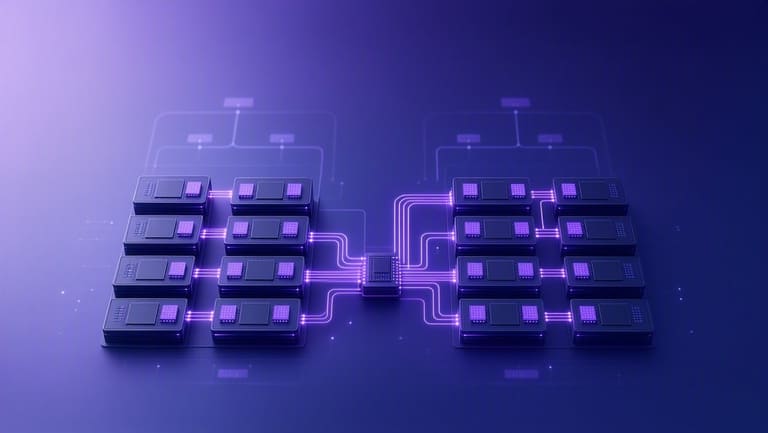
NUMA (Non-Uniform Memory Access) architecture optimizes multi-CPU scaling/performance, but comes with own pros/cons. Let's analyze both:
Advantage / Disadvantage
- Advantage: Low latency access via local RAM.
- Advantage: Scalability, add CPUs/memory as needed.
- Advantage: Higher memory bandwidth, faster data transfer.
- Disadvantage: Remote memory access slows down, misconfigured locality hurts.
- Disadvantage: Apps & OS must be NUMA-optimized, else lose benefit.
- Disadvantage: Imbalanced node distribution causes bottlenecks.
NUMA enables process/memory scaling—growing organization need, seamless expansion, best for high workload. But setup/configure/app support critical.
NUMA Comparison Table
| Feature | NUMA | SMP | Distributed Memory |
|---|---|---|---|
| Memory Access | Local fast, remote slow | All equal | Network-based |
| Scalability | High | Limited | Extreme |
| Cost | ਦਰਮਿਆਨਾ | Low | High |
| Complexity | High | ਦਰਮਿਆਨਾ | Extreme |
Disadvantages: Poor locality, cross-node access causes latency, special app development needed, SMP easier for management.
ਬਹੁ-ਪਰੋਸੈਸਿੰਗ ਸਿਸਟਮਜ਼ ਵਿੱਚ ਡਿਜੀਟਲ ਸੁਰੱਖਿਆ
Multi-processor setups, while bringing performance, introduce new security threats—multiple processors sharing/memory, race conditions, resource access conflicts.
| Threat | Explanation | Prevention |
|---|---|---|
| Data Race | Multiple CPUs concurrently, inconsistent states | Mutexes, atomic operations |
| Unauthorized Shared Access | Malware/users exploit shared resources | ACLs, authentication protocols |
| Virtual Machine Escape | VM accesses host/other VMs | Strong virtualisation isolation, regular updates |
| Side-channel Attacks | Leaking via CPU power/timing | Improved encryption, hardware-level isolation |
OS-level access control, firewalls, IDS (Intrusion Detection Systems), regular security review/scans imperative. User awareness and training against phishing/social engineering vital as well.
Security Tips
- Apply updates/patches promptly.
- Strong passwords/MFA (multi-factor authentication).
- Disable unneeded services—reduce attack surface.
- Encrypt sensitive data.
- Enable/firewall and IDS, monitor.
- Minimize user permissions.
- Regular audits/vulnerability scans.
Security is a combination of technical controls and user education—training, simulations reduce human error. Even best tech can't save against careless users.
NUMA ਅਰਕੀਟੈਕਚਰ ਦੀ ਭਵਿੱਖੀ ਦਿਸਾ
NUMA architecture, OS adaptation, and memory technologies—all moving fast. AI, big data, high-performance computing will drive NUMA demand/hardware optimization. NUMA-aware OSs/ development tools will become standard.
| Trend | Explanation | Expected effect |
|---|---|---|
| Improved Memory Tech | HBM, DDR5—higher speed/bandwidth | Reduced latency across nodes, overall performance boost |
| OS Optimization | Smart scheduler/memory placement | Better locality, maximize local node access |
| Better Node Interconnects | Low latency links (Infinity Fabric, NVLink) | Cross-node data transfer speed up |
| AI/ML workloads | Ever larger datasets, model training | NUMA provides high efficiency/platform |
Future: OS auto-detects topology, NUMA-aware scheduling, virtualization/container platforms fully NUMA-aware, heterogeneous computing (GPUs, FPGAs with NUMA nodes).
Future Trends
- Memory technologies: HBM, DDR5, persistent memory
- OS-level NUMA scheduling
- Node interconnects: Infinity Fabric, NVLink
- Growing AI/ML workloads
- NUMA awareness in containers/virtualisation
- Heterogeneous computing integration
Open source OS/tools will democratize NUMA tech. Community contribution, dev training, sharing critical for innovation.
ਸਿੱਟਾ: ਮਲਟੀ-ਪ੍ਰੋਸੈਸਰ ਵਰਤਣ ਲਈ ਜਾਚੀ ਜਾਵੇ
NUMA/ਮਲਟੀ-ਪ੍ਰੋਸੈਸਰ, ਆਧੁਨਿਕ IT infra ਦੀ ਬੁਨਿਆਦ, ਪਰ optimisation, hardware-software matching, configuration crucial. Misconfigured setups waste resources/cause delays/bottlenecks.
| Area | Explanation | Recommended Action |
|---|---|---|
| Hardware Selection | CPU, motherboard/RAM compatibility | Workload-matched, tested components |
| OS setup | NUMA/multi-CPU enabled/configured | Updated OS, correct NUMA settings |
| Software Optimization | Multithread support, NUMA awareness | Thread usage/NUMA locality optimization |
| Monitoring | Performance, resource bottlenecks | Regular monitoring, adjust as needed |
Plan, monitor, and re-tune. NUMA complexity needs developer/admin awareness. Security/data integrity must not be ignored.
Checklist
- Check hardware compatibility: CPU, RAM, motherboard
- Update OS: latest version, security patches
- Enable/configure NUMA in OS
- Optimize software: multithread, NUMA-aware
- Monitor system: CPU/memory/network, find bottlenecks
- Apply security measures: prevent vulnerabilities
NUMA and multi-processor setup, when understood and optimally applied, bring high performance and efficiency. Learn, deploy, monitor regularly for best outcomes.
NUMA/ਮਲਟੀ-ਪ੍ਰੋਸੈਸਰ ਵਰਗੀਆਂ ਟਕਨੀਕਾਂ ਨਾਲ ਵਿਅਕਤੀਗਤ ਪਧਤੀ
NUMA ਅਤੇ ਮਲਟੀ-ਪ੍ਰੋਸੈਸਰ support ਦਾ ਸਮਝਣਾ, configuration, optimization, workload-application analysis—best practice imperative. Wrong config/bad workload match = delays, inefficiency!
Analyze workload, pinpoint which apps support multithread/NUMA, assign resources accordingly.
Right Approach
- Workload analysis
- Application requirement matching
- Resource distribution
- NUMA/workload optimization
- Locality memory mapping
- Performance monitoring/tuning
NUMA locality, OS/app NUMA-awareness essential—data kept local, remote access minimized. OS/app must support this, otherwise latency bottlenecks.
| Feature | Right Practice | Wrong Practice |
|---|---|---|
| Workload Analysis | Detailed, application-based | Assumed, generic |
| Resource Distribution | Match requirements | Random, unoptimized |
| NUMA Optimization | Locality-focused | No locality, cross-access frequent |
| Performance Monitoring | Constant, adjust as needed | No monitoring, ignore bottlenecks |
Keep monitoring, update/fine-tune—best performance only possible with measured, responsive action.
ਅਕਸਰ ਪੁੱਛੇ ਜਾਣ ਵਾਲੇ ਸਵਾਲ
ਓਪਰੇਟਿੰਗ ਸਿਸਟਮ ਵਿੱਚ ਮਲਟੀ-ਪ੍ਰੋਸੈਸਰ support ਦਾ ਮਤਲਬ ਕੀ ਹੈ ਤੇ ਇਹ ਲੋੜੀਦੀ ਕਿਉਂ?
ਮਲਟੀ-ਪ੍ਰੋਸੈਸਰ support ਤੋਂ ਮਤਲਬ — ਸਿਸਟਮ ਨੇ, ਕੋਈ ਵੀ, physical CPUs ਜਾਂ multi-core CPUs, ਸਮਰਥੇ/ਸਹੀ ਤਰੀਕੇ ਨਾਲ ਵਰਤਨਾ ਪਵੇ; ਤੇ, ਅਨੇਕ ਕੰਮ ਇੱਕਵੇਲੇ ਕਰਨਾ, ਕਾਰਗਰਤਾ ਵਧਾਉਣਾ, resource utilization optimal ਕਰਨਾ ਸਮਭਵ।
NUMA ਅਰਕੀਟੈਕਚਰ, simple ਮਲਟੀ-ਪ੍ਰੋਸੈਸਰ ਤੋਂ ਓਹਲੇ/ਵੱਖਰੀ ਕਿਵੇਂ ਸ਼ਾਮਲ ਹੁੰਦੀ, ਤੇ ਕਿ ਫਾਇਦਾ?
NUMA 'ਚ, ਹਰ processor ਲਈ local memory node ਹੁੰਦਾ; shared memory model 'ਚ (SMP), CPUs same pool share ਕਰਦੇ। Local access faster, remote slower; NUMA latency cut, throughput boost, but code/OS optimization critical।
ਕਿਹੜੇ ਓਪਰੇਟਿੰਗ ਸਿਸਟਮ ਹੋ NUMA/ਮਲਟੀ-ਪ੍ਰੋਸੈਸਰ fully support ਕਰਦੇ?
Windows Server, Linux distros (Red Hat, CentOS, Ubuntu), BSD-variants; but old OS ਨੂੰ ਤੋਂ restrictive support ਜਾਂ none ਮਿਲਦੀ।
ਮਲਟੀ-ਪ੍ਰੋਸੈਸਰ/NUMA support ਨਾਲ ਯਥਾਰਥ ਪਰਦਰਸ਼ਨ ਵਾਧਾ, ਕਿਸ ਉੱਤੇ depend?
Workload distribution (threads/tasks), locality mapping, OS NUMA-awareness, application design; best parallel/local node access yields peak performance।
NUMA advantages/deep practice downsides?
NUMA ਨੂੰ local access ਦਾ ਫਾਇਦਾ; downside—cross-node frequent access latency, locality-aware optimization required, system complexity grows।
Multi-processor system ਵਿੱਚ digital security, ਕੀ key points?
Shared-resource risks (VM escape, side-channel attacks, race conditions), system update, role-based access control, strong authentication, patch management are vital।
NUMA future—ਹੁਣ, ਕੁਝ ਨਵੀਂ ਟਕਨੀਕਾਂ ਤੇ integration ਯਥਾਰਥ?
Memory innovation (persistent/HBM/DDR5), interconnect evolution, smarter OS scheduling, AI/ML workload scaling, virtualization/container NUMA-awareness; open-source community will drive new optimization tools।
ਮਲਟੀ-ਪ੍ਰੋਸੈਸਰ system buy/configure ਕਰਿਆ ਜਾਂ NUMA-system, ਛੋਟੀ-ਛੋਟੀ ਚੀਜਾਂ/ਕਿਰਿਆਵਾਂ?
Workload need analysis, NUMA node distribution planning, RAM speeds, interconnect, OS/app NUMA-awareness check, code optimization, locality mapping; peak performance via proactive placement/optimization।