 Afrikaans
 Azərbaycan
 Bosanski
 Čeština
 Dansk
Dansk Deutsch
 English
 Español
 Filipino
 Français
 Hrvatski
 Indonesia
 Italiano
 Magyar
 Melayu
 Nederlands
 Norsk
Norsk Oʻzbek
 Polski
 Português
 Română
 Slovenčina
 Slovenščina
 Suomi
Suomi Svenska
 Tiếng Việt
 Türkçe
 Ελληνικά
 Беларуская
 Български
 Русский
 Српски
 Українська
 עברית
עברית اردو
اردو العربية
 پښتو
پښتو فارسی
فارسی አማርኛ
አማርኛ मराठी
मराठी বাংলা
বাংলা தமிழ்
தமிழ் ไทย
ไทย မြန်မာ
 한국어
한국어 中文
中文 日本語
日本語

အနာဂတ် IT နယ်ပယ်တွင် system performance သည် တိုးတက်လာသော hardware architectures အတွက် အရေးပါဆုံးအရာဖြစ်လာသည်။ သာမန် CPU တစ်လုံးအားသာယူရာမှာ Server, Big Data Processing, High Performance Computing ဝန်ဆောင်မှုများအတွက် တစ်ခါတစ်ရံ မလုံလောက်နိုင်နိုင်သဖြင့် Linux, Windows Server အပါအဝင် OS တွေသည် Multi-Processor Architecture ကို
နိဒါန်း – Operating System များတွင် Multi-Processor Support
Digital realm မှာ IT Hardware တောင်းဆိုမှု တိုးတက်လာသည်။ Server နှင့် ကြီးမားသော Data Processing နှင့် Performance လိုအပ်သော စနစ်များအတွက် CPU တစ်လုံးသာမက အများအပြား CPU ပါဝင်မှုကို OS level တိုင်အောင် Optimize လုပ်ရန်လိုတယ်။ Linux, Windows Server တို့သည် Hardware resources တွေ့ဖွယ် Parallel threading, Dynamic load balancing, Fault-tolerance, Scalability, Efficient resource utilization feature များ ဖြင့် system performance ကို တိုးတက်ချေပါတယ်။
- စရိတ်တတ်နိုင်ချင်း: Server တွင် CPU တစ်လုံးထက်ပိုပြီး အလုပ်တင်နိုင်သည့်အတွက် hardware investment ကို save မလုပ်နိုင်ပါ။
- High Availability: CPU တစ်ခု fail ဖြစ်ရင်လည်း system ကြီးလုံး shutdown မလုပ်ဘဲ အခြား CPU ကတင်ပိုဆောင်လို့ရှိပါတယ်။
- Dynamic Performance: Thread/Process များကို CPU အတန်းလိုက်မှာ distribute ပြီး throughput ကို maximize နိုင်ပါတယ်။
- Scalability: ဦးရေတဲ့ workload လိုအပ်တဲ့အခါတွင် hardware (CPU/RAM) add ချဲ့ခံနိုင်သည်။
OS က Input/Output နှင့် Memory Access ကို optimized စနစ်တွေနဲ့ manage လုပ်ပေးဖို့လိုတယ်။ ယနေ့မှာ NUMA architecture ၊ Memory locality optimisation တွေဟာ performance Boost များအတွက် OS level မှာလိုအပ်ပါသည်။
Multi-CPU System တွင် အဓိက Hardware Components
| Component | Description | Importance |
|---|---|---|
| CPU | Instruction, Processing power မြှင့်တင်မှု | Application throughput နှင့် efficiency |
| ရမ် | Temporary data storage /မြန်နှုန်းမြင့် ဝင်ရောက်အသုံးပြုမှု | Process/Thread data ကို မှန်ကန်စွာ allocate, access |
| Mainboard | Hardware interconnect | Data transfer efficiency |
| Operating System | Resource Scheduler/Manager | CPU/Memory balancing & utilization |
Linux, Windows Server များအတွက် Multi-CPU architecture, ဆက်လက်တိုးတက်လာမှုအတွက် OS Level support လုပ်ဖို့အရေးကြီးသည်။ High-load Data Processing, Parallel Task ရှိသည့် Jobs များတွင် must-have ဖြစ်လို့သည်။
NUMA Architecture – မှန်ကန်ပြီး ဘာကြောင့် အရေးကြီးသလဲ?
Traditional SMP (Symmetric Multiprocessing) တွင် CPUs များသည် shared memory pool ကို access လုပ်သည်။ NUMA (Non-Uniform Memory Access) architecture အတွက် CPU တစ်လုံးစီ၏ Memory access speed ချိန်ညှိထားသည်။ Local memory access များသည် remote memory access ထက်လျင်မြန်သည်။
NUMA စနစ်သည် memory access latency ကို minimize လုပ်နေ ပြီး large dataset, server processing အတွက် performance boost တွေဖြစ်ပေါ်စေသည်။ Local memory allocation, remote memory access reduction တွေက High Performance Computing (HPC), database server, Cloud virtualization platform များတွင်ပါဝင်သည်။
NUMA Features
- Local Memory Access (Fast): CPU တစ်လုံးတွင် local RAM သုံးနိုင်သည်။
- Remote Memory Access (Slow): အခြား CPU node RAM access အပြင် latency ကြီးမီးနိုင်သည်။
- Scalability: CPU/RAM များတိုးချဲ့နိုင်သည်။
- Intelligent Memory Management: OS သည် data locality principle အရ optimize လုပ်သည်။
- Node-based: CPU + RAM Unit တစ်ခုစီကို node တစ်ခုကြည့်သည်။
NUMA architecture သည် OS တွင် optimization လုပ်လို့ရပြီး application thread, data storage ပိုင်းမှာ RAM distribution (locality-based) ကို management လုပ်ပါသည်။ Optimization မလုပ်ရင် latency issues ဖြစ်နိုင်သည်။ Kernel scheduler, memory allocation algorithm ကို NUMA awareness မရှိလိုအပ်သည်။
SMP vs NUMA Comparison
| Feature | NUMA | SMP |
|---|---|---|
| Memory Access | Local/Remote | Equal Access |
| Scalability | High | Limited |
| Performance | Large dataset good | Small dataset OK |
| Complexity | High | Low |
NUMA Architecture ကို database server, virtualization, supercomputing lab မှာ efficiency ရှိစေသည်။ Software/OS တွေဟာ hardware topology အပေါ် resource allocation, memory management, threading ပိုင်းမှာ optimize လုပ်ဖို့လိုတယ်။
Multi-Processor Support ရှိတဲ့ Operating System များ
သဘာဝဟာ server/desktop/virtualization/Cloud စနစ်တွေအတွက် Parallel CPU utilization support မပါ OS သည် modern workloads မတင်နိုင်ပါ။ Multi-Core System တွေ ပလက်ဖောင်းတစ်ခုစီ၏ NUMA support level, Hardware compatibility တွေကျပ်လို့ပါ။
| OS | Multi-Processor Support | NUMA Support | Use Cases |
|---|---|---|---|
| Windows Server | High | Advanced | Enterprise server, Data center |
| Linux (Ubuntu, CentOS...) | High | Kernel version Dependent | Server, Cloud, DevOps |
| macOS | အလယ်အလတ် | Basic | Desktop, Graphics, Video Editing |
| VMware ESXi | High | Advanced | Virtualization server |
OS seçimမှာ Hardware compatibility, application workload အစာမတော်ဖြစ်အောင် စနစ် choose လုပ်ထားသင့်သည်။ Regular security update/support အရေးကြီးပါ။
Popular OS List
- Windows Server
- Linux Distros (Ubuntu, CentOS, Debian...)
- RHEL (Red Hat Enterprise Linux)
- VMware ESXi
- macOS Server
NUMA support ကျွမ်းကျင်တဲ့ OS တွေဟာ Parallel processing system စနစ်တွေမှာ latency, speed, efficiency မှိုးမြလာစေပါတယ်။
NUMA Architecture – Misconceptions & Truths
NUMA Architecture ကို server လှည့်မှုမှာသာအသုံးပြုတယ်ဆိုတာဟာ ဒေါသ misconception တစ်ခုဖြစ်တယ်။ Real world မှာ gaming workstation, desktop, High-End computing တွေမှာလည်း NUMA နဲ့ optimized လုပ်လို့ရတယ်။
- Myth: NUMA is server-only။ Truth: Desktop/workstation performance boost ပြုလုပ်နိုင်
- Myth: NUMA always improves speed။ Truth: Bad config, latency, performance drop ဖြစ်နိုင်
- Myth: NUMA setting is too complex – ignore။ Truth: Right tools/knowledge နဲ့ optimize လုပ်လို့ရတယ်။
- Myth: App automatically gets NUMA benefit။ Truth: App architecture must support NUMA locality
- Myth: NUMA upgrades RAM capacity။ Truth: NUMA only optimizes RAM access speed
NUMA misconfiguration နဲ့ workload distribution မမှန်တဲ့ application မှာ latency, database fragmentation, video rendering slowdown, memory bottleneck ဖြစ်ပါတယ်။
| Scenario | NUMA Enabled | NUMA Disabled | Explanation |
|---|---|---|---|
| Database | +20% Fast | Normal | Local RAM access boost |
| Video Rendering | +15% Faster | Normal | Thread locality optimized |
| VM Hosting | +10% Advantaged | Normal | OS level resource management |
| Memory Heavy Apps | +25% Faster | Normal | Latency minimized |
NUMA awareness, Kernel scheduler, Thread/Process allocation, Memory fragmentation prevention ကို system admin တစ်ယောက် optimize လုပ်နိုင်ပါတယ်။
Multi-CPU Support – Performance Boost Tips
Multi-CPU OS support ပါ system workload အတွက် performance ထင်ရှားစွာ တိုးတက်စေသည်။ CPU Thread distribution, workload balancing, NUMA memory locality awareness, Cache efficiency, Parallel IO Management, Real-time monitoring စနစ်တွေဟာ modern system performance ကို maximize လုပ်ပါတယ်။
- Parallelism: Multiple CPUs run jobs/threads in parallel
- Load Balancing: CPU thread allocation optimized
- NUMA Memory locality: Local memory access, latency reduction
- Thread Management: OS scheduler tuned for multi-core
- Cache effectiveness: Reduce bottleneck by proper cache management
| Factor | Description | Effect |
|---|---|---|
| CPU Cores | Independent processing units | Linear performance gain (thread parallelism) |
| NUMA optimization | RAM locality management | Lower memory access latency |
| Thread Scheduling | Thread/Process distribution | Higher throughput |
| ကက်ရှ် | RAM-cache/CPU cache utilization | Fast data access |
Application architecture တစ်ခုသည် Parallel/threaded workload supported မလာဘူးဆိုရင် multi-CPU system မှာ “benefit မရှိ” အဆင့်မပါနိုင်ပါဘူး။
NUMA Architecture – အားသာချက်၊ အားနည်းချက်
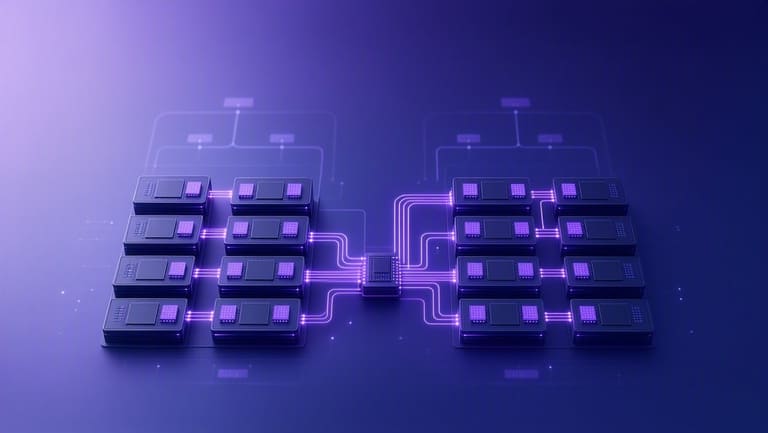
- Advantage: Local RAM access faster (lower latency)
- Advantage: Scalability – more CPUs can be added
- Advantage: Memory bandwidth increases (data transfer speed)
- Disadvantage: Remote RAM access slow (mismanaged)
- Disadvantage: Application/OS must be NUMA-aware
- Disadvantage: Resource imbalance leads to bottlenecks
Scalability, bandwidth efficiency, workload optimization မှာ NUMA architecture ဟာ server workload ဖြည့်နိုင်သည်။ Application/OS မ properly manage မလုပ်ရင် performance loss ဖြစ်နိုင်သည်။
| Feature | NUMA | SMP | Distributed Memory |
|---|---|---|---|
| Memory Access | Local/Fast, Remote/Slow | Equal | Via Network |
| Scalability | High | Limited | Very High |
| Cost | အလယ်အလတ် | Low | High |
| Complexity | High | အလယ်အလတ် | Very High |
NUMA-aware application “design/model optimize” မလုပ်ဘူးဆိုရင် latency, resource fragmentation etc. ဖြစ်နိုင်သည်။
Multi-Processor System Security
Multi-core system သည် performance boost လုပ်တတ်လေတော့ security risk များနဲ့ပါဘယ်လို့နေရင် shared RAM, multi-threading, process privilege escalation, VM escape, side-channel attack များကအသုံးပြုနိုင်တယ်။ Access control, firewall, encryption, security patch, ID verification optimization တွေရပါသည်။
| Threat | Description | Prevention |
|---|---|---|
| Data Race | Multiple CPUs access same data simultaneously | Mutex (Atomic lock), Race condition prevention |
| Unauthorized Access | Privilege escalation, shared resource access | ACL, Authentication Protocols |
| VM Escape | VM accessing host or neighboring VM | Strict virtualization, Patch updates |
| Side-Channel | Leak via CPU power/timing analysis | Encryption, Hardware-level security |
- Update security patches regularly
- Use strong passwords, MFA
- Disable unused services/apps
- Encrypt sensitive data
- Configure firewall, IDS
- Minimize user privilege, access only on need
- Audit security regularly
Phishing ရှာတယ်၊ User awareness သည် technical security မကျော်လွန်နိုင်ပေမယ့် User training နဲ့ together – human error ကိုလည်း “တားဆီး” နိုင်ပါတယ်။ Security is technical+organizational+user-awareness altogether!
NUMA Architecture – အနာဂတ်
| Trend | Description | Impact |
|---|---|---|
| Memory Technology Improvements | HBM, DDR5, high bandwidth memory | Latency reduction, speed increment |
| OS Optimization | Kernel scheduler, memory allocation tuned for NUMA | Application locality maximized |
| Fast Interconnects | Infinity Fabric, NVLink | Data rate, remote RAM access improved |
| AI Workloads | Increasing model/data size | NUMA locality is “essential” for training big data |
- HBM, DDR5 memory modules
- NUMA-aware OS/kernel scheduler
- Fast node links (Infinity Fabric, NVLink)
- AI/ML workload explosion
- Container/VM NUMA integration
- Heterogeneous compute (GPU, FPGA integration)
Open-source OS distros တစ်ချို့သည် NUMA/locality optimization module တွေ cloud workload, AI, virtualization နယ်ပယ်တွင် integrate ဖို့ “community-driven” innovation လုပ်နေသည်။
နိစစ်ချက် – Multi-Core System Setup Tips
| Concern | Description | Best Practice |
|---|---|---|
| Hardware Selection | CPU/Mainboard/RAM compatibility | Use validated hardware combo |
| OS config | NUMA/CPU support enabled | Update, optimize kernel/NUMA |
| Software design | Threaded/NUMA compatibility | Design for multi-core, NUMA locality |
| Monitoring | Performance bottleneck detection | Review, adjust regularly |
- Hardware compatibility check
- Update OS/version, patch
- NUMA enable/configure
- Software/threading optimization
- CPU/RAM/Network monitoring
- Security configuration update
Best Practice: Multi-CPU, NUMA Architecture Setup
System admin/developer တစ်ယောက်အနေနဲ့ job analysis မှ “workload distribution”, NUMA-aware software optimization, RAM locality management, real-time performance monitoring, resource balancing, bottleneck detection – တို့ကို “continuous improvement” နဲ့ လုပ်သင့်ပါတယ်။
- Workload analysis/identification
- Application requirement assessment
- Resource allocation planning
- NUMA/thread locality optimization
- RAM access, caching locality design
- Performance tracking/adjustment
| Aspect | Best Practice | Pitfall |
|---|---|---|
| Workload Analysis | Thorough analysis, detailled requirement | Assumption, ignore real profile |
| Resource Allocation | Allocate on need/locality | Random/unoptimized assignment |
| NUMA Optimization | NUMA-aware, locality-based memory allocation | Ignore NUMA, scatter RAM assignment |
| Performance Monitoring | Continuous review/fix | No monitoring, inefficiency |
System performance ကို maximize လုပ်မယ်ဆိုရင် NUMA-aware OS/module, thread locality configuration, hardware compatibility, workload balancing, continuous monitoring/adjustment process တွေကို “သိမ်းထား” လုပ်သင့်ပါတယ်။
မေးလေ့များ – FAQ
OS က Multi-Processor Support ပေးရတာဘာလဲ၊ အရေးကြီးပဲလား?
Multi-CPU support သည် OS တစ်ခုစီမှာ Parallel processing, Thread distribution, High-load workload balancing ကို execute လုပ်တဲ့ hardware/software synergy ဖြစ်သည်။
NUMA architecture မှ SMP ကိုတစ်ပြိုင်တစ်လက် ဘယ်လိုကွဲပြားသလဲ၊ ကိုယ်တိုင် အကျိုးရှိတယ်လား?
NUMA က SMP နှင့်မတူဘူး – SMP ဟာ Shared RAM pool usage၊ NUMA ဟာ Local RAM optimization ။ High-load workloads မှာ NUMA locality optimization လုပ်ရတယ်။
Linux, Windows Server, ESXi, macOS တို့ NUMA support မယ်ပဲလား?
Linux (Ubuntu, CentOS), Windows Server, VMware ESXi, BSD-based OS များသည် NUMA-aware kernel/config support ပါသည်။ နောက်ဆုံး version ကို update/patch regularly လုပ်ပြီး hardware compatible ဖြစ်ရပါမယ်။
Performance boost ကိုတစ်ကယ်ရဖို့လိုအပ်တဲ့အရာများကဘာရှိသလဲ?
NUMA locality-based RAM allocation, optimized threading distribution, Real-time OS scheduler, efficient workload parallelism, Application architecture optimization နဲ့ hardware compatibility သောပြုပါ။
NUMA architecture က အားသာ/အားနည်းဘယ်လိုရှိလဲ?
NUMA advantage – workload locality, RAM access speed boost။ Disadvantage – misconfigured system, app locality support မရှိလဲ latency ဖြစ်နိုင်တယ်။
Multi-CPU system security အတွက် စိုးရိမ်မယ် အချို့အရာတွေဘာလဲ?
Shared RAM access, VM escape, privilege escalation, side-channel attack, race condition prevention, patch update, MFA, firewall/ACL, user training နဲ့ technical+organizational security နော်။
NUMA Future – သူ့ပုံစံပြောင်းလဲခြင်းတွေ, new technology integration များမှာ?
HBM/DDR5 fast RAM module, new kernel scheduler, AI/ML workload optimize, server workload locality planning, distributed container NUMA integration, FPGA/GPU heterogeneous compute integration နဲ့ open source innovation လုပ်နေတဲ့ community-driven projects တွေပါ။
Multi-CPU, NUMA system ဖန်တီး/ဝယ်ယူမယ်ဆိုသိထားလိုသေးတဲ့အချက်များဘာတွေလဲ?
Hardware compatibility, OS/version update, NUMA setting enabled, Application-NUMA locality design, Performance monitoring, Security best practice တို့ကို “စနစ်” အားဖြင့် correct လုပ်ဖို့အရေးကြီးပါတယ်။