 Afrikaans
 Azərbaycan
 Bosanski
 Čeština
 Dansk
Dansk Deutsch
 English
 Español
 Filipino
 Français
 Hrvatski
 Indonesia
 Italiano
 Magyar
 Melayu
 Nederlands
 Norsk
Norsk Oʻzbek
 Polski
 Português
 Română
 Slovenčina
 Slovenščina
 Suomi
Suomi Svenska
 Tiếng Việt
 Türkçe
 Ελληνικά
 Беларуская
 Български
 Русский
 Српски
 Українська
 עברית
עברית اردو
اردو العربية
 پښتو
پښتو فارسی
فارسی አማርኛ
አማርኛ मराठी
मराठी বাংলা
বাংলা தமிழ்
தமிழ் ไทย
ไทย မြန်မာ
 한국어
한국어 中文
中文 日本語
日本語


ယနေ့ခေတ်မှာ အသုံးပြုသူများသည် မတူညီသော စက်ပစ္စည်းများကနေ အင်တာနက်သုံးကြသောကြောင့် Multi-Device Testing ကို မလွဲမအြုံ လိုအပ်လာပါတယ်။ ဒီဘလော့ဂ်ရင်းမှာ Multi-Device Test ဆိုတာဘာလဲ၊ တိုးတက်လာပုံ၊ မိုဘိုင်း၊ တက်ဘလက်၊ desktop စက်များအတွက် စစ်ဆေးရန်လိုအပ်ချက်များကိုအမြဲလေးစိစစ်လမ်းကြောင်း၊ အသုံးပြုသူအတွက် အကောင်းဆုံးအတွေ့အကြုံပေးနိုင်ရန် Test နည်းလမ်းများ၊ အောင်မြင်မယ့် test လုပ်နည်း၊ အားသာချက်၊ အားနည်းချက်များ၊ ဒေတာအခြေခံ ဆန်းစစ်ချက်နှင့် ရလာသော ရုပ်သက်သက် ရင်းနှီးရမည့်အချက်များကို ဖွင့်ချခြင်း၊ key-point များတွဲ၍ သိမ်းစရာ လမ်းညွှန် Comprehensive Guide ပါပေးဆွေးနွေးထားပါတယ်။ ရည်ရွယ်ချက်ကတော့ မည်သည့်စက်ပစ္စည်းမဆို အဆင်ပြေချောမွေ့စွာ သုံးနိုင်အောင် စနစ်တကျ တိုးတက်စမ်းသပ်တွေ့ရှိအောင်လုပ်ကြရာမှာအငြားအများဆုံးပါ။
Multi-Device Test ဆိုတာဘာလဲ?
Multi-Device Test ဆိုတာကတော့ အပ်လီကေးရှင်း (သို့) ဝက်ဘ်ဆိုဒ်တစ်ခုသည် မတူညီသော စက်ပစ္စည်း (ဥပမာ မိုဘိုင်း, tablet, desktop PC) နဲ့ OS (Android, iOS, Windows, macOS စတာ) သုံးလောက်မှာ သူ့အဆင်ပြေမှု၊ အတည်ပြုမှု၊ အလုပ်ဖြစ်မှုကို စစ်ဆေးခြင်း test ဖြစ်ပါတယ်။ ဒီ test မှာ Screen size နဲ့ resolution တစ်စုစပ် စားစွမ်းအား hardware မတူသည့် စက်များမှာတည်း User Experience တစ်ခု ပြည့်စုံစီမံရေးအတွက် လိုအပ်ပါတယ်။
အဓိကရည်ရွယ်မြားကတော့ application သို့ website သုံးသူတိုင်းနဲ့ အဆင်ပြေတဲ့အတွေ့အကြုံ မည်သည့်စက်ပစ္စည်းတွင်မဆို လက်ခံနိုင်အောင် ထိရောက်စတင်စစ်ဆေးနိုင်တာပါ။ မတူတဲ့ device များတွင် compatibility, performance၊ UI error များ စနစ်တကျတွေ့ရှိနဲ့ပြင်သွားနိုင်ပါတယ်။ ပြုလုပ်သွားတာကြောင် user မန်နေဂျာ များနှင့် app/site စုစုပေါင်း အရည်အသွေး တင်တက်လာနိုင်သည့်အခိုက်အတန့်ကြောင်း။
Multi-Device Test အကြောင်းအရေးပါတဲ့အချက်
- အသုံးပြုသူအတွေ့အကြုံကို တိုးတက်မြှင့်တင် — site/ app မည်သည့် device မှာမဆို အဆင်ပြေစီမံနိုင်၍ သုံးသူများစိတ်ချပါတယ်။
- မွေ့တယ်တဲ့ compatibility ပြဿနာဖယ်ရှား — device & OS မတူပေါ်ပြဿနာတွေတော့ အတည်ပြုပေးနိုင်ပါတယ်။
- Brand reputation များစွာ ထိခိုက်မှုမရှိစေကြောင်း — တစ်စက်တည်းနဲ့အတူ User ထိတွေ့မှု တည်တံ့စေပါတယ်။
- Conversion rate တိုးမြှင့် — site/ app မှာ စတင်ရှိအောင် မတူ device တွေမှာ user ခံစားသည့်အချိန် အမြင့်ဆုံးရနိုင်ပါတယ်။
- Development expense လျော့ပါးမှု — အစပိုင်းမှာ error တွေဖော်ထုတ်ပြင်လို့ နောက်ပိုင်းကုန်ကျမှု တားနိုင်ပါတယ်။
Multi-Device Test တွေကို manual, automation နည်းလမ်းနှစ်မျိုးအနက် စစ်တဲ့ test ပြုလုပ်နိုင်ပါတယ်။ Manual မှာ tester များသည်တစ်စက်စီ စမ်းကြည့် test လုပ်ရင်း၊ automation မှာတော့ predefined scenario များကို script ဖြင့် auto run ချသွားပါတယ်။ နှစ်မျိုးလုံးတွင် အသုံးတည့်နိုင်ချက်၊ အားနည်းချက် ရှိပြီး၊ ထပ်နောက်တန်ဖိုးများနှင့် အခြား test method တွဲသုံးရင် အကောင်းဆုံးအဖြစ်ရနိုင်ပါတယ်။
| Test ကိုင်တွယ်မှု | ဖော်ပြချက် | အကျိုးအမြတ် |
|---|---|---|
| Manual Test | Tester များက စက်ပစ္စည်း မတူ သီးသန့် စမ်းကြည့် စစ်ဆေးပါတယ်။ | အသုံးပြုသူအတန်းအယဉ်အနေအာသာ ဖြစ်ဖို့, complex scenario ဖော်ထုတ်နိုင်မှု။ |
| Automation Test | Scenario script များ ကိုတော့ auto ဖြင့်နောက်တကြောင်း run ချသွားပါတယ်။ | မြန်, နောက်တကြောင်းတည်ဆောက်နိုင်ခြင်း, broad coverage အတွက်အထူးသင့်လျော်။ |
| Emulator/Simulator Test | အနိမ့်မှာ ကောင်းမယ် device ကို virtual မှာ run ဖြစ်ပါတယ်။ | စျေးကြီးမှုမရှိ, device configuration မတူကြည့်နိုင်မှု။ |
| Cloud-based Test | Cloud မှာ run ဖြစ်ပြီး, တကယ်ဆက်နဲ့ device တွေပါပါဝင်ပါတယ်။ | device များစွာလမ်းကြောင်း access, scalability. |
Multi-Device Test သည် ယနေ့ software development life cycle ထဲမှာ အသုံးပြုသူတွေ device မတူ များစွာ သုံးလုံးစားနေရတဲ့နေမှာ မငြယ်မမြှုပ် Critical ဖြစ်ဝင်ပါတယ်။ Test ကိုအချိန်နှင့်တစ်ပြိုင်နက် run ဖြစ်ရင် Launch app ချိန်မှာ User Satisfaction တိုးတက်စေပါတယ်။
Multi-Device Test တိုးတက်လာပုံ
Multi-device test အတန်းက Internet နှင့် mobile tech ကြီးတိုးပျံ့လာပုံကို ဆင်တူတယ်။ အစမှာ site, app တည်း desktop တွေပဲ သုံးစေ။ Mobile device များများလာပြီးနောက်ပိုင်းမှာတော့ screen size, OS, browser combination များတိုးလာလို့ developer တစ်သူက platform မတူစမ်းတဲ့တာဝန်ကြီးလိုအပ်ပေါ်လာတယ်။ ဒီစဉ်ထဲမှာ Multi-Device Test ကို မလွဲမအြုံ လိုအပ်လာစေတယ်။
Test တိုးတက်လာပုံမှာ Manual အစပိုင်းကရင် Automation tool တွေ Cloud-based platform တွေရဲ့ တိုးတတ်လာပုံ ဖြင့် test process တွေ accelerate ဖြစ်လာတယ်။ Continuous Integration (CI) နှင့် Continuous Deployment (CD) methods တိုးလာသည်နဲ့ Multi-device test ကို development cycle တွေနဲ့ ချိတ်ဆက်အသုံးပြုလာပါတယ်။
Multi-device Test Development Stages
- Desktop-centered Development: ခေတ်စဉ်က site, app ကို desktop ပဲ သုံးစေ။
- Mobile Boom: Mobile devices တွေအမြင့်ဆုံးလာတာနဲ့ Screen size နောက်တကြောင်း configure လိုအပ်လာတယ်။
- Manual Test Expansion: အစပိုင်းမှာ device မတူ manual တာမယ် ကျယ်ပြန့်စွမ်းရွေ့ပြင်ဖြစ်တယ်။
- Automation Tool Growth: Accelerate test/development ဖြင့် tool တစ်ခုစု build လုပ်တဲ့နောက်တကြောင်း။
- Cloud-based Platform: Device/browser combination မတူမနိမ့်ေတြ run test နိုင်စေတဲ့ platform တိုးတက်လာတယ်။
- CI/CD: Multi-device Test ကို Integration/deployment process တွေနဲ့ linked သုံးလာတယ်။
အောက်ကအချက်အလက်မှာ Multi-device Test တိုးတက်လာပုံနှင့်ကျော်သော milestones တွေအကြောင်းပါရန်။
| Year | Update | Impact |
|---|---|---|
| 1990s | Web Trend Started | Browser incompatibility issues ဆွဲစေပြီ။ |
| 2000s | Mobile device Spread | Screen size, mobile browser optimized လုပ်ခြင်း။ |
| 2010s | Smartphone Era | iOS, Android OS အားလုံးကို app build/testဖြစ်ပေါ်လို့ developer များနဲ့ test အရေးပါလာတယ်။ |
| 2020s | IoT and Connected Devices | Wearable/Smart device & test process complexity ထပ်တိုး။ |
ယနေ့ခေတ်မှာ Multi-device Test သည် User experience (UX) တိုးတက်မှု၊ app ရှိအရည်အသွေး တိုးမြှင့်မှုအတွက် မလွဲမအြုံ Testing method ဖြစ်ပါတယ်။ Device မတူ User မတူဖြစ်တာနဲ့ ချောချောမွမယ် UX ပေးဖို့အတွက် Multi-device Test ပညာမှတစ်လျှောက် Critical ဖြစ်လာပါတယ်။
မိုဘိုင်း၊ တက်ဘလက်၊ desktop အတွက်လိုအပ်ချက်များ
Multi-device test ကိုအောင်မြင်အောင်ပြုလုပ်ဖို့ device/platform requirement တွေမှာ hardware/software/network/ resolution တစ်စုစပ် သီးသန့်ရွေးချယ်နိုင်အောင်စုစည်းထားရပါတယ်။ မတူ device type တစ်ခုစီပါလေ့လာတာ device များကလည်း ပြီးပြည့်စုံမရ ယုံကြည်နိုင်စေရန် ပါဝင် device လိုအပ်ချက်များကို တစ်စက်စီ သိမ်းဆည်းရွေးမယ်။
အောက်ကအချက်မှာ device မတူ type တွေရဲ့ requirement summary ပါ။ Test strategy တစ်ခုလည်း device selection/test environment တည်ယူသုံးပေးနိုင်ပါတယ်။
| Requirement Type | Mobile | Tablet | Desktop |
|---|---|---|---|
| OS | Android, iOS | Android, iOS, iPadOS | Windows, macOS, Linux |
| Screen Size/Resolution | Various sizes/resolution | Various sizes/resolution | Various sizes/resolution |
| Network Type | Wi-Fi, Mobile Data (3G/4G/5G) | Wi-Fi, Mobile Data (3G/4G/5G) | Wi-Fi, Ethernet |
| Hardware | RAM, Processor, Storage | RAM, Processor, Storage | RAM, Processor, Storage, GPU |
Summary Requirements:
- OS version (Android, iOS, Windows, macOS, Linux)
- Screen size & resolution
- Browser & version (Chrome, Safari, Firefox, Edge)
- Network type (Wi-Fi, Mobile Data, Ethernet)
- Hardware (RAM, Processor, Storage)
- Device orientation (Portrait, Landscape)
Requirements တွေကို arrangement လုပ်ထားမှ test လူကြီးမှာ run မှာစစ်ပေး device & condition သူ့တည်း test ရလာတဲ့ result တွေ အတည်ပြုရှင်းမြောက်စေလို့ automation များမှာ data input အဖြစ် အသုံးပြုနိုင်ပါတယ်။
မိုဘိုင်းစက်အတွက်လိုအပ်ချက်
Mobile test မှာ OS version/model ကြီးမားပြောင်းလဲမှုနဲ့ပတ်သက်စွမ်းရည် require ဖြစ်ပါတယ်။ Plan တစ်ခုမှာ popular model၊ low-end devices ကိုတောင် run test ထည့်သွင်းပါ။ Network condition (weak 3G, high traffic Wi-Fi) တစ်ခုစီမှာ performance ကို test လုပ်ပြီး user actual experience ကိုလေ့လာဖို့လိုအပ်ပါတယ်။
Tablet စက်အတွက်လိုအပ်ချက်
Tablet device တွေမှာ mobile နှင့် desktop ကြားတွေအလယ်ပါ။ Tablet test မှာ screen resolution & orientation (portrait/landscape) သီးသန့်စစ်တင်ပါ။ Multi-touch handling, sensitivity test တွေပါသုံးဖို့လိုပါတယ်။
Desktop စက်အတွက်အထူးလိုအပ်ချက်
Desktop test အတွက် OS မတူ browser version မတူ compatibility ကို ထည့်သွင်းပါ။ Screen resolution, GPU feature သီးသန့်ချိန်ညှိပါ။ Desktop app/ site နှင့်အတူ high-performance task (video editing, gaming) တွေမှာ performance tracking လုပ်ပါ။
အဆင်ပြေစေရန် Multi-device Test သည် User Experience တစ်မျိုးတစ်အမျိုး့နဲ့ stable ဖြစ်အောင်ဆို requirements ကိုစစ်တင်စလို့ user experience ပိုက်ပိုက်တက်လာပါလိမ့်မယ်။
အသုံးပြုမယ့် Test နည်းလမ်းများ
Multi-device Test နဲ့ app/ site သည် မတူကျ device/browser/OS များမှာ correct run ဖြစ်နေဖို့ test method တွေကိုသုံးပါတယ်။ Manual-test, automation, emulator/simulator, cloud-test တို့ကို strategy အဖြစ် run နိုင်ပါတယ်။ Project budget/timeline အပြင် scenario ကြီးမားမွန်မြော်/ပေါဏ္ဏတွေကိုယ့်လိုတင်နည်းမှ အကောင်းဆုံး test method ကိုရွေးဖို့လိုပါသည်။
Manual test — tester များ device/browser မတူ run လုပ်လေ့လာပါတယ်။ User-experience ဖေါ်ချက်ကျယ်ကျယ်နဲ့ complex bugs တွေဖော်ထုတ်နိုင်ပါတယ်။ Downside ကတော့ စဉ်စိစစ်ချက် ၊ အားနည်းသည်၊ time-consuming ၊ inconsistent results ဖြစ်ပါတယ်။
Test Method
- Manual Test — Tester ဖြင့် လက်တွေ့ run စစ်ခြင်း
- Automation Test — Scenario script auto run/schedule
- Cloud-based Test — Cloud device real environment run
- Emulator/Simulator Test — Virtual device/browser run
- Performance Test — device/browser/date ပြောင်းလဲရင် performance tuning test
Automation test — script များ auto run (Selenium, Appium, etc.) ဖြစ်ပါတယ်။ Repeatable task တွေပိုမြန် coverage ပိုတိုးဖို့အစီစဉ်ပါ။ Downside ကတော့ setup/maintenance cost, UX/manual bug detect မဖြစ်နိုင်ခြင်း။
| Test Method | Advantages | Disadvantages |
|---|---|---|
| Manual Test | User-centric, complex bugs detect | Time-consuming, cost, inconsistent results |
| Automation Test | Speed, repeatability, coverage | Setup/maintain cost, UX not covered |
| Cloud-based Test | Diverse device access, scalability | Security risk, requires stable internet |
| Emulator/Simulator Test | Cheap, fast, integration | Doesn’t fully reflect real device behaviour |
Cloud-based test — real device cloud မှာ run test ဖြင့် device/browser variety တွေကို remote run, scale, geo-distributed user simulate လို့ရပါတယ်။ Downside ကတော့ expensive, security headache။
Emulator/simulator test — development early stage မှာ feedback ပိုမြန် device virtualမှာ quick run test ဖြစ်ပါတယ်။ Real device behaviour ကို accuracy မတော်လဲတောင် support/test အနေနဲ့ usefulness ရပါတယ်။
အောင်မြင်မယ့် Multi-Device Test လုပ်နည်းအချက်များ
Multi-device Test ကို target device/browser/OS combination တစ်ခုစီမှာ success ရလာဖို့ Step-by-step Plan, test environment setup, repeatable test script, feedback loop, performance measure တွေကို စနစ်တကျ implement လုပ်ဖို့လိုပါတယ်။
| Tips | Description | Importance |
|---|---|---|
| Strategy Planning | Test coverage/full scenario manually define | High |
| Real Device Testing | Emulator လုံးထက် real device run | High |
| Automation | Repeating test/ daily run schedule | အလယ်အလတ် |
| Performance Tracking | Device/browser combination တွေအတွက် performance measure | High |
Test environment setup မှာ device/browser/OS combination လေး run, network simulation run (slow 3G, high-speed Wi-Fi) လုပ်တာ UX flaw တွေ early detect/resolve ဖြစ်ပါတယ်။
Best Practice Summary
- Scenario ကို advance planning လုပ်ပါ။
- Real device run ချလိုက်ပါ။
- Automation tool တွေကို daily/repeat run schedule လုပ်ပါ။
- Performance test ကို focus လုပ်ပါ။
- Network environment simulation run ဖို့ planning ပါ။
- User feedback ရှုပ်ထွေးမှုကို consider ပါ။
User feedback method (survey, beta test, session recording) တွေကိုအသုံးပြု feedback loop run ချတာ UX flaw တွေ early fix/ improve လုပ်နိုင်ပါတယ်။ Test result analysis/reporting မှာ device combination flaw detect, development team priority assign, improvement loop optimize ရနိုင်ပါတယ်။
Multi-Device Testing အားသာချက်
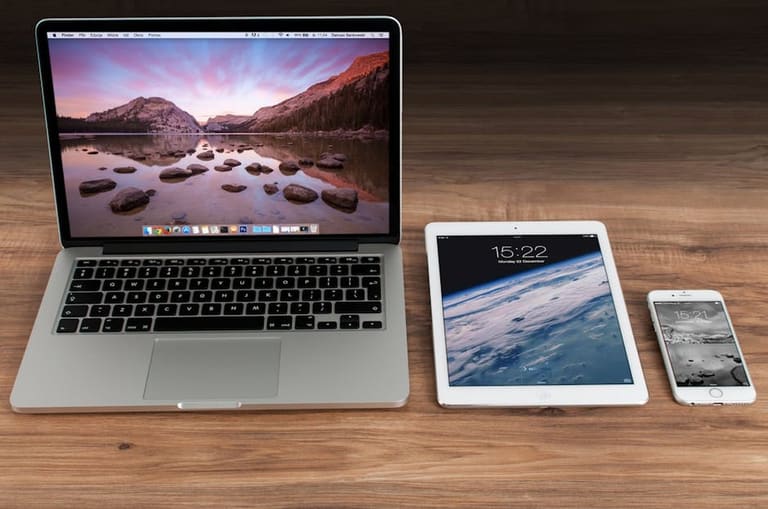
Multi-device Test ကို run လုပ်ခြင်းက ယနေ့ digitize environment မှာ app/site နီးနီးဆက်သွယ် device/browser/OS မတူတွင် run ချားမှ customer loyalty/ satisfaction တက်စေတဲ့ brand image ရရှိပါတယ်။
Development early stage မှမတူ device compatibility flaw detect/resolve, screen/browser/device combination variety performance optimization နဲ့တူ UX/polish result တိုးလာနိုင်ပါတယ်။
Advantages Summary
- Wider audience reach
- Improved customer satisfaction
- Lower development cost
- Strong brand reputation
- Competitive advantage
- Better app/site performance
Multi-device Test (UX improvement) မှာ device/browser/OS မတူတွင် user ထားသုံးမှုမှာ consistent nice experience ဖြစ်သွားစေမယ့် loyalty/ retention တိုးလာနိုင်ပါတယ်။
Multi-device Test (data analysis) မှ popular device/browser/OS insight, flaw detection, device engagement analysis တွေ future dev decision ချိန်ညှိဖို့ guide role ဖြစ်ပါတယ်။
Multi-Device Test အားနည်းချက်
Multi-device Test အစွမ်းပတာကဲ့သို့တောင် complexity/expense performance တိုးလာနိုင်ပါတယ်။ Test environment complexity က device-browser combination ပေါကြွနေတယ်။ Scenario list, resource allocation စနစ်တကျလုပ္မို့ test workloadတိုးလာတယ်။
Expense (cost) တွေအတွက်မတူ device/software/tool purchase/maintenance, expert tester payroll တိုးနိုင် တယ်။ SMB များအတွက် budget constraint ဖြစ်ပါတယ်။ Device license/user fee တွေမှာ total expense တိုးတက်လာတယ်။
Disadvantage Highlight
- High expense: device/tool purchasing & maintenance.
- Time-consuming: Multiple device/OS/platform test cycle.
- Complexity: Scenario/environment management headache.
- Resource required: expert tester & infrastructure needed.
- Inconsistent result: hardware/software variety flaw detect difficulty.
Consistency flaw (device/browser combination result inconsistency) တွေ hardware/software variety ကျယ်နိုင်ပါတယ်။ Test environment precision/ result analysis formula ကို focus လုပ်ပါ။
| Disadvantage | Description | Possible Solution |
|---|---|---|
| High Expense | Device/software/infrastructure cost | Cloud-based test, Open-source tool |
| Complexity | Platform/device combo headache | Automation, centralized test management |
| Time-consuming | Test scenario workload | Parallel testing, CI |
| Inconsistency | Result difference | Standardized env, virtual devices |
Consistency flaw ကို standardized test environment, strict data analysis, virtual device backup run (emulator/simulator) ဖြင့် minimize လုပ်နိုင်ပါတယ်။
Multi-Device Test အတွက် အကောင်းဆုံး လုပ်ဆောင်နိုင်မှု
Multi-device Test အကောင်းဆုံး strategy ဆိုတော့ popular device/browser/OS list ၊ test coverage wide planning ၊ automation/manual loop clear ၊ feedback continuous loop run ချတာပါ။ Target audience device/browser choice ကို priority assign/test run ချမယ်။
| Best Practice | Description | Importance |
|---|---|---|
| Device Variety Selection | Target audience device/browser/OS collect | Critical for wide coverage |
| Test Automation | Repeated scenario run automation tool | Efficiency/accuracy gain |
| Real Device Testing | Run test on real device/browser | Hardware/software compatibility proof |
| Continuous Integration | Embed test into CI/CD cycle | Early flaw detect, steady improvement |
Automation tool (Selenium, Appium) သုံးသူ run schedule ထည့်ပါ။ Manual test flaw detect limitation ကို avoid လုပ်သင့်ပါ။ UX test အတွက် manual test/ human review ဖြစ်ပါတယ်။
Guide Step-by-step
- Target device/browser/OS research
- Test environment setup — real/virtual/cloud device platform
- Test scenario design — wide coverage, screen size, UX combination
- Automation tool configure, repeat run schedule
- Continuous test embed — CI/CD integrate
- Feedback/analysis continuous loop optimize
Data analysis/feedback result သုံးချိန် UX flaw ကို continuous improvement loop run ဖြင့် brand image တိုးတက်၊ customer satisfaction/retention တိုးမြှင့်နိုင်ပါတယ်။
Data Analysis နှင့် အတည်ပြုပေးသောဖန်တီးချက်
Multi-device Test ရလာသည့် valuable data ကို Analysis, summary report တစ်ခုဖြင့် visualize လုပ်ရာမှာ device/browser/OS combination, screen resolution, error rate, load time, user flow, behaviour pattern တို့ကို metric wise analysis လုပ်ပါတယ်။
Common metric (load time, error rate, tap/click, engagement duration) တွေကို display chart/table ဖြင့် flaw/ improvement area ကို identify လုပ်နိုင်ပါတယ်။
| Device | OS | Avg Load Time (sec) | Error Rate (%) |
|---|---|---|---|
| Mobile (Android) | Android 12 | 2.5 | 1.2 |
| Tablet (iPad) | iOS 15 | 3.8 | 2.5 |
| Desktop (Chrome) | Windows 10 | 1.8 | 0.8 |
| Desktop (Safari) | macOS Monterey | 2.0 | 1.0 |
Report prepare ချိန်မှာ non-technical audience တွေတော့ visual/chart/data summary တွေထောက်ထားဖို့ အရေးပါပါတယ်။ Result, flaw point, UX improvement, competitor compare data summary, technical feedback, action suggestion တွေ ပါဝင်ဖို့တစ်ဆုံးသည်။
Result Report Suggestion
- Device/browser/OS performance metric summary
- Error type/frequency log
- User feedback summary
- Reason analysis/solution suggestion
- Report periodic update/share
- Competitor compare insight
Data analysis/reporting method မှ flaw detect, UX improvement, performance optimization, competitive advantage တိုးလာနိုင်ပါတယ်။ Quality multi-device testing guide မှာ accurate analysis/good reporting essentialပါ။
သော Multi-Device Test မှ ရရှိသော အဓိက အချက်
Multi-device Test ကို run လုပ်ခြင်းက ယနေ့ web/app အောင်မြင်မှုမှာ user experience impact လုပ်ပါတယ်။ Result, user-feedback, data analysis မှ flaw/ improvement, action point detect ဖြစ်တယ်။ Device/browser/OS combination ထပ်တိုး user experience flaw ကို target ပေးထားရပါတယ်။
| Test Category | Main Finding | Recommended Action |
|---|---|---|
| Compatibility | Display/layout flaw detected | Responsive design, CSS optimize |
| Performance | Slow load on mobile | Image optimize, cache tune |
| Usability | Navigation flaw on tablet | Touch UI improvement, feedback loop |
| Security | Device-specific vulnerability | Security protocol update, regular scan |
Finding summary ကို dev team အတွက် improvement planning နဲ့ flaw targeting easy path guide ဖြစ်ပါတယ်။ Example: E-Commerce site ပြုလုပ်လာ device/browser combination ထားမှာ product image, payment flaw စစ်တင် improvement လုပ်။ News app browser/device varietyမှာ loading flaw, UX flaw detect မလွဲမအြုံ prioritise လုပ်။
Actionable Advice
- Responsive framework use adapt screen/device variety
- Image/video optimize device/browser combination မှာ loading flaw fix
- User feedback collect analyze/loop run
- Device/browser variety test run
- Security scan run regular flaw fix
- Mobile-first မဟာဗျူဟာ apply optimize UX
Analysis/reporting မှ flaw detect/device/browser/OS combination flaw prioritize/ fix လုပ် />
Multi-device Test ကတော့ strategy invest ကိုတန်တဲ့ brand reputation, customer loyalty, performance improvement, competitive advantage တိုးတက်မှုကျယ်ပြန့်ပါ။
မေးခွန်းများစွာ - FAQ
Multi-device test မှာ ဘာကိုထည့်သွင်းစဉ်းစားဖို့ အရေးကြီးလဲ? Test scope မှာ ဘာတွေပါဝင်သင့်လဲ?
Screen size၊ OS၊ browser မတူ combination မှာ correct UX/visual/layout/function/ performance/security flaw detect လုပ်ပါ။
Manual test vs automation test - ဘယ် method ရော အားသာဲနည်းလဲ?
manual test မှာ UX flaw detect/ unexpected bug detect အရေးပါ။ Automation test တာရှိမှာ repeat/error flaw detect efficiency တိုးနိုင်။ combination run အကောင်းဆုံး။
Emulator vs real device test - ဘာကန်းကြာပါသလဲ၊ ဘယ် scenario မှာဘယ်ခု run ကြိုက်သလဲ?
Emulator test မှာ device/browser behaviour simulate run ဖြစ်ပါတယ်၊ accuracy flaw detect limitation ရှိပါတယ်။ real device test မှာ hardware-specific flaw detect accuracy ပိုတိုးပါတယ်။ Performance, battery, camera functionality တိုင်း run real device necessary။
Performance flaw detection/fix - ဘယ်လိုဆောင်ရွက်ရမလဲ?
Performance flaw က Load test tool, memory profiler, code analysis နဲ့ detect/fix လုပ်ပါ။ Optimize code, compress image, cache tune, server optimize method run ပါ။
Multi-device test tool/platform များ - paid/ free option ကြိုတင်သုံးတယ်လား?
BrowserStack, Sauce Labs, LambdaTest (paid), Selenium, Appium (free) ချဲတယ်။ Budget/requirement ကို device/browser/OS run schedule ပြုလုပ်ပါ။
User experience (UX) evaluation/ user feedback integration — ဘယ်လိုလုပ်သင့်လဲ?
Usability test, A/B test, survey, session record method run UX flaw detect improvement loop တိုးနိုင်ပါတယ်။
Multi-device test frequency — ဘယ်လိုလုပ်သင့်လဲ၊ ဘယ်ချိန် run နည်း?
New feature, design change, OS update, bug fix တစ်ဖွည်း run schedule. CI/CD cycle မှာ code push/merge ခွင့်တက် catch အတွက် automation run.
Test reporting — ဘယ် format run report, ဘာ info important?
Report မှာ device/browser/OS, test scenario, error log, performance metric, solution suggestion summary ပါ သင့်ပါ။ Development team အသေးအစ analyze/fix လုပ်ပါ။