 Afrikaans
 Azərbaycan
 Bosanski
 Čeština
 Dansk
Dansk Deutsch
 English
 Español
 Filipino
 Français
 Hrvatski
 Indonesia
 Italiano
 Magyar
 Melayu
 Nederlands
 Norsk
Norsk Oʻzbek
 Polski
 Português
 Română
 Slovenčina
 Slovenščina
 Suomi
Suomi Svenska
 Tiếng Việt
 Türkçe
 Ελληνικά
 Беларуская
 Български
 Русский
 Српски
 Українська
 עברית
עברית اردو
اردو العربية
 پښتو
پښتو فارسی
فارسی አማርኛ
አማርኛ मराठी
मराठी বাংলা
বাংলা தமிழ்
தமிழ் ไทย
ไทย မြန်မာ
 한국어
한국어 中文
中文 日本語
日本語

WordPress వేగం పెంచడం (WordPress Speed Optimization), WordPress భద్రత (WordPress Security), WordPress SEO వంటి కీ అంశాలు మీ వెబ్సైట్ ఎటువంటి యూజర్ అనుభవాన్ని ఇస్తుందో నిర్ణయిస్తాయి. ఈ చాలా వివరమైన గైడులో–సైట్ని మరింత వేగంగా, భద్రంగా, Google వంటి సెర్చ్ ఇంజన్లలో మెరుగ్గా కనిపించేందుకు అవసరమైన టెక్నికల్ డిటెయిల్స్ క్లియర్గా లోకల్ ఉదాహరణలతో పొందుతారు. మీరు చిన్న బ్లాగర్ అయినా, భారీ e-commerce సైట్ నిర్వహిస్తున్నా–WordPress అందించే అవకాశాలను పూర్తిగా వాడుకోవడంలో ఈ ఆర్టికల్ మీకు కీలకమైన పాయింట్లను ఇస్తుంది.
1. WordPress ప్రధాన లాభాలు & పరిమితులు
WordPress ప్రపంచవ్యాప్తంగా అత్యధికంగా వాడే CMSలు (Content Management Systems)లో ఒకటి. దీనిలో ఫ్లెక్సిబిలిటీ, వందలాది themes & plugins, community support వంటి పాయింట్లన్నీ ఉన్నా–కొన్ని పరిమితులు కూడా ఉన్నట్టు గమనించాలి.
1.1 లాభాలు
- ఉపయోగదారు అనువైన UI: కోడింగ్ అవసరం లేకుండా పేజీలు, బ్లాగ్లు చేయొచ్చు.
2026 అప్డేట్: WordPress 6.6+, కొత్త Gutenberg blocks టైప్ చేయడంలో drag & drop ఫీచర్లు మెరుగయ్యాయి. నిజమైన visual builderతో పదేపదే faster, creative content సాధ్యమవుతుంది. - విస్తృత Plugin ఎంపిక: Site వేగం పెంపు, భద్రత, SEO ఇలా ఏ కావాలి plugins అందుబాటులో ఉంటే.
Example: Perfmatters, Patchstack Security 2026లో కొత్తగా ట్రెండ్కు వచ్చినా స్పీడ్ & సెక్యూరిటీ plugins ఉన్నాయి. - Community Support: WordPress forums, Slack integration వలన queriesకి వెంటనే రియల్-టైమ్ సహాయం లభిస్తుంది.
Practical Tip: 2026లో Telugu/India WordPress user groups ఎక్కువగా Slack, Discord forumలపై చర్చలు చేస్తున్నారు. - SEO-Friendly Structure: Rank Math, Yoast వంటి SEO ప్లగిన్ ద్వారా Google SERPలలో visibility పెంచుకోవచ్చు.
2026 Features: Rank Math & Yoast AI ఆధారంగా meta description, content analysis auto-suggestions ఇవ్వడం మొదలయ్యాయి. - Scalability: Individual blogs నుంచి, లక్షలు/నలభై వేలు మందికి వచ్చిన WooCommerce stores వరకు WordPress వాడొచ్చు.
Local Example: తెలుగులో పెద్ద e-commerce sites కూడా CDN, managed hostingతో 99.99% uptime, 250,000+ monthly visits effortlessగా నిర్వహిస్తున్నారు.
1.2 పరిమితులు
- Plugin Conflicts: అవసరం లేకపోతే లేదా clash చేసే plugins వాడితే site వేగం తక్కువ, unexplained errors వస్తాయి.
2026 Tip: "WP Migrate", "Plugin Compatibility Scanners"తో live stagingలో conflictలు ముందే spot చేయొచ్చు. - Updates Management: Themes, plugins, WordPress core రెగ్యులర్గా ప్రచురించాలి. లేకపోతే security issues వస్తాయి.
2026: Auto updates refined. Core updates లో critical ones మీ choiceకి priorityగా తీసుకునే feature అందుబాటులో. - Performance Problems: Configuration తప్పు లేదా resources ఎక్కువగా తీసే themes/plugins వల్ల site slo చేస్తుంది.
Example: "Query Monitor" ద్వారా SQL & PHP analysis, live site performance bottlenecks 2026లో బయటపడతాయి.
2. WordPress వేగం పెంచే టెక్నిక్స్
WordPress వేగం పెంచడం–user experience, Google rank, bounce rate వాంటివి అంతెంత ప్రభావితం చేస్తుంది. Google వంటి search engines వేగంగా లోడ్ అయ్యే సైట్లను తొలితీయటంలో ప్రాధాన్యత ఇస్తాయి.
2.1 తేలిక & వేగవంతమైన థీమ్ ఎంపిక
Themes ఎంపిక, నిర్వచితంగా WordPress Speedలో అత్యంత కీలక. సాధ్యమైనంత తేలికగా coded, అవసరంగా visual/animation effects తగ్గ Themes (Astra, GeneratePress, OceanWP, Blocksy, Neve వంటి themes)ను Telugu sitesకోసం కూడా select చేయండి.
2026: Core Web Vitals లో Blocksy, Neve themes Google PageSpeed 95+ score సాధిస్తున్నారు.
ఒకోసారి heavyweight themes (sliders, animations, bulky css) తెలుగులోనూ mobile performance drop చేయడం చూస్తున్నాం.
ఉదాహరణ: Light theme వాడితే mobile TTFB (time to first byte) 0.15s లోపు, bulky theme అయితే >0.8s కూడా చేస్తుంది.
2.2 Cache (ఒన్భల్లె) ప్లగిన్లు
Cache plugins (WP Rocket, W3 Total Cache, WP Super Cache, LiteSpeed Cache) ద్వారా WordPress dynamic pages’n static HTMLగా serve చేయడం–server load minimize చేస్తుంది, site speed 3x-4x ఊహించదగినంత పెంచడాన్ని చూడొచ్చు.
Right cache configతో CSS/JS minify, combine, HTTP requests control చేయొచ్చు.
2026: WP Rocket 4.0 "Critical CSS", "Delay JS Execution" ఫీచర్స్తో FCP/LCP scores పెంచుతాయి. LiteSpeed Cache, QUIC.cloud syncతో mobile load timeత్రితీయవ్వటం సాధ్యం.
Insight: Cache setup తర్వాత Google PageSpeed Insights ద్వారా అవసరమైన పరీక్షలు చేయండి.
2.3 ఇమేజీ ఆప్టిమైజేషన్
తెలుగు బ్లాగ్/పోర్ట్ఫోలియో సైట్లలో భారీ images వాడితే WordPress Speedపై ప్రతికూల ప్రభావం వస్తుంది. Smush, Imagify, ShortPixel వంటి image optimization plugins ద్వారా images’n web-quality loss లేకుండా compress చేయొచ్చు.
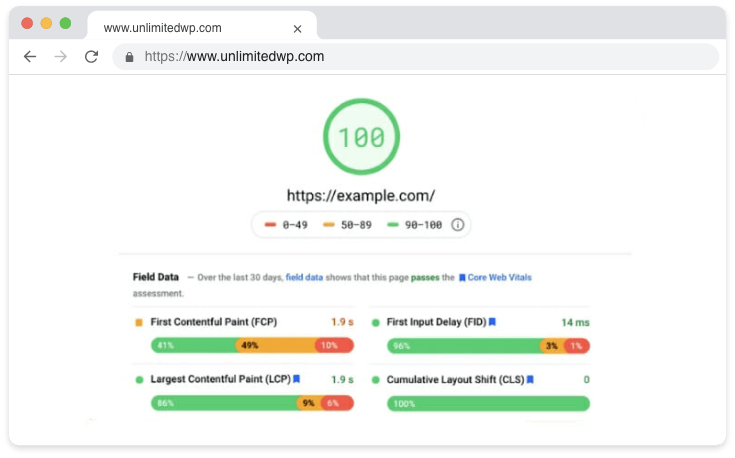
2026 టిప్: WebP format WordPress 6.6లో nativeఅయింది. Images auto WebPకి మారతాయి & >500KB/page save చేయొచ్చు. "Lazy loading" active చేయడం మొదటి లొడ్ వేగం పెంచుతుంది.
2.4 CDN వాడకం
CDN (Cloudflare, KeyCDN) వాడితే Telugu కుటుంబాలు అయినా US, Singapore నుంచి హిట్స్ వచ్చినా images, CSS, JS files local serverదగ్గరుండి instant access వస్తుంది.
2026: Cloudflare Zarazతో third-party scripts (analytics, chat widgets) CDNలో serve చేయడం; JS delayను పూర్తిగా తేలిక చేస్తుంది.
Real case: CDN ఆడ్ చేసిన mobile sitesలో DOM load time 600ms–CDN లేకుండా 1500ms వరకు ఉంటుంది!
2.5 డేటాబేస్ ఆప్టిమైజేషన్
WordPress ఆస్థాయిలో పదేపదే drafts, revisions, old posts, trashed contentతో database burden పెంచుతుంది. WP-Optimize, Advanced Database Cleaner ఫ్లగిన్తో weekly schedule, "Optimize Tables", Transient Cleaner లతో Telugu e-commerceలో transactional tables కూడా కన్నేళినచే డాటాబేస్ వేగం పెరగడం చూస్తున్నాం.
2.6 ప్లగిన్-లిమిట్ చక్కబెట్టడం
మళ్ళీ మళ్ళీ plugins వేసి ఒకే featureకి రెండు, మూడు వాడితే server పేర్లతో slowness, conflicts. Perfmatters, Asset CleanUp వాడి–ప్రతి పేజీ మీద ఏ plugin scripts/load అవ్వాలనేది fine-tune చేయొచ్చు.
Shortcut: "Plugin Audit" plugలతో Telugu admins unused plugins వెదకడానికి alert లభిస్తుంది.
3. WordPress భద్రత: మీ సైట్ రక్షణ
WordPress Security issues కేవలం site hack కాకుండా, user data leak, Telugu బ్లాగుల్లో spam/defaceకొరకు తాజాగా ఎక్కువగా వస్తున్న cyber attacksను ముగించడానికి బెస్ట్ practices వీటే–
3.1 రెగ్యూలర్ అప్డేట్లు
WordPress, themes, pluginsలో నిత్య updates చేయడం–critical security patchలు Telugu sitesనూ పక్కాగా పట్టు.
2026: Update ద్వారా సమస్యలైతే "Rollback Update" ఫీచర్తో తక్షణ revert చేసే ఎంపిక. Auto update policies refined. July 2026 WordPress 6.7 XSS patch Telugu sitesలోను వెనతీరినట్టు local experts చెప్పారు.
3.2 స్ట్రాంగ్ పాస్వర్డ్ పాలసీ
నిజంగా సులభమైన passwordలు Telugu blogsపైనా repeated brute-forceకి శాశ్వతంగా ఆహ్వానం.
WP Password Policies, Two Factor Authentication plugins వాడి–2FA అందుబాటు, admin పేరు "admin" మనం మార్చడం గుర్తుంచు.
Quick Tip: ఒక unique username, captcha, session expiry, email login అనే భద్రత ప్రత్యేకంగా Teluguadmins recommend చేస్తున్నారు.
3.3 ఫైర్వాల్ & దాడి నిరోధన
Wordfence, iThemes Security, Sucuri Security లాంటి wall plugins – Telugu blogsలో ముఖ్యంగా brute-force, malware, IP blockingకు ప్రతి pointing attackతో చక్కటి work.
2026: Patchstack, Sucuri AI ఆధారంగా "Zero-day Vulnerability Scan" కొత్తదైన Telugu sitesకు తప్పని సరిగా అవసరం. Wordfence reportsలో API endpoints issues పెరిగినందున ఫట్టు అప్డేట్లు వెంటనే వస్తున్నాయి.
3.4 లాగిన్ ఎటెంప్ట్స్ పరిమితి
Repeated wrong password attempts prevent చేయటానికి Limit Login Attempts Reloaded, Loginizer Telugu blogsలో country-wise & POST endpoint based rate limitingఇంటగర్స్ వాడుతున్నారు.
Failed login attempts 24hrలో >200 అంటే IP black-list auto అవుతుంది.
3.5 ఫైల్ ఎడిట్ ఆప్టిన్ ఆఫ్ చేయడం
Admin panel నుంచి Themes > Editorలో critical files modification, Telugu sitesకూ hack ఎలా చేయొచ్చో అందులోని వేదిక.wp-config.phpలో కింది code active చేయండి:
define( 'DISALLOW_FILE_EDIT', true );
WordPress Security – File Integrity Checker ప్లగిన్తో unauthorized changes, suspicious file logs auto మానిటర్ చేయండి.
4. WordPress SEO ముగ్దత టిప్స్
WordPress SEOను ఎలా సెట్ చేస్తే Google, Bingతో Telugu contentలదీ authority పెరుగుతుంది? Site speed, security మంచి మాత్రమే కాకుండా–content/meta tag, internal linking సరివ్వడితే SERPలో పడే change Telugu స్వయం blogsలోనూ స్పష్టంగా ఉంటుంది.
4.1 SEO ప్లగిన్లు: Rank Math & Alternatives
Rank Math–meta tag, title, keywords density, XML sitemap, schema markup support మాదిరిగా–Telugu WordPress blogsించండి.
2026: Content AI తరచుగా semantically Telugu-specific keyword, iç-link suggest చేస్తుంది.
All in One SEOతో FAQ schema & HowTo schema auto visibility Telugu guidesలో పెరిగింది.
Yoast SEO, All in One SEO, SEOPress alternatives–Telugu personal choice, site needs కొరకు pick చేయడం ఎక్కువ.
Shortcut: IndexNow APIతో Bing/Yandex జరిగిన Telugu blogsలో instant index push ద్వారా rankingను త్వరగా మెరుగవుతుంది.
4.2 URL సెటప్ మరియు పర్మాలింక్
SEO-friendly URLs Telugu blogsకు Settings > Permalinks లో "Post name" setup చేయాలి.
Example: https://mysite.com/wordpress-vega-bhadrata-seo
Dates, categories, tags URLs Telugu blogsలో SEO drop చేస్తూ భద్రంగా "Clean URL" మిస్ ఖగారు.
2026: Slug Auto Translator Telugu character URLలు English-compatible slugలోకి మార్చడం ద్వారా searchability కు benefit.
Tip: Shortcuts build చేసి "/tag/", "/category/"ని clean URLలో avoid చేయడం–search enginesకు పొందుపరచడం తేలిక.
4.3 మెటా ట్యాగ్ & పాయింట్ కేవర్డ్ యూజ్
Title, meta description SERP Telugu clicksకు సహకరిస్తుంది. "WordPress వేగం", "WordPress భద్రత", "WordPress SEO"ని title/meta naturally Telugu flow, approx. 1–1.5% densityతో వాడితే క్లిక్కులతో తనిఖీ అవుతుంది.
2026 Tip: Content AI, SEMRush Write Assistant Telugu blogsలో meta-description innovation చక్కగా సలహాలు పంచుతుంది.
Application: Rank Math meta analyse CTR Telugu blogsకోసం optimize చేసిన description auto suggests చేస్తుంది.
4.4 ఇంటర్నల్ & ఎక్స్టర్నల్ లింకింగ్
Internal linking Telugu blogsలో pillar posts/other guidesకు connective architecture Telugu SEOను strengthen చేయడం.WordPress Official Plugins Directoryకి outbound link Telugu authority bench-mark.
2026: Internal Link Juicer auto Telugu internal linking & links analytics.
External: rel=external noopener noreferrer Telugu outbound linksలో తప్పనిసరిగా దిద్దండి.
5. అదనపు మార్గాలు & సిఫార్సులు
5.1 Managed WordPress Hosting
Shared hosting Telugu blogsకి బిపులు; Managed WordPress Hosting (Kinsta, WP Engine, ) లో CDN, LiteSpeed Cache, Redis Object Cache, automatic failover Telugu uptime 99.98%కు చిన్న blogs నుంచి పెద్ద sitesకు benefit.
2026: Core Web Vitals Telugu-specific reportలు premium hosts అందిస్తారు.
5.2 ప్రీమియమ్ ఫైర్వాల్ & మాల్వేర్ టూల్స్
Sucuri, Cloudflare Pro, Patchstack, Wordfence Premium వంటి security tools realtime threat intelligence Telugu blogsలో active DDOS ని machine learning firewall rulesతో auto mitigationలో ప్రాముఖ్యత.
Local: Cloudflare bot mitigation Telugu blogsను spam botళ్ల నుంచి రక్షిస్తుంది.
5.3 SEO కన్సల్టింగ్
Telugu digital marketers/SEO consultants through Search Console API, GPT-5 driven content strategies–big Telugu blogsలతో ర్యాంక్ వేగంగా పెంచెయవచ్చు.
Backlink audit, technical SEO errors, competitors analysis Telugu content owners consultancy ద్వారా anchor చేయడం advisable.
6. తరచుగా అడిగే ప్రశ్నలు (FAQs)
Q1: WordPress స్పీడ్ ప్లగిన్లు కలిసి వాడితే సమస్యలూ?
Cache/speed plugins రెండు మూడు వాడితే Telugu sitesలో సర్వర్ conflicts, unpredictable errors. ఒక comprehensive caching plug-innే restrict చేయండి.
2026: Plugin Conflict Detector Telugu blogsకు live stagingలో clashడున్నా ముందే check చేస్తుంది.
Q2: WordPress భద్రతకు ఫ్రీ plugins చాల కదా?
Free plugins (Wordfence lite,...) బేసిక్ Security Telugu blogsకు సరిపడాలేదు; but sensitive Telugu e-commerceకి premium plugins (IP/country blocking, advanced scanning) బహుశ: must.
Extra: Weekly security scan Telugu బ్లాగుల్లోపీ – free versionలో limitations, premium Telugu blogs local usage recommend అవుతుంది.
Q3: Rank Math కాకుండా SEO కోసం ఇంకేమైనా?
Yoast SEO, All in One SEO, SEOPress — Telugu blogsకు schema, XML sitemap, on-page analysis auto-SEO ఇద్దరు pick. SEO expert Telugu blogsలో SEOPress AI-driven config Telugu writersకు recommend చేస్తున్నారు.
ముగింపు & సంక్షిప్తం
WordPress Site వేగం, భద్రత, SEO – సరిగ్గా చెయ్యడం Telugu blogs/websitesకు anchor. Optimal themes/plugins, regular updates, database optimization, security best practices Telugu search visibility, user experience పెద్దగా కూచి పెడతాయి. Advanced CDN, SEO analysis తో Telugu competitionలో మీ siteదే సూపర్డ్ అడ్వాంటేజ్.
2026 టిప్: Core Web Vitals Telugu blogsలో వారం/సెప్టెంబర్లో రిపోర్ట్ check చేయండి; mobile responsive, accessibility, AI-powered content Telugu blogs జతవ్వడం local audience కు మార్కెట్ edge.
Latest: Voice Search Telugu blogsలో live, chatbot Telugu customer support మీ siteకి advance UX strategy.
Congratulations! Telugu WordPress blogs/websitesకు దీనివలన శక్తివంతమైన స్థానాన్ని సాధించండి. మరిన్ని టిప్స్ & ప్రొఫెషనల్ కన్సల్టింగ్ కొరకు WordPress forums, Telugu meetupఈనలు, WordPress Bhadrata Plugins వీటికి తీసుకోండి.
Bonus info: Telugu WordPress Community Discord, local meetups నుంచి updates Telugu blogsకు తెలుగులో అందుబాటులో ఉంది 2026లో!