 Afrikaans
 Azərbaycan
 Bosanski
 Čeština
 Dansk
Dansk Deutsch
 English
 Español
 Filipino
 Français
 Hrvatski
 Indonesia
 Italiano
 Magyar
 Melayu
 Nederlands
 Norsk
Norsk Oʻzbek
 Polski
 Português
 Română
 Slovenčina
 Slovenščina
 Suomi
Suomi Svenska
 Tiếng Việt
 Türkçe
 Ελληνικά
 Беларуская
 Български
 Русский
 Српски
 Українська
 עברית
עברית اردو
اردو العربية
 پښتو
پښتو فارسی
فارسی አማርኛ
አማርኛ मराठी
मराठी বাংলা
বাংলা தமிழ்
தமிழ் ไทย
ไทย မြန်မာ
 한국어
한국어 中文
中文 日本語
日本語

Punjabi ਹੋਸਟਿੰਗ (web hosting) ਦੁਨੀਆਂ ਵਿੱਚ, ਪਰੋਫੈਸ਼ਨ ਤੇ ਸਹੁਲਤ ਵਾਲੇ directadmin install ਪ੍ਰੋਸੈਸ ਆਗੇ-ਹੋ ਰਹੇ। DirectAdmin settings (ਸੈਟਿੰਗ) ਅਤੇ ਵੱਖ-ਵੱਖ configuration ਤਰੀਕਿਆਂ ਦੀ ਵਿਸਥਾਰ ਵਾਰ ਜਾਣਕਾਰੀ ਇਸ guide ਵਿੱਚ ਮਿਲੇਗੀ। ਨਾਲ-ਨਾਲ directadmin panel ਵਰਤਣ ਦੀਆਂ ਕਈ ਖ਼ਾਸ ਚਲਨੀਆਂ, ਲਾਭ-ਘਾਟ, alternative ਹੱਲ ਅਤੇ ਆਮ ਸਵਾਲਾਂ ਨੂੰ detail ਵਿੱਚ ਚਰਚਾ ਕਰਾਂਗੇ, ਤਾਂ ਜੋ ਤੁਸੀਂ ਚੁੱਕ-ਕੂਕ hosting management ਦਾ ਅਨੁਭਵ ਹਾਸਲ ਕਰ ਸਕੋ।
DirectAdmin ਕੀ ਹੈ ਅਤੇ ਇਹ ਕਿਉਂ ਚੁਣਿਆ ਜਾਂਦਾ?
DirectAdmin, web hosting ਦਾ management ਕਰਨ ਲਈ ਵਰਤਿਆ ਜਾਂਦਾ ਇੱਕ secure ਤੇ user-friendly directadmin panel ਸੌਫਵੇਅਰ ਹੈ। Linux-ਬੇਸਡ ਸਰਵਰਾਂ ਉੱਤੇ ਖਾਸੇ ਤੌਰ ਤੇ popular। Usability, low resource use ਤੇ plugins ਦੀ ecosystem, ਇਸਨੂੰ developers ਅਤੇ sys admins ਲਈ favourite ਬਣਾਉਂਦੇ ਹਨ।
- ਖੂਬੀ ਵਾਲਾ UI: Panel design, ਨਵੇਂ users ਤੇ ਹੋਰ admins ਲਈ hassle-free & easy.
- ਸੋਖਾ ਇੰਸਟਾਲ: DirectAdmin install steps, step-by-step, beginner friendly process.
- Features: Email management, DNS config, Database control—ਸਭ ਕੁੱਝ ਇੱਕ panel 'ਚ.
- Resource use: DirectAdmin low RAM ਤੇ CPU consume ਕਰਦਾ, server speed steady ਰੱਖਦਾ।
DirectAdmin ਇੰਸਟਾਲ ਤੋਂ ਪਹਿਲਾਂ ਤਿਆਰੀ
ਸਮਝਦਾਰੀ ਨਾਲ directadmin install ਕਰਨ ਲਈ, ਪਹਿਲਾਂ ਕੁਝ configurations check ਕਰ ਲਉ। ਠੀਕ planning, time save ਕਰਦੀ ਤੇ errors ਰੋਕਦੀ।
ਸਰਵਰ ਲੋੜਾਂ
DirectAdmin normally CentOS, CloudLinux, Ubuntu ਜਾਂ Debian distributions 'ਤੇ best ਚੱਲਦਾ। Minimum server requirements OS ਤੇ hosted site size ਉੱਤੇ depend ਕਰਦੇ ਹਨ, ਪਰ ਕੱਲ below points ਧਿਆਨ ਵਿੱਚ ਰੱਖੋ:
- CPU ਅਤੇ RAM: user count ਦੇ ਹਿਸਾਬ ਨਾਲ ample ਹੋਣੇ।
- Storage: SSD/NVMe ਜਾਂ fast disk use ਕਰੋ।
- Internet bandwidth: panel fast use ਲਈ connection strong ਹੋਵੇ।
- Firewall: install time ਵਰਤਿਆ ports open ਹੋਣ।
IP Address ਤੇ Licensing
DirectAdmin, license based panel ਹੈ। ਹਰ directadmin panel install ਲਈ stable IP ਤੇ valid license must। License key ਲੈਣ ਤੋਂ ਬੱਅਦ directadmin settings 'ਚ add ਕਰ ਸਕਦੇ ਹੋ।
DirectAdmin ਇੰਸਟਾਲੇਸ਼ਨ Steps
Server ready ਹੋਵੇ ਤਾਂ, ਇਹ steps follow ਕਰ ਕੇ ਆਪਣਾ directadmin install complete ਕਰ ਸਕਦੇ ਹੋ:
1. System update
Linux distro ਹਿਸਾਬ ਨਾਲਉ, ਸਭ packages update ਕਰੋ। ਜਿਵੇਂ CentOS ਉੱਤੇ:
yum update -y
2. Required packages install
DirectAdmin ਨੂੰ proper ਕੰਮ ਕਰਨ ਲਈ, libs ਤੇ packages install ਹੋਣੇ। Commandline install ਜਾਂ install process 'ਚ auto install option ਮਿਲ ਜਾਂਦੀ। Always docs ਤੇ server needs check ਕਰੋ।
3. DirectAdmin Install Packet Download
DirectAdmin.com ਤੋਂ official setup files ਲਵੋ (external link)। SSH ਤੋਂ download setup.sh script:
wget https://www.directadmin.com/setup.sh
chmod +x setup.sh
./setup.sh
4. License ਅਤੇ Settings Info Type ਕਰੋ
Installer ਤੁਹਾਡੇ license ਜਾਂ main directadmin settings ਲੈਣਗਾ। IP, hostname, DNS info crucial, ਸਾਰਾ data accurate ਭਰੋ।
5. Services Configuration
Install finish ਹੋਦੇ, email services, DNS, database, firewall by default configurated ਹੋ ਜਾਂਦੇ। Customize ਕਰ ਸਕਦੇ ਹੋ—ਜੇ plugin enable ਕਰਨਾ, PHP version switch, etc.
Example Install Scenario:
ਮੰਨੋ ਤੁਸੀਂ PHP 8.1 ਤੇ MySQL 8 use ਕਰਨਾ ਚਾਹੁੰਦੇ ਹੋ। Install wizard time, ਵਰਜਨ select ਕਰਕੇ default configs ready ਕਰ ਸਕਦੇ ਹੋ। Baad, special php.ini ਜਾਂ MySQL configs ਨਾਲ tuning/optimization ਵਾਸਤੇ system 'ਚ change ਕਰ ਸਕਦੇ ਹੋ।
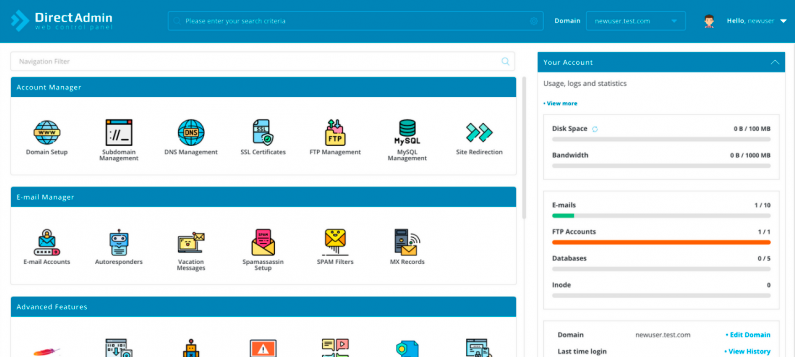
DirectAdmin Settings: Panel Insights
DirectAdmin settings 'ਚ ਕੰਮ ਸੋਖਾ ਬਣਾਉਣ ਵਾਲੀ ਕਈ choices ਹਨ। Accurate settings, hosting management secure ਤੇ smooth ਬਣਾਉਂਦੇ ਹਨ।
DNS Management
Default ਤੌਰ ਤੇ, DirectAdmin ਆਪਣਾ DNS server active ਕਰਦਾ। ਜੋ ਕੀਤਾ external DNS use ਨਹੀਂ ਕਰ ਰਹੇ, panel ਦੀ DNS UI 'ਚ ਅੱਗੇ A, MX, CNAME, TXT etc ਦੀ entries change ਕਰ ਸਕਦੇ ਹੋ।
Email Settings
Email create ਕਰਨਾ, spam filtering, forwarding—directadmin panel ਤੋਂ ek-click manage। Spam prevention ਵਾਸਤੇ add-ons use ਕਰਨ ਦੇ config ਨਾ ਛੱਡੋ।
Database Management
DirectAdmin, MySQL/MariaDB integration ਨਾਲ ਆਉਂਦਾ। Users ਲਈ ease 'ਚ databases ਬਣਾਉਣ ਦਾ option: phpMyAdmin ਉੱਤੇ ਏਕਸਾਥ ਕੰਮ ਹੋ ਜਾਂਦਾ।
Firewall ਤੇ Security
Built-in security features ਦੇ ਨਾਲ, CSF (ConfigServer Security & Firewall) ਵਰਗੇ security plugins ਜੋੜ ਸਕਦੇ ਹੋ। Panel ports manage, attack blocking, protection—ਸਭ ਕੁਝ comfort ਨਾਲ।
Advantages ਅਤੇ Disadvantages
DirectAdmin ਦੀਆਂ ਕੁੱਝ ਸਰਵਣੀਆਂ ਤੇ weaknesses ਹਨ—ਇਨਾਂ ਨੂੰ ਪੂਰੀ ਤਰ੍ਹਾਂ ਜਾਣ-ਕਰਕੇ panel fit ਹੋਣ ਦਾ final decision ਲਓ।
Advantages
- Resource Use: Similar panels ਨਾਲ compare ਕਰਕੇ, RAM ਤੇ CPU use ਘੱਟ।
- UI: Simple, intuitive panel—new admins/fresh users ਲਈ adapt easy।
- Expandable: Features ਤੇ plugins, ਲੋੜ ਮਤਾਬਕ add-on ਕਰ ਸਕਦੇ ਹੋ।
- Cost: cPanel/Plesk, etc ਦੀ cost ਨਾਲ compare, license cheaper।
Disadvantages
- License Required: Free panel ਨਹੀਂ, extra expense ਲੱਗਦਾ।
- Plugins: cPanel level plugin ecosystem ਨਹੀਂ (though improving).
- Docs: Official docs ਕਈ ਵਾਰੀ short; community help ਲੈਣੀ ਪੈਂਦੀ।
Alternative Methods ਤੇ Solutions
ਹੋ ਸਕਦਾ directadmin install best match ਨਹੀਂ; ਹੋਰ panel try ਕਰ ਸਕਦੇ ਹੋ:
- cPanel & WHM: Most famous, but costly licenses।
- Plesk: Windows/Linux support, features heavy, control panel।
- VestaCP, CyberPanel: Open-source free options (sometimes limited support/features)।
Example Application Scenario
ਮੰਨੋ ਇੱਕ hosting company ਹੋ, ਨਵਾ ਟਰਮੀਨ DirectAdmin install ਕਰਨਾ। ਤੁਸੀ directadmin panel clients ਵਾਸਤੇ deploy ਕਰ ਰਹੇ ਹੋ। Install complete ਕਰਨ ਤੋਂ ਬਾਅਦ, Apache, Nginx, PHP, etc ਅਕੈਡਮਿਕ ready। Specific needs ਵਾਸਤੇ DNS records change, SSL certs ek-click add, DBs manage—all in panel। Optimal speed, best usability possible।
Website security ਨੂੰ cover ਕਰਨ ਵਾਲਾ lehja ਵੀ check karo—DirectAdmin ਵਰਤਣ ਨਾਲ cyber attack risks minimize ਕਰ ਸਕਦੇ ਹੋ ().
ਅਕਸਰ ਪੁੱਛੇ ਜਾਂਦੇ ਸਵਾਲ
Q1: DirectAdmin install ਕਿੰਨਾ time ਲੈਂਦਾ?
Well-prepared server ਤੇ directadmin install usual 15–30 min 'ਚ done। ਮਸ਼ੀਨ speed, internet, package updates ਤੇ depend।
Q2: DirectAdmin settings ਨਾਲ security ਵਧਾਈ ਏ?
CSF firewall, tough password, subdomain configs ਤੋਂ directadmin settings ਨਾਲ security upgrade। Regular backup best practice data save ਲਈ।
Q3: DirectAdmin panel license cost ਕਿਵੇਂ count ਕਰਦੇ?
DirectAdmin panel license pricing mostly monthly/yearly subscription। Service package ਤੇ IP count ਮਤਾਬਕ price change। Bulk licenses economy offer ਕਰਦੇ।
Ending
ਇਸ ਲੇਖ ਵਿੱਚ directadmin install ਤੇ directadmin settings detail ਨਾਲ explained। Learning curve easy, resource use low, especially small ਤੇ mid size business ਲਈ DirectAdmin best pick। Large projects/advanced needs ਹੋਣ ਤੇ other panels ਵੀ consider ਕਰੋ। Overall, DirectAdmin ਦੀ user-friendly UI, fast setup, security/performance mix ਵਧੀਆ solution ਦੇਂਦੇ। Install steps proper follow ਕਰੋ, directadmin panel 'ਚ ਗੱਲ-ਬਾਤ- hosting management total comfort ਨਾਲ ਹੋ ਜਾਂਦੇ।