Afrikaans
 Azərbaycan
 Bosanski
 Čeština
 Dansk
Dansk Deutsch
 English
 Español
 Filipino
 Français
 Hrvatski
 Indonesia
 Italiano
 Magyar
 Melayu
 Nederlands
 Norsk
Norsk Oʻzbek
 Polski
 Português
 Română
 Slovenčina
 Slovenščina
 Suomi
Suomi Svenska
 Tiếng Việt
 Türkçe
 Ελληνικά
 Беларуская
 Български
 Русский
 Српски
 Українська
 עברית
עברית اردو
اردو العربية
 پښتو
پښتو فارسی
فارسی አማርኛ
አማርኛ मराठी
मराठी বাংলা
বাংলা தமிழ்
தமிழ் ไทย
ไทย မြန်မာ
 한국어
한국어 中文
中文 日本語
日本語

Hello everyone! If you’re looking for a comprehensive guide for setting up your Minecraft server, you’re in the right place! Whether you want to enjoy Minecraft in the comfort of your home or in professional environments with friends or gaming communities, setting up a Minecraft server can take your experience to another level. In this article, we will explore the hardware and software requirements, various setup alternatives, tips for managing your Minecraft server, and the advantages and disadvantages step by step. If you’re ready, let’s get started!
What is Minecraft Server Setup?
While Minecraft itself offers an incredible experience, setting up a personal Minecraft server takes the game to a whole new level. Whether you’re playing with a close group of friends or catering to a larger community, running your own server grants you unparalleled freedom and control. For instance, you can set your own rules, install plugins to add new features to the game, and create different worlds to unleash your creativity.
In summary, Minecraft server setup is a fantastic way to personalize the game and enhance social interaction. However, you should keep in mind that there are specific requirements you will need to meet. What are these requirements and how should you plan for them? We will answer these questions later in the article!
Necessary Steps and Preparations
If you are new to setting up a Minecraft server, following the right steps can help you save both time and energy. First, it is essential to decide which version you want to use (Java or Bedrock). The Java version typically offers more customization options, while the Bedrock version stands out for its cross-platform support.
Hardware Requirements
To run a Minecraft server, you will need either a powerful computer or a rented server. Recommendations for CPU, RAM, and storage are generally as follows:
- Processor (CPU): Choose a high-frequency processor with at least 2 cores. The importance of processing power increases as the number of players increases.
- RAM: For a Minecraft server, a minimum of 2–4 GB of RAM is generally recommended. If player counts are high or you are using heavy mods/plugins, you can aim for 8 GB or more.
- Storage: Using an SSD is advantageous. High read/write speed SSDs allow the game to run more smoothly.
Software Requirements
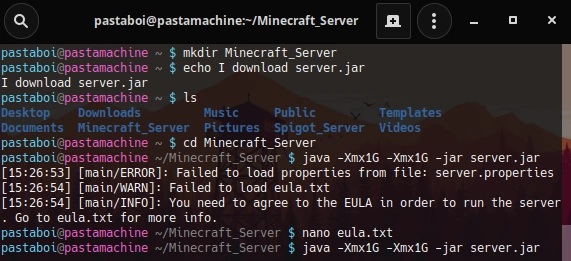
For Minecraft server setup, you will need installations like Java Runtime Environment (JRE) or OpenJDK. You can download the official server files (server.jar) from Minecraft's official site. Then, basically, follow these steps:
- Download the server files.
- Configure the settings in the server.properties file to your liking (port, world name, etc.).
- Don’t forget to change the value in the EULA (End-User License Agreement) file to true to indicate your acceptance.
- You can use a command like
java -Xmx1024M -Xms1024M -jar server.jar noguito start the server.
If the server is running successfully after setup, you will see specific log messages on the console. You can also start adding the desired plugins at this stage.
Different Server Types and Advantages
When we talk about Minecraft servers, it’s not just about vanilla (unmodified) versions. There are various server bases like Spigot, Paper, and Bukkit. These versions allow you to add extra features to the game or improve performance through plugins. Below are some types you can find:
- Vanilla Server: Provides the complete original Minecraft experience. Ideal for those who do not want to use a different structure than the official server.
- Bukkit/Spigot: Offers an expandable structure with plugins. Known for user-friendly plugin management and community support.
- Paper: A fork of Spigot, it provides high performance and optimization. Preferred for large player communities.
- Forge: Focuses on mods. Perfect for those who want to add entirely new blocks, creatures, or mechanics to the game.
Minecraft Server Setup: Advantages and Disadvantages
Setting up a Minecraft server offers many advantages, but like everything else, it comes with its disadvantages. Here are some key points to consider:
Advantages
- Freedom: You can set the game rules, add mods and plugins as you please.
- Sharing and Community: You can share your server not just with friends but also with global players to make new friends.
- Opportunity for Development: Through plugins and mods, you can elevate your creativity and have different experiences.
- Scalability: You can upgrade your hardware or server configuration whenever you want.
Disadvantages
- Cost: Powerful hardware or renting server services can be economically challenging.
- Technical Knowledge Requirement: Server settings, mod installations, and troubleshooting may require technical knowledge.
- Management Difficulty: As the number of players increases, you may need to invest more effort and time in managing your Minecraft server.
- Security Risks: Running a publicly accessible server can expose you to issues like DDoS attacks or unauthorized users.
Minecraft Server Management
After setting up a Minecraft server, one of the most important steps is establishing a solid management structure. This point includes not just maintaining server performance but also enhancing user experience. Minecraft server management encompasses various areas such as regular backups, updates, moderation, and security.
Security Measures
When it comes to Minecraft server management, security should always be a priority. To protect player data and prevent cheating, you can implement the following steps:
- Secure Passwords: Use strong, randomly generated passwords for your server management panel and FTP accounts.
- Updated Plugins: Regularly update server plugins to prevent security vulnerabilities.
- Firewall and Anti-DDoS: Set up firewall settings to protect your server and opt for a provider offering anti-DDoS services if possible.
- Whitelist: Using a whitelist system where only approved users can access the server helps block unwanted entries.
Backups and Updates
Having a current backup on hand is crucial when unforeseen issues or data loss occurs. Therefore, automating your backup processes is the best approach. Additionally, keeping your server updated by monitoring new releases and plugin updates from Minecraft can optimize performance and close security gaps.
Furthermore, checking out similar guides on the site can make your job easier. For instance, referring to another guide on the site can provide server optimization tips.
FAQ (Frequently Asked Questions)
- I only have basic technical knowledge; can I set up a Minecraft server?
Yes, even with basic technical knowledge, you can easily set up the server by following the steps. There are many resources and community support available online. - Is Minecraft server management difficult?
The difficulty level varies depending on the size of the server and the plugins used. Initially, setting up the basic configurations will suffice. As you gain experience over time, you can manage it more professionally. - What plugins can I use on my server?
It varies based on the server type. If you are using Spigot or Paper, there are many available plugins. You can find source codes and download options on related community websites or GitHub.
Conclusion
In this guide, we have attempted to share valuable information ranging from the fundamentals of Minecraft server setup, its advantages and disadvantages, to methods of managing your Minecraft server and security aspects. With the right hardware and software settings, you can create a smooth Minecraft server setup for your friend group or a large participant community. As long as you prioritize regular updates, plugin monitoring, and backups, you can be assured of a successful server experience in the long run. Remember: shaping the world of Minecraft is completely in your hands!