 Afrikaans
 Azərbaycan
 Bosanski
 Čeština
 Dansk
Dansk Deutsch
 English
 Español
 Filipino
 Français
 Hrvatski
 Indonesia
 Italiano
 Magyar
 Melayu
 Nederlands
 Norsk
Norsk Oʻzbek
 Polski
 Português
 Română
 Slovenčina
 Slovenščina
 Suomi
Suomi Svenska
 Tiếng Việt
 Türkçe
 Ελληνικά
 Беларуская
 Български
 Русский
 Српски
 Українська
 עברית
עברית اردو
اردو العربية
 پښتو
پښتو فارسی
فارسی አማርኛ
አማርኛ मराठी
मराठी বাংলা
বাংলা தமிழ்
தமிழ் ไทย
ไทย မြန်မာ
 한국어
한국어 中文
中文 日本語
日本語

இந்த விரிவான வலைப்பதிவு, பிரபலமான ஒரே-கார்டு கணினியான Raspberry Pi-க்கு சிறந்த செயல்பாட்டு அமைப்புகள் (OS) மற்றும் அவற்றின் நிறுவல் செயல்முறைகளை உள்ளடக்கியது. இந்தக் கட்டுரையில் Raspberry Pi என்றால் என்ன, ஏன் அதிகம் பயன்படுத்தப்படுகிறது, எந்த OS-க்கள் ப்ரபலம் என்ற தகவல்கள் முழுமையாக தரப்படுகின்றன. நிறுவல் படிகள் அறிந்து கொள்ளும் போது, OS-க்கள் சந்திக்கப்படும் பல்வேறு சவால், வல்லமை, மற்றும் சந்தேகங்களை விவரித்துள்ளோம். தனிப்பயன் OS தேர்வுகள், அடிக்கடி ஏற்படும் தவறுகள், திட்ட யோசனைகள், வளர்ப்பாளர்களுக்கான கூர்மைச் சுருக்கங்கள், வெற்றிக்கதைகள் மற்றும் நடைமுறை பரிந்துரைகளும் இதில் உள்ளன. Raspberry Pi உலகத்தில் முதல் படி எடுக்கும் அனைவருக்கும் தெரிந்த ஆலோசனை ஏற்கத்தக்க உபயோகமான உள்ளடக்கம்.
Raspberry Pi என்றால் என்ன? ஏன் நாம் இதை தேர்வு செய்ய வேண்டும்?
Raspberry Pi என்பது பிரிட்டிஷ் Raspberry Pi Foundation உருவாக்கிய, ஒரு கார்டுக்குக் கூடிய, குறைந்த செலவு கொண்ட கணினி. ஆரம்பத்தில் கல்விக்காக உருவாக்கப்பட்டது; ஆனால் தற்போது ஆடம்பர வாயிலாகவும் தொழில்துறை தேவைகளிலும், ஆர்வமுள்ளவர்களின் தனிப்பட்ட திட்டங்களிலும் பரவலாகப் பயன்படுகிறது. சிறியவன், இருமுறை - அதாவது மின்சாரச் செலவில் குறைந்ததும், பல்வேறு இலக்குகளுக்குச் செய்வதிலும் மிகவும் சீரழிவாகும், Raspberry Pi தொழில்நுட்ப ஆர்வமுள்ளவர்களுக்கும், தொழில்நுட்ப வல்லமைகளுக்கும் மிக முக்கிய கருவியாக மாறியுள்ளது.
| மாடல் | பிராசசர் | ரேம் | பயன்பாட்டு விளக்கம் |
|---|---|---|---|
| Raspberry Pi 4 Model B | 1.5GHz Quad Core | 1GB, 2GB, 4GB, 8GB | Desktop, Media Center |
| Raspberry Pi Zero W | 1GHz Single Core | 512MB | IoT, Embedded Systems |
| Raspberry Pi 400 | 1.8GHz Quad Core | 4GB | Education, Basic Programming |
| Raspberry Pi Pico | 133MHz Dual Core | 264KB | Microcontroller Projects |
Raspberry Pi-யின் சிறப்புகள்:
- குறைந்த செலவு: பெரிய கணினிகளுடன் ஒப்பிடும் போது நிவந்தமான விலை.
- சிறிய பரிமாணம்: எளிதில் எங்கும் எடுத்துச் செல்ல முடியும்மற்றும் பல்வேறு திட்டங்களில் இணைக்க முடியும்.
- குறைந்த மின்சார பயன்பாடு: மின்சாரம் சேமிக்கிறது, பேட்டரி எடுத்து இயக்கப்படும் திட்டங்களுக்கு சிறந்தது.
- பன்முக முன்னேற்றம்: பல்வேறு OS-க்கள், பயன்பாட்டு அலுவல்கள்.
- பெரிய சமூக ஆதரவு: இணையத்தில் பல படிக்கைகள், வெவ்வேறு ஆலோசனை வெள்ளம்.
Raspberry Pi என்பது ஆர்வம் கொண்டவர்களுக்கு ஒரு மாற்றாக மட்டுமல்ல; கல்வி, தொழில்துறை, குடிநிலை கணினி கட்டமைப்புகளிலும் முக்கிய பகுதி வகிக்கிறது. மாணவர்களுக்கு கணினி அறிவியல் மற்றும் நிரலாக்கம் சொல்லிட சிறந்த தளமாகும்; தொழில்நுட்ப வல்லமைக்கு prototypes உருவாக்கவே, சிறந்த கருவி. எளிமையிலிருந்து பல்வேறு இறங்கு வரை, Raspberry Pi எல்லா நிலைகளிலுமே உதவும் திறன் கொண்ட ஒரு தொழில்நுட்ப சாதனம்.
பார்க்க, Raspberry Pi ஏன் பொதுவாகத் தேர்வாகிறது? செப்படி மிக எளிது: வணிக-விலை, வல்லமை, சமூக ஆதரவு. உங்கள் திட்டம் வீட்டுமை IoT, ரோபோ NR, அல்லது இருந்து நிரலாக்கம் மட்டும் எப்படி இருந்தாலும் – Raspberry Pi அனைத்திற்கும் குறுந்தகடுகளும், தூக்கலும் வழங்குகிறது.
Raspberry Pi-க்கு பிரபலமான செயல்பாட்டு அமைப்புகள்
Raspberry Pi எனும் முனைநிலை, பல்வேறு OS-களை இயங்கச்செய்யும் திறனை கொண்டது. இதனால் இது, ஆர்வம் கொண்டவர்களுக்கு மட்டும் அல்ல, கல்விக் குறியீடுகளுக்கும், தொழில்துறை தேவைகளுக்கும் பரவலாக பயன்படுகிறது. சரியான OS தேர்வு, உங்களின் Raspberry Pi-யின் செயல்திறனிலும், திட்டம் இலக்கிலும் நேரடியாக தாக்கம் பண்ணும்.
பிரபல OS-க்கள்:
- Raspberry Pi OS (முனைப்பெயர்: Raspbian)
- Ubuntu Desktop/Server
- Windows 10 IoT Core
- LibreELEC
- RetroPie
- Kali Linux
ஒவ்வொரு OS-க்கும் தனித் தன்மைகளும், பலவும், இடர்பாடும் இருக்கிறது. Raspberry Pi OS, Raspberry Pi hardware-க்கு குறைந்த அளவிலான software-துடன், பெரிய சமூக ஆதரவுடன் இயங்கும்; Ubuntu பொதுவான software-விரிவிலும், விசிறந்த சுற்று. Windows 10 IoT Core, Microsoft-இன் hardware integration ஆயிற்சி சாதிக்க விரும்புபவர்களுக்குப் perfect,.
| OS | பண்புகள் | பயன்பாடு |
|---|---|---|
| Raspberry Pi OS | Lightweight, Optimized, Social support | General use, Education, Projects |
| Ubuntu | Wide Software, User interface | Server, Desktop |
| Windows 10 IoT Core | Microsoft Integration, IoT | IoT Devices, Embedded |
| LibreELEC | Media Center, Easy install | Home Cinema |
Oyun Projects-க்கு RetroPie, emulators-களுடன் classic games-களை இயக்க உதவும்; Security/ethical hacking-க்கு Kali Linux பரவலாக பயன்படுத்தப்படுகிறது. Raspberry Pi OS உள்ளிட்ட OS-க்கு தேர்வு உங்கள் நோக்கத்திற்கு, hardware அபிலிட்டிக்கு, software support என்ன என்பதினைபொறுத்தது.
OS-ஐ தேர்ந்தெடுக்கும் போது hardware அனேகத்தையும், software-இல் support-ஐ, community-ஐ கவனிக்கவும். அமைப்பும், config-ம் எளிதானது என்றால் ஆட்டி அமையும். சரியான OS-க்கு, வாழ்க்கையில் Raspberry Pi மாறும்!
Raspberry Pi அமைப்பூக்கு படிகள்
Raspberry Pi-யை உபயோகிக்க ஆரம்பிக்க, முதலில் OS-ஐ நிறுவவேண்டும். இந்த செயல்முறை, SD Card-ல் OS image பதிவுசெய்து அதை Raspberry Pi-ல் சேர்க்கும். சரியான அமைப்பு, உங்கள் சாதனத்தின் ஒழுங்குமுறை, செயல்திறன் ஆகியவற்றில் எண்ணும் பாதிப்பை தருகிறது. இங்கே, கட்டமாக நீங்கள் செய்ய வேண்டியவை:
அமைப்பும் செய்வதற்கு, வேண்டிய hardwareாத்தியை உடனே தயாராக வைத்திருங்கள்: Raspberry Pi, SD Card (16GB குறைந்தது நல்லது), power adapter, HDMI cable, keyboard-mouse set. OS image-ஐ computer-ல் download செய்யும், write செய்யும் software செயல்பாட்டு விசைக்கும் PC தேவை.
| தேவை | விளக்கம் | பரிந்துரை |
|---|---|---|
| Raspberry Pi Board | Main Processor | Raspberry Pi 4 Model B |
| SD Card | OS & Files | SanDisk 32GB Ultra microSDHC |
| Power Adapter | Energy supply | Raspberry Pi முறை power supply |
| HDMI Cable | Display connectivity | AmazonBasics High-Speed HDMI |
Raspberry Pi அமைப்பின் படிகள்:
- OS Image download: Raspberry Pi OS (முனைப்பெயர்: Raspbian) போன்ற image Raspberry Pi-ன் website-இல் download செய்யவும்.
- SD Card write: Etcher போன்ற software-ஐ computer-ல் install செய்து OS image-ஐ SD card-க்கு write செய்யவும்.
- SD Card செருகவும்: Raspberry Pi board-ல் SD card-ஐ சேர்க்கவும்.
- Peripheral connect: HDMI cable, keyboard, mouse, power adapter-ஐ Raspberry Pi-க்கு connect செய்யவும்.
- Device on: Power adapter-ஐ connect செய்து Raspberry Pi-ஐ on செய்யவும். OS load ஆகும்.
- இனிப்பில் சேர்: Screen instructions ஒன்றாக language, keyboard layout, Wi-Fi configuration செய்து OS install முடிக்கவும்.
OS நிறுவப்பட்டது பிறகு, இனிப்பு Raspberry Pi-யை பயன்படுத்த ஆரம்பிக்கலாம். Updates, security, performance maintenance-க்கு OS-களை வெள்ளிநாட்களில் update செய்யும் பழக்க வழக்கே நல்லது. Raspberry Pi Society அல்லது forum-களில் doubt-களுக்கு support பெறலாம்.
சிறந்த செயல்பாட்டு அமைப்புகள்: விரிவான ஒப்பீடு
தேவைக்கேற்ப OS-ஐ தேர்வு செய்வது, Raspberry Pi-யில் அதிக சக்தி பெற நிர்ணயமாகும். ஒவ்வொருக்கும் வீறுபாடு, வல்லமை, குறைபாடு இருக்கும். இதோ, விபரமாக ஒப்பீடு:
| OS | முக்கிய பண்புகள் | நன்மைகள் | குறைவுகள் |
|---|---|---|---|
| Raspberry Pi OS (Raspbian) | Debian-based, optimized, user friendly | Community, easy install, software package இறு | Lightweight OS-களுக்கு ஒப்பிடும் போது performance சிறிது குறைவாகும் |
| Ubuntu | Popular Linux distro, Stability, frequent updates | Wide software, security updates, easy usage | Hardware resources அதிகம் பிடிக்கும் |
| LibreELEC | Media center (Kodi-centric) | High performance, easy install, lightweight | General-purpose usage இல்லாது |
| RetroPie | Game emulation-centered | Many emulators, easy install, user interface | Non-gaming purpose-களில் நன்மை குறைவு |
- Raspberry Pi OS: beginners மற்றும் ஸ்டாண்டர்ட் பயனாளர்கள்க்கு சிறந்தது.
- Ubuntu: ப்ரொஃபஷனல் மற்றும் server வேலைக்காரர்கள்க்கு.
- LibreELEC: Media setup-க்கு உறுதியான தேர்வு.
- RetroPie: Retro Gaming console செய்ய விரும்புவோர்க்கு வாய் திற.
- DietPi: Ultra-lightweight OS தேவை அழைக்கும் திட்டங்களுக்கு.
OS-ன் install, configuration steps அனைத்துக்கும் documentation/தோட்டம் உள்ளது. Raspberry Pi OS image write SD card, Ubuntu மற்றும் மற்ற Linux-க்கள் installation, setup-க்கான ஆலோசனை - வேறுபாடுகள். செயலாக்கத்தில் OS சேவை, software compatibility, community support எல்லாம் அந்தந்த OS-க்கு உண்டு.
Community support அதிகம் பெற்ற OS-க்கள், customer issues-க்கு prompt solution, how-to guides வழங்க உதவும். OS தேர்வு செய்யும் போது வலுவான community, documentation, support காணவும்.
தனிப்பயன் OS தேர்வுகள்
Raspberry Pi-யின் மிக பெரும் நன்மைக்குள், உங்கள் திட்டங்களுக்கு தனிப்பயன் OS-ஐ உருவாக்கும் வல்லமை. Default OS மட்டும் அல்ல, media centric, gaming-centric, security-centric, server-centric தேவைக்கேற்ப பல வகை தனிப்பயன் OS-க்கள்.
இவை ஒன்று, resource-efficient, performance-centric ஆக உருவாகின்ற OS-க்கள். Raspberry Pi-யின் hardware-க்கு perfect fit, தேவையைப் பொறுத்து unnecessary software இல்லாது, fast & stable. Media-centric OS video/audio, gaming-centric OS controller-support, etc — நோக்கோடு மிகச்சிறந்த நிகழ்வாக பிரிக்கப்படும்.
- RetroPie: Game emulation-centric OS.
- LibreELEC: Kodi-centered Media OS, lightweight.
- Recalbox: Retro gaming-க்கு easy-to-use OS.
- DietPi: Lightweight, server-centric OS.
- Kali Linux: Security, penetration test.
- MotionEyeOS: Video surveillance-centric OS.
OS-களின் முயற்சியில், Raspberry Pi உபயோகப்படுத்தும் பல்வகை திட்டங்களை நிலையில், resource, security, customization, stability தேவை படிக்கலாம். இங்கே, popular custom OS-க்களின் சிறப்பு-ஒப்பீடு:
| OS | Primary Usage | Features | Install Simplicity |
|---|---|---|---|
| RetroPie | Gaming | Many emulators, configurable | நடுத்தரம் |
| LibreELEC | Media Center | Kodi-integrated, video performance | Easy |
| DietPi | சர்வர் | Ultra-light, versatile | நடுத்தரம் |
| Kali Linux | Security | Pen-test tools, analysis | Hard |
Custom OS-களில் Kubuntu, Raspbian இரண்டும் பிரஸ்தவமானவை. இதில் Kubuntu என்ற OS இப்போது பார்க்கலாம்.
Kubuntu
Kubuntu, Raspberry Pi-யை desktop computer போல பயன்படுத்த விரும்பும் திட்டங்களுக்கு ஏற்ப desktop-centric experience தரும் Ubuntu-based OS. KDE Plasma UI (user interface)-வுடன் அழகான, simple environment. Office tools, web development, graphics, productivity software எல்லாம் Kubuntu-வில் உண்டு.
Raspbian
Raspbian என்பது Raspberry Pi Foundation-ன் Debian base-ல் உருவான, Raspberry Pi-க்கு exclusive OS. Beginnersக்கும், advanced usersக்கும் fit. Huge software repo, community support, documentation கொடுக்கிறது. Learning, tinkering, prototype விரும்புவோர்க்கு கணிசுமான OS.
Raspberry Pi-இல் அடிக்கடி நிகழும் தவறுகள்
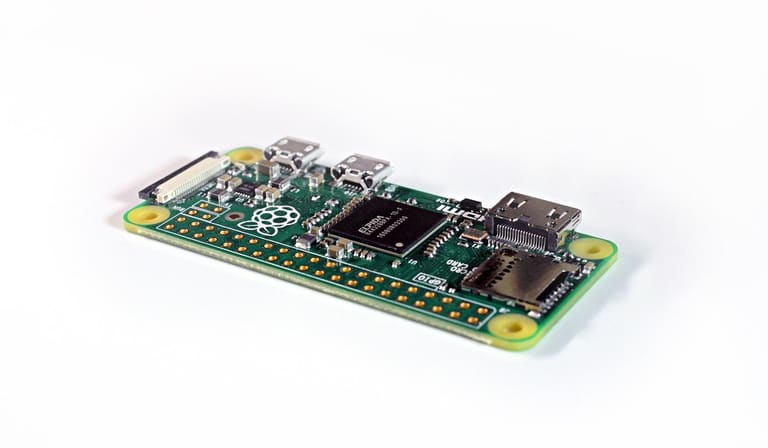
Raspberry Pi beginners & pros இருவருக்கும் ஒரு easy platform; ஆனால் installation, operation-ல் சில common mistakes பல பவர் performance drops, device failure, data loss-க்கு காரணம். இந்த தவறுகளைக் கவனித்து, சிறந்த பயனாளராகவும் வரலாம்.
புதிய பயனாளர்கள் எல்லாம் hardware, OS-ல் சில முக்கிய விசாரணைகளை தவறவிட்டவுடன், கீழே வரும் mistakes நடைபெறும்:
- அடிக்கடி நிகழும் தவறுகள்:
- Poor power supply
- Wrong OS image installation
- SD card formatting error
- Thermal control இல்லாது
- Security negligence
SD card selection மிக முக்கியம். Cheap card-கள் speed, reliability குறையும் — data corruption, boot failure அதிகமாம். Quality card, proper OS writing இதெல்லாம் ஆக வேண்டும்.
| பிழை வகை | உள்ளோடு இருக்கலாம் விளைவுகள் | தடுக்கவும் நிதானங்கள் |
|---|---|---|
| மோசமான power adapter | Instability, data errors | Certified adapter |
| Inferior SD card | Performance dip, data loss | High-speed, branded card |
| Thermal issue | Performance drop, hardware failure | Cooling fan/heatsink use |
| Security fault | Data theft, device hack | Strong password, firewall use |
பாதுகாத்து, heatsink, fan security firewall/password இவற்றை பயன்படுத்தி தொலைபேசி, system protection-ஐ செய்யவும்.
Raspberry Pi திட்ட யோசனைகள்
Raspberry Pi பயன்படுத்தும் எல்லா குழுக்களுக்கும் IoT, robotics, media server, gaming ஒரே platform. Beginners இப்போது simple project, advanced users complex project. Practical learning/fun applications/DIY வழி Raspberry Pi-யை பயன்படுத்தலாம்.
Electronics-savvy persons sensors/controllers-கு advanced applications, software-savvy customized programs, apps. Everyday life simplicity, hobby சார்ந்த projects Raspberry Pi-யில் உண்டு.
- அமைப்பு திட்டங்கள்:
- Smart Home Controller: Lights/heating/devices remote control.
- Retro Gaming Console: Classic emulator-based setup.
- Media Server: Movies/music/photos streaming.
- Security Camera: Home/office monitoring webcam project.
- Weather Station: Temperature/humidity tracker.
- Robotics: Simple robot or autonomous vehicle.
Ideas-க்கு சிறந்த சொல்லியுள்ளோம்:
| திட்டம் | விளக்கம் | தேவை உள்ளவை |
|---|---|---|
| Smart Greenhouse | Temperature/humidity/light auto-control. | Raspberry Pi, sensors, relay, pump, LED |
| Face Detection System | Face recognition-based security. | Raspberry Pi, camera module, software |
| Home Automation Center | Unified smart appliance control. | Raspberry Pi, smart devices, Zigbee/Z-Wave |
| Portable Arcade Machine | Small, moveable gaming rig. | Raspberry Pi, screen, joystick, buttons, case |
இந்தத் திட்டங்களில், சுத்தமாக பயணிக்க, online guides, forums, community consult செய்து புதிய வளர்ச்சி சேர்க்கலாம். உங்கள் creativity-யையே project-க்கு முன்னோக்கி உங்களை முன்னெடுக்கிறது.
வளர்ப்பாளருக்கான நேரடி குறிப்புகள்
Raspberry Pi-ல் development செய்து, உங்களுக்கு productivity high & results best கிடைக்க சில மோசடி கொடுங்கள்:
IDE-க்கள், version control (Git), code backup, debugging, என்ன software/facilities கேட்டும் productivity, success குறுக்கு. Raspberry Pi projects-க்கான நேரடி முறைகள்:
- வளர்ப்பாளர் குறிப்புகள்:
- Correct OS selection
- IDE/version control use
- Efficient hardware utilization
- Security configuration
- Community support
- Regular backup
பயன்பாட்டு IDE-க்கள்: Visual Studio Code, Thonny (Python IDE), SSH, Git version control integration. GPIO Zero library (Python) hardware control, prototyping, learning all easy.
| Tool/Resource | Purpose | Benefit |
|---|---|---|
| Visual Studio Code | IDE/editor | Debug, plugin, git integration |
| கோ | Version Control | Track changes, multi-user collaboration |
| Raspberry Pi Stack Exchange | Q&A platform | Community support, solution search |
| GPIO Zero | Hardware control | Python script, prototyping |
Raspberry Pi-யின் resource limitations உள்ளதால், efficient coding, optimized algorithm, unnecessary process avoid, best security configure must. Code scan, security logic, periodic OS update keep mandatory.
Raspberry Pi வெற்றிகள்
Raspberry Pi launch day முதல் கல்வி, industry, hobby, commercial projects எல்லா இடங்களிலும் grand success. Low-cost, flexible board, big community–maximum use casesதான் நடந்துள்ளது. இங்கே Raspberry Pi கிடைத்த வெற்றி project-களின் சில உரை:
| சாதனம் | Project | விளக்கம் |
|---|---|---|
| Education | Coding Class | Schools, colleges—Programming, electronics teaching. |
| Home Automation | Smart Home System | Light/temperature/appliance unified control system. |
| Industry | Industrial Data Analysis | Factory sensor-based data analytics. |
| Healthcare | Medical Device | Affordable patient monitoring. |
Raspberry Pi community, open sharing, collaboration-resource-ோடு நூற்றுக்கணக்கான success stories corresponds.
- வெற்றி உதாரணங்கள்:
- DIY retro game consoles
- Smart irrigation for agriculture
- Weather monitor stations
- Robotics/automation
- Security camera, surveillance
- Media cloud storage, streaming server
Open source home automation, low-cost medical devices, Raspberry Pi என்று எல்லா sector success solution-போல் பயன்படுகிறது.
வெற்றிக்கதைகள்
Raspberry Pi community உலக முழுவதிலும், innovation & solution-க்கு கவர்ச்சி. Code training, engineering lab, industry, robotics, environmental monitoring என சாதனங்களும் பிடிவாதமும் அதிகமாகிருந்துள்ளது.
Raspberry Pi என்பது hardware வல்லமை மட்டுமல்ல; ஒரு mega-community too. இந்த குறிப்புகள், knowledge-sharing, teamwork மற்றும் new projects-க்கு மாபெரும் வாய்ப்பு தரும்.
Raspberry Pi பயன்பாட்டுக்கான பரிந்துரைகள்
Raspberry Pi-யை செயல்படுத்தும் போது, performance, security, project reliability-க்கு கீழ்காணும் சிறந்த வழிமுறை மற்றும் பரிந்துரைகளை கவனிக்க வேண்டும்:
- Power Adapter: Certified adapter; instability prevent.
- OS Update: Regular update – security & performance.
- Cooling: Heatsink, fan use on heavy-duty project.
- Security Steps: Firewall, strong password, network configuration for security.
- Backup Policy: Data backup for safety.
- Correct OS: Project-based OS selection.
System maintenance-க்கு monthly dust cleaning, cable check, weekly heat check, weekly OS update அவசியம். இங்கே Raspberry Pi maintenance tips:
| Maintenance Action | Details | Frequency |
|---|---|---|
| Dusting | Brush/blower to remove dust | Monthly |
| Cable check | Secure cable connect | Monthly |
| Heat check | Temperature control/fan use | Weekly |
| Software update | OS/software update | Weekly |
Raspberry Pi troubleshooting-க்காக official site, forums, groups நீங்களும் அனைத்து resources-களும் பயன்படுத்தலாம். Any problem—learning opportunity! Creativity-யினை பயன்படுத்தி புதிய projects-க்கு புது முனைக்கும் arrive செய்யுங்கள்.
அடிக்கடி கேட்கப்படும் கேள்விகள்
Raspberry Pi புதியவர்கள் எந்த OS-ஐ தேர்வு செய்ய வேண்டும்? ஏன்?
Raspberry Pi OS (Raspbian) பொதுவாக beginners-க்கு சிறந்த OS. Simple UI, huge community support, documentation, built-in tools—all beginner-friendly. Raspberry Pi hardware-க்கு பெரிய optimization-அது மேலும் சிறப்பு.
Raspberry Pi-க்கு புது OS install செய்தால் warranty effect ஆகுமா?
Generally warranty affect ஆகாது. Hardware damage (overclock, etc) warranty impact ஆகலாம். Official install guides-ஐ follow செய்ய வேண்டும்.
Project build செய்ய OS update எவ்வளவு often செய்ய வேண்டும்?
Monthly once or twice enough. Security fix, performance improvement-க்கு periodical update கட்டாயம். Otherwise, device vulnerable.
Custom OS உருவாக்கும் pros & cons?
Pros-ல் optimized, unnecessary software இல்லாது project-centric, security focus; Cons-ல் technical knowledge, heavy time investment, maintain responsibility. Custom OS only for targeted project.
Raspberry Pi-ல் நல்ல programming language/tools எது?
Python most common – big library support, documentation. C/C++ performance-centric applications-க்கு suitable. IDE-கள்: Thonny IDE (Python), VS Code, SSH shell.
Raspberry Pi-ல் ஒன்று மேற்படு OS-க்களை ensemble செய்ய வழி?
NOOBS tool-ஐ SD card install, boot time OS select வழி; alternatively Docker-ல் container-based multiple OS.
OS install-ல் common mistakes-க்கு solution?
Wrong OS image, SD card formatting, adapter lacking, SSH error. Solution: Official site image download, formatting tool use, certified adapter, SSH config check.
Media server Raspberry Pi-ல் install செய்ய மிகச்சிறந்த OS & software?
LibreELEC, OSMC (Kodi-integrated Media center) perfect; alternatively Pi OS-ல் Plex Media Server install செய்யலாம்.