 Afrikaans
 Azərbaycan
 Bosanski
 Čeština
 Dansk
 Deutsch
 English
 Español
 Filipino
 Français
 Hrvatski
 Indonesia
 Italiano
 Magyar
 Melayu
 Nederlands
 Norsk
 Oʻzbek
 Polski
 Português
 Română
 Slovenčina
 Slovenščina
 Suomi
 Svenska
 Tiếng Việt
 Türkçe
 Ελληνικά
 Беларуская
 Български
 Русский
 Српски
 Українська
 עברית
 اردو
 العربية
 پښتو
 فارسی
 አማርኛ
 मराठी
 বাংলা
 தமிழ்
 ไทย
 မြန်မာ
 한국어
 中文
 日本語


အက္ခရာကီးဘုတ်ဆိုင်ရာ အဆင်ပြေဘက်ဒေါသထောက်ပံ့ပစ္စည်းများနှင့် လက်ဘယ်နာတာကာကွယ်ရေးပစ္စည်းများ သည် နည်းပညာနဲ့ရင်းနှီးပြီး တစ်နေကုန် ကီးဘုတ်၊ mouse အသုံးပြုရသူများအတွက် လက်၊ ဘယ်ကောက်၊ တံတိုင်းနှင့် ပုခုံးပိုင်းမှာ မသုံးစွဲသင့်တဲ့အဆီတက်ကို လျော့ချဖို့အလွန်အရေးကြီးတဲ့ပို့လုပ်မှုများဖြစ်သည်။ ကောင်းမွန်စွာရွေးချယ်တင်သွင်းထားတဲ့ ဘက်ဒေါသကာကွယ်ပစ္စည်း၊ အဆင်ပြေ ergonomic ကီးဘုတ်၊ mouse pad၊ တောင်းလက်ထိုးပုံအစီစဉ်၊ ဓာတ်ခွဲတိုင်းနှင့် မိုလာကူးခြင်းနဲ့ တွဲသုံးရင် လက်ဘယ်တစ်လျှောက်မှာ သဘာဝနေအနေဖြစ်မြှင့်တင်နိုင်ပြီး ရိုက်နှိပ်သလို အသုံးပြုအဆင်ပြေမှု၊ နာတာနှေးနင်းခြင်းများကို တိုးတက်စေပါမည်။ သို့သော် ယင်းပစ္စည်းများသည် တစ်အလုပ်နက်ထားဆေးဖြစ်သည်မဟုတ်ပါ။ ဥပမာ - နာကျင်ခြင်း၊ ခြောက်ခြင်း၊ အားလျော့ခြင်းများရှိပါက ကျန်းမာရေးအဖွဲ့အစည်းကို ဆွေးနွေးသင့်ပါသည်။
ယနေ့ခေတ် Web developer, content creator, customer support, e-commerce manager, system administrator, remote worker စသည့် နည်းပညာ လူအနုပညာများသည် တစ်နေ့ ၆-၁၀ နာရီလောက် keyboard/ mouse နဲ့ ကုန်သွားကြသည်။ Hostragons blog မှာ ဒီအကြောင်း ထည့်သွင်းပြောဖို့အကြောင်းရင်းပါသည်။ Digital productivity ဆိုတာ မြန်မြန်ဖြစ်တဲ့ hosting, web site အနာမက်နှင့် server တည်ဆောက်မှု အပေါ်မှာပဲ မတည်ပါဘူး။ ကျန်းမာရေးနဲ့ အလုပ်ကြာမြင့်လုပ်နိုင်စွာမရှိတဲ့ app လည်း တည်ကြားမနေ။ Web project တိုးတက်နိုင်ဖို့ ကိုယ်ရေးရာကျန်းမာရေးကို ဦးစားပေးနဲ့နားလည်ချက်ပေးရမယ်။ ဒီနည်းပညာ + ကျန်းမာရေးစုံလင်ပြောသွားတဲ့ လမ်းညွှန်မှာ ဘက္ဒေါသ ထောက်ပံ့ပစ္စည်းများ၊ လက်ဘယ်ကာကွယ်ပစ္စည်းများကို ခွဲခြားထားပြီး ဝယ်ယူဆုံးဖြတ်မှုနှင့် နေ့စဥ်အသုံးအများအတွက် ဖြေရှင်းနည်းများပြောသွားပါမည်။
အက္ခရာကီးဘုတ်ဆိုင်ရာ အဆင်ပြေဘက်ဒေါသထောက်ပံ့ပစ္စည်းတွင်ဘာတွေပါဝင်သလဲ?
Ergonomic keyboard support သည် ကီးဘုတ် သုံးစဉ်လက်ဘယ့် အရုဏ်မပြောင်းတော့အောင် လက်နှစ်ကောက်ကျိုးမှု ဝေးထားနိုင်တဲ့ layout နှင့်ပစ္စည်းများပါဝင်သည်။ Gel wrist support, sponge, memory foam, သစ်သားအထောက်, split keyboard, angled keyboard tray, under-desk keyboard drawer, adjustable standing desk စသည်ဖြင့် ရရှိနိုင်သည်။
အဓိကရည်ရွယ်ချက်မှာ လက်ဘယ့် သဘာဝပုံစံနဲ့နီးရှိအောင်ထောက်ပံ့ခြင်းဖြစ်ပါတယ်။ Neutral position ဆိုတာ လက်နဲ့ တံတိုင်းတစ်ကြောင်းတစ်မျှအဖြစ်၊ အလယ်ကောက်နေ့ကို မဝေးစေနိုင်သည့် နေရာပုံစံပေးခြင်းဖြစ်ပါတယ်။ ယခုအရာမဖြစ်နဲ့လက်ဘယ်၊ tendon နှင့် nerves တွေသည် friction နှင့် pressure များတွေ့နိုင်သည်။ 특히 software development, data entry, call center operations, content writer လူတွေ keyboard usage ဆိုင်ရာ လက်ကောက်အလျားပေးမှာ အလွန်အဓိကပါ။
ဘက်ဒေါသထောက်ပံ့ပစ္စည်းနဲ့ ကီးဘုတ်ထောက်ပံ့ပစ္စည်းက တူညီသလား?
တူညီမှုမရှိပါ။ Wrist support ဆိုတာ သာလွန်ပြီး လက်ဘယ်အောက်ပိုင်း/ ပဉ္စင်းအနီးမှာ တာငြိမ်းတဲ့ pad ပစ္စည်းတွေပဲဖြစ်ပါတယ်။ Keyboard support ဆိုတာ ကီးဘုတ်အမြင့်၊ အလျား၊ ဘက်တည်ကို နေရာတိုင်းပေးနိုင်တဲ့ device တွေကို ချိန်ညှိထားသည်။ Gel wrist pad နဲ့ negative slope keyboard tray တို့သည် တစ်ခုချင်းစီမှ တိုးတက်မှုတစ်ခုပြောနိုင်သည်။ စာရင်းတွေအားလုံးကို ဂုဏ်ယူမှုအဖြစ် chair, desk, monitor height များနဲ့တွဲလျက် layout ကို နားလည်ရမယ်။
လက်ဘယ်ကာကွယ်ရေးပစ္စည်းများက ဘာပြဿနာများဦးလေးစီးစည်းနိုင်သလဲ?
လက်ဘယ်ကာကွယ်ရေးပစ္စည်းတစ်ခုက လက်နာတာကို magic နည်းနဲ့ပျောက်တဲ့အရာမဟုတ်သေးပါ။ သူတို့က simply extra mechanical load ကိုလျော့ချပေးပါတယ်။ Long-term keyboard, mouse usage ရဲ့ common complaints တွေမှာ - wrist burning, finger numbness, forearm tension, grip strength weak, shoulder & neck fatigue လည်းပါဝင်သည်။ ဒီ symptoms တွေမွုတစ်ခုတစ်ပြင်မှာ medical checkup လုပ်အပ်ပါတယ်။
Ergonomic products တွေလက်ဘယ် angle ကိုပျော်စရာတိုးတက်စေလို့တစ်ခု, contact pressure ကို spread out လို့တစ်ခု, correct posture ကို remind ချဉ်းကျပီး မာစဉ်ရှိအောင် သိတွေ့စေပါတယ်။ ကီးဘုတ်တစ်ခုပြာအမြင့်ထပ်ပါကလက်ဘယ်တက်များဖြစ်စေနိုင်ပြီး negative slope keyboard tray က shoulder relax + wrist ကို neutral closer ပေးနိုင်ပါတယ်။ Day to day usage မှာ 8 hr/day, 5 days/week ဆိုရင် month နှစ်ပတ်လည် usage 160 hr ခန့်၊ ဒီ small adjustments သည် effect၊ တစ်ဦးတစ်ယောက်တစ်အချိန်တစ်နေ့၊ အလုပ်ထောင်သို့တိုးတက်မှအရေးကြီး။
ကျန်းမာရေးနဲ့နည်းပညာဆိုင်ရာ intersection မှာ ဘာလို့အရေးကြီးလဲ?
Tech gears တွေကို နှစ်ပေါင်းများစွာ CPU, screen resolution, latency, security တို့အပေါ်မှာပဲ choose ပါအုံ။ ၂၀၂၆ နည်းပညာလုပ်ငန်းမှာတော့ “ergonomics” ကို performance criteria ဖြစ်လာပြီ။ Developer coding speed, designer efficiency, support agent response quality တို့သည် software tools, body comfort နှစ်မျိုးကြောင့် ဆုံးဖြတ်ပေးကြသည်။ Wrist pain ဝေဒනාရှင် focus time လျော့, error rate တိုး, extra break လိုအပ်လာတတ်ပါတယ်။
Ergonomic keyboard supports နှင့် တစ်ခုချင်းလက်ဘယ်ထောက်ပံ့ပစ္စည်းသည် office accessories ကိုသာမတော့၊ digital business continuity နှစ်မျိုးဖြစ်လာပါတယ်။ Reliable hosting တန်း web site accessible ဖြစ်ဖို့ digital infrastructure လိုလားသလို၊ sustainable working body infrastructure လည်းအရေးကြီး။ Web project performance အတွက် မြင့်မားတဲ့ စွမ်းဆောင်ရည်ရှိသော web hosting, brand security အတွက် ဒေါင်းအမည် မှတ်ပုံတင်ခြင်း, data security အတွက် SSL လိုင်စင် အသုံးပြုနေရင်း၊ လက်ဘယ်စနစ် ၊ တောင်းအမြင့် ၊ ergonomic standards တက်စေသည်။
Ergonomic Keyboard အနည်းစားနှင့် Wrist Support ပစ္စည်းများဖော်ပြဇယား
| ပစ္စည်းအမျိုးအစား | ဘာလှှမ်းမလဲ? | ဘယ်သူတို့အတွက် သင့်တော်သလဲ? | ပဋိညာဉ်သတိထားစရာ |
|---|---|---|---|
| Gel wrist support | လက်ဘယ်အနီး contact pressure ကို soft လျော့ | Office worker, content writer, support team | Too high ဖြစ်ရင် wrist ကိုညာအောင်တက်နေတာ အန္တရာယ် |
| Sponge/memory foam support | Short-term comfort ပေးသော ချော့/စိတ်အရာ | Light/Medium keyboard user only | အချိန်ကြာရင် collapse ဖြစ်နိုင်၊ regular check နောက်မကျ |
| Wooden wrist support | Hard, stable, long-lasting support | Mechanical keyboard users, fixed desk users | Surface smooth ဖြစ်ရမယ်၊ edge point wrist ကိုမနာစေ |
| Split ergonomic keyboard | Hand shoulder width closer placement | Heavy coder, editor, data entry | Adaptation period 1-3 weeks ကို လက်ခံနိုင် |
| Negative slope keyboard tray | Keyboard front higher, back lower set | 6 hr/day computer user | Desk/silla height နှင့် together adjust |
| Ergonomic mouse pad | Mouse activity support with wrist contact | Designer, gamer, office staff | Mouse movement restriction, shoulder tightness မဖြစ်စေ |
သင့်စနစ်အတွက် ၇အဆင့် ဗဟုသုတ checklist
Ergonomic keyboard support/ wrist support selection မှာ price, brand, looks ကိုသေချာမဖြစ်စေ။ Best product ကိုမှာ table height, keyboard type, typing habit, body measurement နဲ့ compatible ဖြစ်တယ်ဆိုမှပဲ true။ အောက် checklist ကို follow လုပ်၍ ဝယ်ယူဆုံးဖြတ်မှာ help ပါတယ်။
၁. နေ့စဥ် computer သုံးစဉ်အချိန်ကိုတွက်ပါ
1-2 hr/day သုံးသူနဲ့ 8 hr/day coder user ထမှာ requirement က deviate လုပ်ပါတယ်။ 4 hr+ usage မှာ wrist support, keyboard height, mouse position critical ဖြစ်နိုင်၊ 6 hr+ ဆို accessories တွေအပြင် workstation whole assessment လုပ်ရပါမယ်။
၂. Keyboard height ကို တသိတာမသိဖြစ်အောင်
Mechanical keyboard များသည် membrane keyboard တွေထက် usually higher ဖြစ်တယ်။ Keyboard front edge က wrist ကို force lift ဖြစ်လာတယ်ဆို wrist support ကို add လုပ်လို့ရတယ်။ Support ကို keyboard height ထက်ပိုမမြင့်စေပါ။ Palm base ကို lightly support, writing ဆင့်မှာ wrist ကို deep ပိုင်အောင်မလုပ်သင့်ပါ။
၃. Material ကို usage style နဲ့ သင့်တော်အောင်ရွေးပါ
Gel support နဲ့ cool, gentle feeling ရနိုင်သလို; memory foam support က user hand shape ကို conform လုပ်တယ်; wood support က hard, durable ဖြစ်တယ်။ Sweating issue ရှိတဲ့သူတော့ breathable fabric/wood surface ကောင်းတယ်။ Shared office မှာ easy cleanable surface ကို pick လုပ်ရ hygiene issue မရှိစေနိုင်။
၄. Negative slope option ကို test လုပ်ပါ
Keyboard rear leg ကို open လုပ်ခြင်းသည် positive slope ဖြစ်စေပြီး wrist ကို upwards bend ဖြစ်စေတတ်သည်။ Negative slope မှာ keyboard back lower, front higher setလို wrist neutral closer ဖြစ်နိုင်ပါတယ်။ Frequent typist/professional တွေအတွက် test လုပ်သင့်ပါတယ်။
၅. Mouse နှင့် keyboard တူညီ alignment ထားပါ
Mouse ကို ဝေးသွားဖြစ်သဖြင့် wrist support ကိုယူမဖြစ်နိုင်ပါ။ Mouse ကို keyboard အနားသူ၊ elbow ကို body ကို ပေါင်းစပ်အောင် set ပါ။ Wide mouse motions ကို shoulder, small motion ကို fingers ချတာမလုပ်နိုင်ပါ။ Sharp wrist motion ကို repetitive သုံးပေါ် fatigue လျော့နိုင်ပါ။
၆. Monitor, silla, desk configuration ကိုတန်ဖိုးတစ်ခုလည်းရ
Wrist pain cause ကို direct wrist နဲ့မဆို sometimes shoulder, neck position ပျော်တယ်။ Elbow ကို 90 degree bend relax၊ shoulder တက်အောင်မလုပ်၊ feet floor touch ဖြစ်စေသတည်း။ Monitor top edge ကို eye level closer တည်ရင် neck drop မဖြစ်၊ upper body balanced ဖြစ်စေ
၇. Return/try period ကိုသတိထားပါ
Ergonomics is personal. Perfect support တစ်ယောက်အတွက် may be inadequate for another. Product buying ကနည်းနည်း try, fit check, return policy ခံယူပါ။ Split keyboard သို့ adaptation 1-3 weeks open minded ဖြစ်ပါ။
လိုက်နာသုံးစဉ် – Wrist Support ကို တပ်စီတပ်စဥ်ဘယ်လိုမှန်လည်း?
Wrist support ကို ဝယ်ပြီးနောက် အသုံးပြု run step မှာလည်းမှာပါ။ အရမ်းနှိပ်ဖို့ pillow မဟုတ်ဘူး။ Typing interval မှာ palm base ကို light rest, extreme bend avoid သည်။ Fingers key reach မှာ wrist neutral free position ပေးထား။
- Support should align parallel to keyboard: Off-center left/right support wrist sideways bend ကိုပိုတည့်
- Height match must: Pad is higher than keyboard front edge → wrist upwards pressure
- Gentle touch only: All weight on pad → nerve & blood vessel crush
- Rest not while typing: Active typing/finger movement support mostly during break
- Mouse support avoid exaggeration: High mouse pad → mouse control hard, shoulder motion tight
Remote worker & Developer အတွက် practical ergonomic workstation example
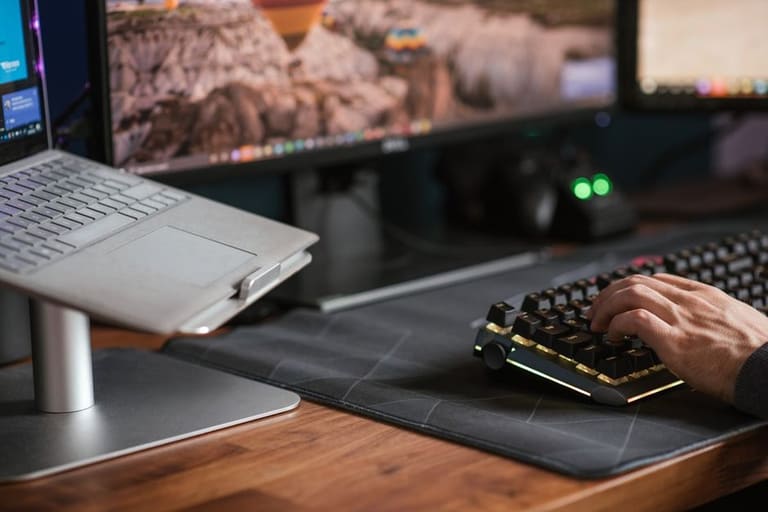
Heavy computer user အတွက် setup simple but measurable ဖြစ်ရမည်။ 75 cm desk height သည် short user shoulder lift ဖြစ်စေ၊ ထိုတွင် adjustable silla, footrest, keyboard tray အသုံးပြုနိုင်။ Long user အတွက် desk low ဖြစ်ပြီး back round ဖြစ်နိုင်။ Right setting only, no universal size! eg. Developer 7 hr/day typing, mechanical keyboard front height 3.5 cm, wrist tense evening. Step 1 – keyboard rear leg closed, Step 2 – wrist support 2–2.5 cm height trial, Step 3 – mouse closer, elbow near body, Step 4 – micro breaks 60–90 second every 30–45 min. Result – higher comfort for most. Site admin user, frequent shortcut learn → less wrist load. Less repetitive movement means less click. WordPress, email, control panel, file management workflow fast for WordPress ဟော့စတင်း, cPanel ဟိုစ့်တင်, အဖွဲ့အစည်း အီးမေးလ် အရေးကိစ္စဖြေရှင်းချက်များ infrastructure နှင့် ergonomic combine.
Micro breaks & exercise – Product ထက်ပိုသင့်တော်တဲ့ regular habit
Most expensive ergonomic keyboard ကိုတောင် immobility totally dissolve မလုပ်နိုင်ပါ။ Wrist health best tip ကို regular micro breaks ဖြစ်စေသတည်း။ Every 20–30 min, 20 sec hands off keyboard muscle activity change။ 45–50 min Focus work → 3–5 min stand break. Below routine medical advice မဟုတ်၊ healthy user relax only:
- Finger open-close: 10 times gentle open/close hand
- Forearm relax: Arm drop, shoulder rotate back 5 times
- Neutral wrist awareness: Palm lift from desk, back of hand inline with forearm
- Eye rest: 20 sec looking far point to reduce screen strain
- Position change: Hourly stand or alter chair sitting position
Buying mistakes to avoid
Ergonomic product main mistake – rely on single accessory to solve discomfort. Wrist support only but no chair, desk height, mouse adjust → little benefit. Second mistake – too soft product. Soft pad – wrist sink too deep, uneven pressure. Third mistake – press wrist pad while typing. Short term comfort but long run pressure overload. Fourth mistake – focus style over sizing. Nice looking RGB/ design product but size not fit → not ergonomic. Fifth mistake – do not delay medical consult if pain, numb fingers, night pain, power loss, pain up arm occurs! Ergonomics is to support healthy habit, not to postpone medical exam.
Hygiene, durability & care
Wrist support continuous skin contact so hygiene is key. Fabric surface – sweat absorption, gel – crack over time, wood – wrong cleaning damage. Weekly cleaning follow manufacturer guideline. Shared office – personal wrist support is best. Durability – memory foam collapse, gel deform, wood edge wear must check. Height change → wrist position change. Ergo equipment yearly review. Same reason – digital infrastructure maintain periodically. Web site keep secure/fast ဝက်ဘ်ဆိုက်ပြုပြင်ထိန်းသိမ်းမှုလမ်းညွှန်၊ SSL ပြန်လည်သစ်စင်နှင့် လုံခြုံရေး ထိန်းချုပ်စစ်ဆေးခြင်း regular reviewသည်။
Corporate team အတွက် ergonomic policy ဘယ်လိုဖန်တီးမလဲ?
Business 10, 50, 200 people work computer → ergonomics shift from personal preference to work quality & employee experience. Corporate ergonomic policy does not have to be expensive. Step 1: survey daily computer use time, major complaints via anonymous form. Step 2: standard desk/chair adjustment guide. Step 3: frequent keyboard user roles offer wrist support, external keyboard/mouse option. Tech team laptop use concern. Laptop keyboard/screen same body – screen elevated → external keyboard needed; keyboard correct → screen low. Laptop stand + external keyboard + external mouse is base ergonomic set for remote team. These small investment = comfort, focus retention, long term satisfaction rate up.
အကျဆုံးနိဂုံး – Healthy wrist = Sustainable digital productivity
Ergonomic Keyboard Support နှင့် Wrist Health Products ခန့်အရေးကြီးလူတိုင်းအတွက် small but powerful comfort layer ဖြစ်သည်။ Right product choose, neutral wrist positioning, proper desk setup, regular micro breaks, conscious use combine → sustainable work possible. Ergonomics is not one time purchase, but continuous work habit adjusting process. Hostragons digital project support focus not only secure/integrity/continuous operation, but healthy working environment for developers. Web site infrastructure want to strengthen Hostragons ဟိုစတင်းပက်ကေ့များ, domain want to secure ဒိုမိန်း စာရင်းစစ်ခြင်း look now — start check keyboard height, wrist position, break frequency in your workspace today!
နေကြတတ်သောမေးခွန်းများ
Ergonomic wrist support မလွဲမချလား?
Short daily computer user များအတွက် required မဟုတစ်ပါ။ 4 hr+ typing, high mechanical keyboard, evening wrist fatigue user အတွက် right height wrist support comfort တိုးနိုင်။
Gel, memory foam, wood support တို့မှာ ဘယ်ဟာကပိုမိုကောင်း?
No single best. Gel – soft, cool. Memory foam – hand shape fit, Wood – stable, durable. Keyboard height, sweat issue, comfort expectation အပေါ်မှာပဲ select မယ်။
Wrist support က carpal tunnel syndrome ကို prevent ပေးနိုင်သလား?
Wrist support alone cannot guarantee prevention or cure. Supports neutral wrist, reduces strain. If numbness, tingling, power drop – see professional.
Ergonomic keyboard ကို ဘယ်လောက်ကြာသုံး? လိုက်နိုင်လဲ?
Standard keyboard → split/alternative ergonomic keyboard change user adaptation period usually 1–3 weeks, temporary slow typing, gradual practice → easier transition.
Wrist health မှာ ပိုလှ မရှိတဲ့ habit ဘာပါလဲ?
Most important – keep wrist neutral, regular micro breaks. Product aids, but bad desk, immobile, repetitive movement not fixed, product efficiency limited.